


Choose SkillCopilotAI as a Cluely alternative when you want interview practice, live assistance, coding help and screenshot questions in one desktop subscription. Its strongest advantages for an active job search are unlimited paid use of those included tools, named GPT/Claude/Gemini model choices by plan, and reusable resume/JD prompts. Consider Final Round AI for job-organized preparation or Interviews Chat for a web option.
The reason to switch should be more specific than “I need my resume in the answers.” Cluely already accepts uploaded documents and custom instructions. The useful comparison is how each tool connects that material to preparation, follow-up questions and review—and what you pay to use those steps.
Method and disclosure: SkillCopilotAI publishes this guide and sells one of the alternatives. Emma's role is article editing and website operations. This article was prepared with AI assistance using linked official pages checked on October 22, 2026. Cluely and SkillCopilotAI pricing, including SkillCopilotAI's model catalog, were rechecked on October 23; the Cluely pricing screenshot and System Prompts instructions were also added that day. Other providers' prices retain their October 22 check date. We did not purchase the competing plans or measure answer accuracy, latency or screen-sharing behavior. The cover is an AI-generated editorial illustration; the practice example below is fictional.
Choose by what you want to change
| Your current need | Option to investigate | What must justify switching |
|---|---|---|
| Repeated interview practice plus coding and screenshot help | SkillCopilotAI | Its included tools fit your preparation, computer and budget |
| One place for each target job's materials, practice and debrief | Final Round AI | Its Goal-based workflow is useful enough to rebuild your preparation there |
| A web option with interview preparation and live suggestions | Interviews Chat | The input method works with your actual meeting application |
| Meeting notes and questions about earlier conversations | Keep Cluely on the shortlist | Replacing interview support would not leave you without the meeting workflow you use |
| Better answers from your existing resume | Configure Cluely first | A current resume, relevant instructions and the correct mode solve the problem without another subscription |
This guide focuses on interviews. A meeting recorder, a speaking coach and a live interview assistant can all appear in an alternatives list while doing different jobs. If your priority is retaining team meeting history, evaluate that directly rather than buying an interview tool because it appears in the same list.
For the broader product assessment, read our Cluely AI review. For this decision, start with the part of your workflow that currently fails.
Cluely already supports resume context
Cluely's customization guide describes Profile → Manage Modes for scenario-specific prompts. It also lists PDF, DOCX and TXT uploads, with up to three files for free users and unlimited files on Pro.
Before paying for a replacement, check whether the active mode contains your current resume and the role you are preparing for. Remove outdated claims and give the tool an explicit boundary: it should ask for missing facts rather than invent projects, team size or business results.
Uploading a file proves that the tool can receive it. It does not prove that every answer uses the right passage or remembers a correction. That distinction applies to every product in this comparison.
| Product | What the official material describes | What to check yourself |
|---|---|---|
| Cluely | Custom modes, instructions and document uploads | Whether the active mode uses your relevant facts in a follow-up |
| Final Round AI | A Goal connects the job, resume and materials with preparation, sessions and debriefs | Whether you want to organize each application around that structure |
| Interviews Chat | Resume/JD-based preparation, mock interviews and response feedback | How preparation material is used in your selected live workflow; do not assume all features share identical context |
| SkillCopilotAI | Dashboard → System Prompts: edit a public template or create a named prompt with your resume facts and target JD | Select the intended prompt; for audio assistance, check whether Use System Prompt is enabled |
The table compares published workflows, not measured answer quality. If context retention is your reason for leaving Cluely, test that behavior before committing to a longer plan.
Where SkillCopilotAI has an advantage over Cluely
For a candidate preparing for behavioral and technical rounds, SkillCopilotAI's main advantage is the interview toolset included in the subscription. Here is how that compares with Cluely's published meeting-focused offer.
| Decision | SkillCopilotAI | Cluely | Why it matters for your interview preparation |
|---|---|---|---|
| Practice before the call | Dedicated AI mock interview practice and interview reports, alongside live assistance | Its pricing emphasizes live responses, meeting notes and past-meeting questions; it does not list an equivalent mock-interview bundle | Rehearse an answer, review it, then prepare another round within one subscription |
| Coding and visual questions | Coding Copilot, Smart Screenshot and Online Quiz Assistant are named included tools | Context-aware live assistance, with no equivalent separately named coding/practice bundle on the pricing page checked | Useful when your process combines spoken behavioral questions with code or visual problem statements |
| Repeated preparation | Paid plans include unlimited use of the listed interview, practice, coding and screenshot features during the subscription | Pro also offers unlimited responses and notes | The advantage is the range of included preparation tools; unlimited responses alone are not exclusive |
| Choosing an AI model | Plans identify the included GPT, Claude and Gemini models; the yearly list also includes Grok | Pro promises access to latest models without naming a comparable plan-level catalog on this price page | You can choose a SkillCopilotAI plan around a published model selection rather than only a generic access claim |
| Personalizing each application | Named System Prompts with templates, editable resume/JD facts and custom instructions | Modes, file uploads and custom instructions | Both personalize answers. SkillCopilotAI gives you a reusable text profile alongside its interview tools; file upload alone is not a reason to switch |
Sources: SkillCopilotAI's included features and model lists, Cluely's plan comparison, and Cluely's customization guide. A feature absent from the price page is not proof that the product cannot perform any related task. These are package and workflow differences, not an accuracy or speed ranking.
The cost advantage depends on which Cluely plan you need. SkillCopilotAI's $89.90 monthly plan is $60.09 less per month than Cluely's $149.99 Pro + Undetectability plan. SkillCopilotAI lists its stealth feature within its plans; Cluely charges for that separate tier. This is a price-and-inclusion comparison, not a tested claim that their screen-sharing behavior is identical. If Cluely's $19.99 basic Pro meets your needs, it remains the cheaper monthly option.
Try the workflow before choosing a billing period: SkillCopilotAI offers a 30-minute free trial, activated after downloading and signing in. Unlimited use of included features and models applies to an active paid subscription.
Compare the bill and the usable free access
The table records public offers, not completed checkout quotes. Cluely and SkillCopilotAI pricing was rechecked on October 23, 2026; Interviews Chat and Final Round AI were checked on October 22. Currency is USD. Check taxes, renewal terms and the selected offer before paying.
| Product and official source | Public price | What the price buys or leaves out |
|---|---|---|
| Cluely Starter | Free | Limited responses and notes; up to three uploaded files |
| Cluely Pro | $19.99/month on the monthly view | Unlimited responses and notes; unlimited files and customization |
| Cluely Pro + Undetectability | $149.99/month on the monthly view | Pro plus the advertised screen-sharing concealment feature; behavior was not tested here |
| SkillCopilotAI | $89.90 monthly; $179.70 every three months; $346.80 yearly | Included interview, practice, coding and screenshot features advertise unlimited paid use; included AI models vary by plan |
| Interviews Chat | Starter $19/month; Booster $29/month; Pro $69/quarter | Starter lists 1,000 credits; Booster and Pro advertise unlimited credits, Copilot time and suggestions |
| Final Round AI | Homepage starting price: $25+/month | This is a starting rate, not a verified month-to-month bill. Confirm the billing period and total in the offer shown to you |
SkillCopilotAI's monthly plan costs more than Cluely's basic Pro plan. Comparing it only with Cluely's $149.99 tier would hide that difference. Its quarterly and yearly rates work out to $59.90 and $28.90 per month, but require paying the full $179.70 or $346.80 for the period. Model access also changes by plan.
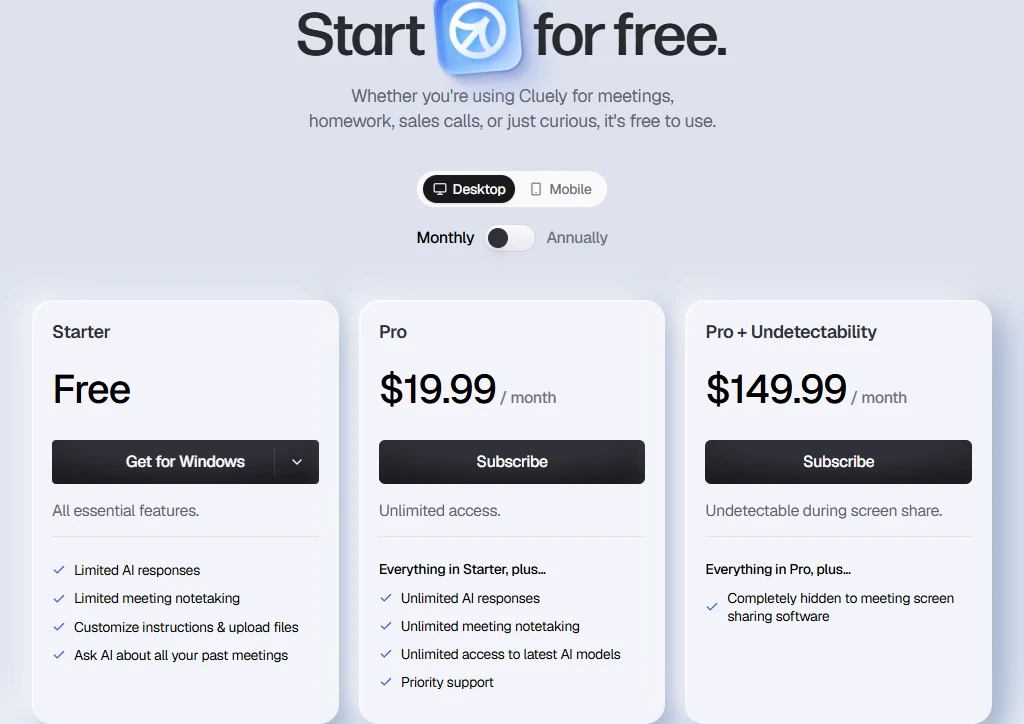
Cluely's official pricing page, captured October 23, 2026 with Desktop and Monthly selected. This records the public price cards, not a completed purchase or a test of screen-sharing behavior. Open the full-resolution original capture.
Free access differs just as much:
- Cluely: limited ongoing responses and notes. Its pricing page does not quantify every free allowance.
- SkillCopilotAI: a published 30-minute trial, activated by downloading the app and signing in. Paid unlimited access is separate from the trial.
- Interviews Chat: 30 free credits without a credit card. The page lists credit usage for both Copilot minutes and suggestions, so do not assume 30 credits means an uninterrupted 30-minute session with unlimited answers.
- Final Round AI: the homepage explicitly says there is no free trial for live sessions. The free workspace lets you prepare Goals and materials; live CoPilot requires an active Pro subscription.
If you need to check a live-answer workflow before buying, the difference between a free workspace and usable session access matters more than a download button. Use only practice settings or assistance permitted for the actual interview.
What each alternative changes
SkillCopilotAI: unlimited preparation tools and model choice
For a job search spanning behavioral and technical rounds, use the same background profile while rehearsing an answer or working through a coding screenshot. Choose the model selection and configure the profile below; the included tools and usage terms are compared above.
Choose the model selection that fits your plan
The published model catalog, rechecked October 23, lists these choices. Included models are unlimited during the active paid subscription; the 30-minute free trial is separate.
| Plan | Included model choices |
|---|---|
| Monthly — 3 | OpenAI GPT-5.6-Luna, Anthropic Claude Haiku 4.5, Google Gemini 3 Flash |
| Quarterly — 6 | The monthly selection plus GPT-5.6-Terra, Claude-Sonnet-5 and Gemini 3.5 Flash |
| Yearly — 10 | The quarterly selection plus GPT-5.6-Sol, Claude Opus 5, Grok 4.6 and Gemini 3.1 Pro |
Start with the shortest plan that includes the models you want. A larger catalog gives you more answer styles to choose from; it does not establish that every model will outperform Cluely on your questions. The practical benefit is having a stated selection within the same interview workspace.
Add your resume and job description in System Prompts
In the desktop app, open Dashboard → System Prompts. Public templates provide starting instructions; fill in the relevant information rather than leaving the template generic. You can also choose Create New to make a separate profile for a different application.
- Open a suitable template and choose Edit, or choose Create New. Give a new prompt a recognizable name, such as “Backend engineer — SQL and caching.”
- In the System Prompt text, add the resume facts you want available: roles, dates, project responsibilities and verified results. Paste the target job description or a concise summary of its requirements directly into the prompt.
- Add response instructions: answer language, length and format, plus a rule to ask for missing facts rather than invent experience. Update the existing prompt or create the new one, then select its card as the active profile.
- Before starting a different application, select its profile and check that it contains the correct resume/JD combination. Saving several prompts does not mean all of them are used together.
Where does the selected prompt apply? The AI chat and text/image-question workflows use the active system prompt, including follow-up messages in a saved chat. The system-audio assistant has an AI Context → Use System Prompt switch: when enabled, it uses the selected prompt; when disabled, it uses the custom context entered for that audio workflow instead. Put the same role facts there if you deliberately choose that separate context.
These instructions describe context configuration, not a measured guarantee that every answer uses every fact. Do not assume that each separate practice mode inherits it without checking that mode's setup. After changing roles or correcting a fact, start a fresh practice conversation to avoid mixing the new profile with an old conversation's history.
Final Round AI: organize preparation around a job
Final Round's current homepage describes a Goal containing the target role, resume and materials, with practice and debriefs attached to the same job. That structure may be useful if your main problem is keeping different applications and their preparation separate.
Switching would mean recreating that structure from your existing materials. Check what you can prepare for free and what requires a subscription before investing time. Do not interpret the homepage's starting monthly rate as proof of a one-month purchase at that amount.
Interviews Chat: choose the input workflow
Interviews Chat's meeting-app FAQ distinguishes a web version, an optional Chrome extension and a Desktop app for desktop meeting applications. That makes it worth investigating if you want a browser option, but “works in a browser” does not mean the browser automatically receives audio from every installed meeting app.
Its Starter plan also creates a different cost decision: a finite allowance versus the unlimited plans. Check how your intended combination of session time and suggestions consumes credits rather than estimating from interview duration alone.
Check your computer before moving materials
SkillCopilotAI's download page lists Windows 10/11 on a 64-bit processor and macOS 14 or later, with a universal Mac installer. If your computer falls outside those requirements, resolve that before comparing plans.
For the other candidates, use the current installer and setup documentation for the exact app you intend to run. Interviews Chat's web and desktop paths are different; Final Round's homepage currently advertises macOS 14.4+ and Windows. Successful installation still does not establish that incoming meeting audio, your microphone and screen input are routed correctly.
In a practice call, confirm which speaker is captured, whether the relevant question reaches the assistant and whether the output stays usable at your normal window size. A vendor's screen-sharing concealment claim does not establish permission to use assistance or guarantee behavior in every recording setup.
Move a Cluely Mode into a job-specific prompt
Cluely's Profile → Manage Modes and SkillCopilotAI's Dashboard → System Prompts both let you keep different instructions for different situations. Moving between them is a manual setup task, not an automatic account import. Start with the Cluely Mode you actually use for interviews, rather than copying unrelated sales or meeting instructions into it.
| What you have in Cluely | What to do in the replacement |
|---|---|
| Mode name and purpose | Create a recognizable System Prompts name for the same role; keep a separate profile for each application |
| Resume/JD attached to that Mode | Use your originals to paste relevant facts and role requirements into the prompt text; files attached in Cluely are not automatically transferred |
| Mode instructions | Copy the useful language, answer-length and format requirements; remove instructions specific to Cluely's controls |
| Facts recovered from earlier meetings | Add only the verified facts you still need; a new prompt does not recreate searchable meeting history |
| Current input and context settings | Select the new prompt, check the audio assistant's Use System Prompt switch, and reconfigure permissions and hotkeys |
| An active subscription | Verify the cancellation timing, access end date and confirmation separately from account deletion |
For example, a Cluely interview Mode might combine a resume attachment, a role document and an instruction to answer in short STAR format. In SkillCopilotAI, create one named prompt containing the relevant resume facts, the role requirements and that format instruction. Select it, then check a practice answer through the input path you will use. If you instead need to search decisions across dozens of previous meetings, this prompt is not a replacement for that history; keeping Cluely for meetings can be the better choice.
Cluely's cancellation instructions direct users to Settings → Billing → Manage. The document says cancellation removes Pro access immediately and does not provide prorated refunds. Read the actual confirmation presented for your account before proceeding; do not assume you can cancel now and keep paid access until the end of the month.
Its account-deletion guide separately instructs users to cancel the subscription before deleting the account. First check your replacement and preserve the materials you need. Account deletion should not be your method of stopping renewal.
A short context check before committing
Use the same small task in your existing setup and the candidate replacement. The following is a fictional practice exercise, not a test we ran or a real employer question.
Give the tool these facts: you are a backend engineer who reduced a reporting job from 120 seconds to 45 seconds using a cache and query changes. You did not manage a team. The target role emphasizes SQL and caching.
Then ask:
- “Help me explain this performance project for the role.”
- “What trade-off should I discuss if asked why we used a cache?”
- “Correction: 45 seconds was the median, not P95. Revise the explanation.”
Check whether the answer stays within the supplied facts. It should not invent direct reports, a cache hit rate or a P95 result. For unspecified trade-offs, look for clearly framed possibilities or questions rather than invented implementation details. After the correction, the next answer should use “median” consistently.
This check can expose a mismatch in context handling; it does not establish overall accuracy or interview readiness. A useful answer is one you can verify and explain in your own words. For a broader selection checklist, see how to choose an AI interview copilot.
Questions before switching
Is there a free Cluely alternative for interviews?
There are limited ways to try alternatives. SkillCopilotAI advertises 30 minutes; Interviews Chat advertises 30 credits. Final Round's free workspace supports preparation, while live sessions require Pro. None of those statements means unlimited free live assistance.
Which alternative accepts interview context?
Cluely accepts documents and custom instructions; Final Round describes Goals with a resume and materials; Interviews Chat describes resume/JD-based preparation. In SkillCopilotAI, enter your role facts and JD in Dashboard → System Prompts and select the intended profile. For audio assistance, check Use System Prompt or populate its separate custom context.
Should I switch if Cluely already works?
Only if another workflow solves a concrete problem or offers a worthwhile cost trade-off. If meeting notes, searchable history and your configured modes already meet your needs, keeping Cluely is reasonable. If preparation and feedback are missing, compare those specific steps before replacing the whole setup.
Compare similar tools
Editor selected
Cluely AI Review 2026: Features, Pricing, Privacy, and Verdict
Is Cluely worth it? This research-based review examines its live meeting features, current pricing, privacy terms, limitations, and best-fit users.
Editor selected
Final Round AI Alternative: Compare Trials, Costs & Workflows
Compare Final Round AI alternatives by unlimited paid-plan features, included AI models, trial access, billing periods and switching workflow.
Editor selected
LockedIn AI Alternative
Choose a LockedIn AI alternative by free access, coding workflow, renewal price, and switching effort, with dated tests and a practical migration checklist.
Same content type
Best Interview Coder Alternative for Coding Interview Preparation
Compare SkillCopilotAI as an Interview Coder alternative: a free-trial coding example, screenshot workflow, and monthly, quarterly, and annual costs.
Choose your next step
Compare another tool or move from research into structured interview practice.