


A useful Final Round AI alternative should solve the particular reason you want to switch. Shortlist SkillCopilotAI for unlimited interview, practice and coding assistance during a paid subscription, with a choice of AI models by plan and a 30-minute trial before buying. Consider Interviews Chat for a browser-oriented workflow and a different pricing structure. Keep Final Round if its preparation and debrief workflow already suits you.
Do not decide from a “per month” number alone. Final Round's public homepage and subscription screen showed different price presentations when checked on October 21, 2026. The billing period, account offer and amount due at checkout matter more than an old comparison's headline price.
Disclosure and method: SkillCopilotAI publishes this article and sells one of the options below. Emma handles article editing and website operations for SkillCopilotAI. This guide was prepared with AI assistance from linked official pages checked on October 21, 2026. We did not buy these plans or run a controlled comparison of their answers, latency or screen-sharing behavior. The cover is an AI-generated editorial illustration. The pricing screenshot in the billing section records Final Round's public offer on the stated date, not product performance.
Choose the replacement by what needs to change
| Your reason for looking | Start here | What would justify the change? |
|---|---|---|
| You want to try an answer workflow before paying | SkillCopilotAI's published 30-minute trial; Interviews Chat's 30 free credits | Enough usable access to check your actual input method and a follow-up |
| You prefer working in a browser | Interviews Chat's web option | It captures the intended source and fits your meeting setup; browser access alone does not prove desktop call-audio support |
| You want spoken guidance and screenshot-based coding preparation | SkillCopilotAI | The installed app handles your practice input, keeps context and produces an answer you can explain |
| You want to practice repeatedly without tracking credits | SkillCopilotAI's unlimited paid-plan features | The subscription covers your preparation and interview period, with the model selection you need |
| You already organize preparation and reviews in Final Round | Keep Final Round on the shortlist | A replacement preserves the parts you use, or makes the loss worthwhile |
| You mainly need feedback after answering | A practice workflow, rather than a live copilot | You can rehearse, review and improve without paying for features you do not need |
For a broader decision framework, see how to choose an interview copilot.
Check your computer and meeting setup first
The following requirements come from public product pages checked on October 21, 2026. Installation support and the ability to capture incoming meeting audio are separate checks.
| Product and source | Published client and system support | Check before switching |
|---|---|---|
| Final Round desktop installation guide | Windows 10 or newer; macOS 11 or newer on Intel or Apple Silicon | Direct meeting-audio capture on Mac requires macOS 14.4 or newer. The guide describes a microphone-based phone/in-person path for older Macs. These requirements cover its new desktop app. |
| SkillCopilotAI downloads | Windows 10/11, 64-bit; macOS 14 or later, with an installer advertised for Intel and Apple Silicon | Choose the installer for your computer and check its permissions and incoming-audio path in a practice call. |
| Interviews Chat meeting-app FAQ | Web app, optional Chrome extension, and a Copilot Desktop app for desktop meeting applications | The public FAQ checked for this article does not specify minimum desktop OS versions. Confirm the current installer requirements before paying. |
If your Mac runs macOS 13, for example, the published SkillCopilotAI requirement rules it out on that installation. Final Round's installation requirement permits it, but its direct meeting-audio requirement still does not. Check the input path you need before comparing subscription prices.
When keeping Final Round makes sense
Final Round's current product page describes a workflow built around a job-specific Goal: collect preparation material, practice or use the copilot, then review a debrief. If you already use those connected steps, replacing only the live answer panel may leave you rebuilding the rest elsewhere.
Its subscription documentation draws an important boundary: you can prepare a workspace without paying, but launching a live or practice session requires a subscription. Do not equate downloading the app with receiving a free live-answer trial.
Before replacing an active subscription, identify the actual failure. Was the question captured incorrectly? Was the profile outdated? Did the answer ignore a correction? Did the purchase require a longer commitment than you wanted? Each calls for a different check; buying a different model pool does not automatically fix incoming audio.
Keeping a tool that works is reasonable. So is switching when another option fixes a verified problem. Neither decision requires believing a vendor's “best overall” label.
Compare billing periods, not just monthly equivalents
The table records public prices observed on October 21, 2026. It is not a checkout quote, and taxes, account-specific offers and later changes may affect what you pay.
| Product and source | Public offer observed | What the amount means |
|---|---|---|
| Final Round public subscription page | Prep: $125/month, billed every two months | The displayed rate implies $250 for that period; confirm the exact checkout total |
| Same Final Round page | Offer: $83.33/month, billed half-yearly; Career: $62.50/month, billed annually | These are longer commitments. The annual displayed rate implies $750; the half-year rate is rounded, so verify its billed total |
| SkillCopilotAI subscription pricing | $89.90 billed monthly; $179.70 every three months; $346.80 yearly | Quarterly and annual equivalents are $59.90 and $28.90/month; those are not monthly payment options |
| Interviews Chat | Starter: $19/month with 1,000 credits; Booster: $29/month; Pro: $69/quarter | The latter two advertise unlimited credits. Check the selected plan's terms and the features you need |
Final Round's homepage also advertised a $25+/month starting point, while the public subscription screen showed the offers above and invited visitors to sign in for a discount. Those observations do not establish which offer your account qualifies for. Use the current plan shown to you, the billing period and the final payable total together. We did not complete a purchase to resolve account-specific pricing.
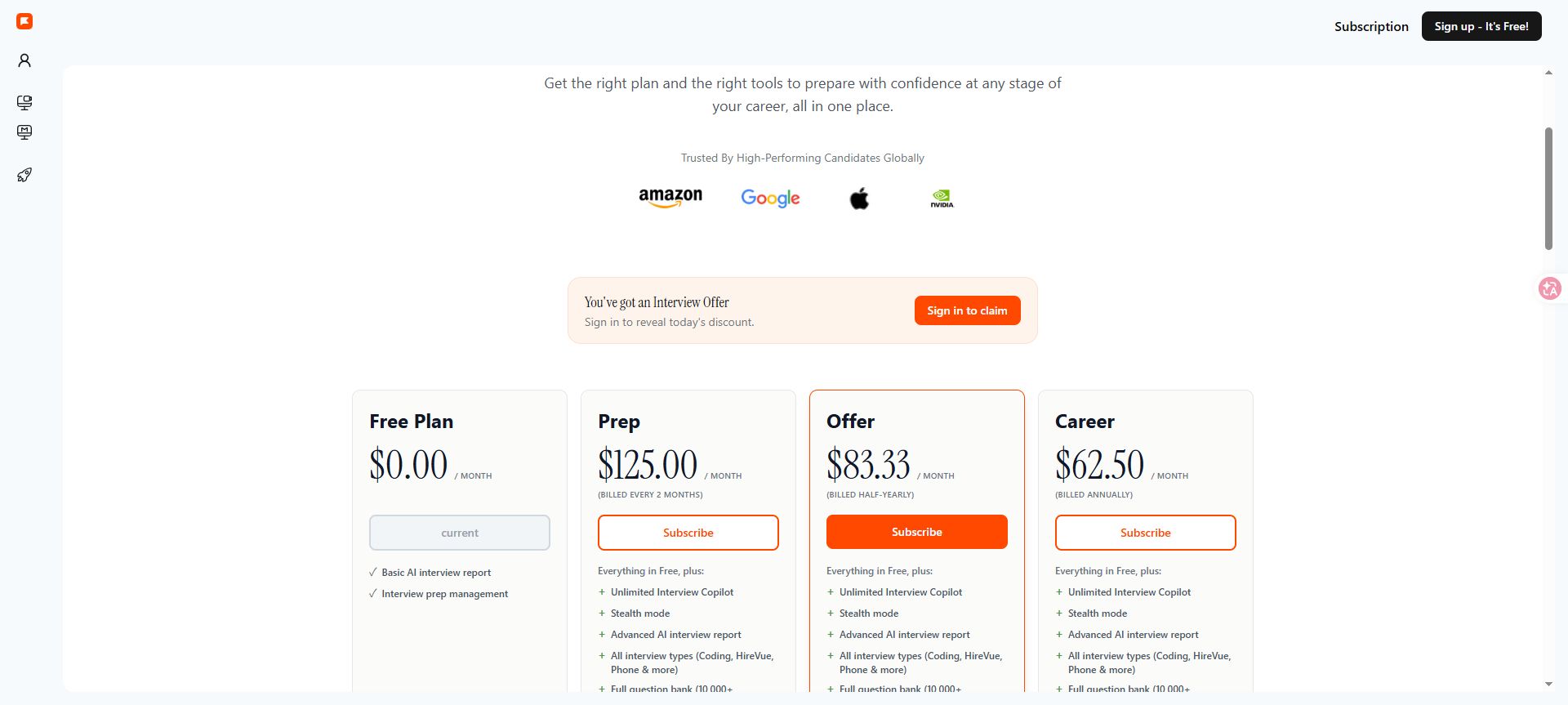
Final Round AI public subscription page, captured October 21, 2026. This is the offer displayed before checkout; account-specific discounts and the final payable total may differ.
The pricing capture shows the public subscription screen used for this comparison. Open the full-size pricing capture to inspect the amounts and billing labels; it does not show a completed checkout.
For example, SkillCopilotAI's $28.90 monthly equivalent means a $346.80 annual payment. If you only want one month, compare its $89.90 monthly option with an actual short-term offer from the other provider. An annual discount can cost more upfront even when the equivalent looks smaller.
What does “free” let you test?
| Product | Published entry access | Important limit |
|---|---|---|
| Final Round | Set up a Goal and add preparation materials before subscribing | Its current help documentation requires a subscription to run live and practice sessions |
| SkillCopilotAI | A 30-minute trial covering most features | Time is finite, and the trial uses a different model selection from higher subscription tiers |
| Interviews Chat | 30 free credits, advertised without a credit card | Credits are not automatically interchangeable with minutes for every action |
Interviews Chat's page separately describes a credit as a minute of Copilot and as a suggestion. It does not settle every combined-use charging case in that short explanation. Ask how your intended workflow consumes credits; do not assume the Starter allowance buys 1,000 minutes plus 1,000 free suggestions.
For every option, check renewal, cancellation, expiry, model access and refund eligibility before paying. A cancellation may stop a future renewal without refunding the current period. Confirm your actual plan's terms instead of assuming that a headline guarantee covers every billing cycle.
SkillCopilotAI: unlimited paid-plan features and model choice
SkillCopilotAI's advantage for repeated preparation is its unlimited use throughout the active paid subscription. The paid-plan feature list includes unlimited real-time interview assistance, AI mock interviews, Coding Copilot, Online Quiz Assistant, Smart Screenshot and interview reports. There is no per-minute, per-session, screenshot-count or answer-credit allowance to ration for those features during your subscription. Custom response settings are also included.
Unlimited access is not exclusive to SkillCopilotAI: Final Round advertises unlimited live Copilot, and Interviews Chat also lists unlimited plans. Compare which features and models your chosen subscription includes.
That lets you rehearse an answer, revise your background, run another mock interview and work through screenshot-based coding questions without buying a separate credit pack for each activity. The interview assistant uses resume and role context; the coding copilot helps with solution approaches, debugging and explanations. These are useful together when one interview process includes behavioral and technical rounds.
Which AI models does each subscription include?
SkillCopilotAI offers models from OpenAI (GPT), Anthropic (Claude) and Google (Gemini) in one desktop assistant. All three provider families appear in the monthly, quarterly and yearly model lists below; the particular models depend on the plan. The yearly selection also includes xAI (Grok).
The current pricing page, checked October 21, 2026, lists the following model selections. Every model included in your paid plan is unlimited for that subscription's active period. The features above are unlimited across all three plans; choosing a longer plan expands the model selection as well as changing the billing commitment.
| Subscription | Included models |
|---|---|
| Monthly — 3 models | OpenAI GPT-5.6-Luna; Anthropic Claude Haiku 4.5; Google Gemini 3 Flash |
| Quarterly — 6 models | All monthly models, plus OpenAI GPT-5.6-Terra, Anthropic Claude-Sonnet-5 and Google Gemini 3.5 Flash |
| Yearly — 10 models | All quarterly models, plus OpenAI GPT-5.6-Sol, Anthropic Claude Opus 5, xAI Grok 4.6 and Google Gemini 3.1 Pro |
Choose monthly if its three models meet your needs and you want the shortest commitment. Quarterly adds three more choices; yearly provides the full ten-model selection listed here. Model names and access reflect the current catalog, so recheck the plan when subscribing. A larger catalog gives you more options; this article does not establish a speed or accuracy ranking between them.
Try the workflow, then choose your subscription period
The useful question is whether that workflow fits your device and task. Follow the current download requirements, then check the same question, screenshot and follow-up you expect to use for practice. For Zoom, the audio setup guide separates your microphone, incoming call audio and the assistant's input path.
The 30-minute limit applies to the free trial, which has a limited model selection. It is not a usage cap on a paid subscription. Unlimited paid access lasts for the subscription period; it does not turn a monthly purchase into permanent access.
We have not established parity with Final Round's Goal organization, history or debrief experience. If those are why you use Final Round, verify the workflow you need before migrating.
Interviews Chat: consider it for a browser-oriented workflow
The Interviews Chat homepage describes web access, an optional Chrome extension and a separate desktop client for desktop meeting applications. It also presents practice and mock interviews alongside its live copilot. That makes it worth checking if browser access or its credit and subscription structure is your reason for leaving Final Round.
Match the client to your input. A browser exercise, a Zoom desktop call and a phone interview are different setups; a successful typed answer does not verify incoming desktop audio. The published free-credit entry gives you a way to investigate, subject to how the relevant actions consume that allowance.
Compare the models and data-handling terms available on your selected plan as well as its displayed price.
Test a replacement with the same small practice task
This is an original fictional evaluation exercise, not a reported result for any product or a real employer assessment. Run it in a permitted practice environment. Do not buy every tool merely to fill in a comparison table; start with available access and record anything you could not test.
Use this profile for each candidate tool:
“I am practicing for a backend role. I implemented request logging and an alert for a checkout API. A teammate owned the retry policy. I do not have verified conversion or latency improvements. Give me three short talking points and do not invent metrics.”
Ask: “What did you improve, and how would you explain your own contribution?”
Then correct the profile: “I only proposed the alert; I implemented the logging. Revise the answer.” A usable response must preserve that narrower ownership instead of continuing to claim an implemented alert.
For screenshot-based coding practice, prepare your own small prompt: “Given request IDs ['a', 'b', 'a', 'c', 'b'], return each ID once, preserving its first appearance.” The expected output is ['a', 'b', 'c']. Change the constraint to keeping only IDs that occur once; the expected output becomes ['c']. These are different tasks. Check whether the next answer follows the new constraint rather than repeating the original solution.
| Check | Evidence to keep | Decision |
|---|---|---|
| Input captured | The question or screenshot actually received | If wrong, fix input before judging answer quality |
| Background respected | No invented metric or teammate's work assigned to you | Reject unsupported claims |
| Correction followed | Logging implemented; alert only proposed | Retest if old context persists |
| Coding constraint changed | First-seen deduplication versus IDs occurring once | Verify the output and explain why the task changed |
| Output usable | Short cues you can explain without reading a script | Adjust format or keep looking |
Record the date, app/client version, device, selected input, plan and actual output. Mark untested items as unchecked. If you already have paid Final Round access, you can use the same task there as your baseline; otherwise do not imply that you ran a side-by-side test.
Move the preparation you need, then review renewal
Before switching, make a short inventory of the role description, resume version, practice notes and outputs you are permitted to retain. Keep a plain-text summary of your actual project facts so you can rebuild context without copying confidential material into another service.
Check export and deletion options inside your current account. This guide does not verify a one-click transfer between Final Round and either alternative. A summary you prepare yourself is not the same as importing all session history or preserving every debrief feature.
Run your practice task in the replacement, check incoming audio if you need it, and review the actual shared view in an authorized rehearsal. No tool in this guide has an independently verified “undetectable” guarantee. Use live guidance only where the interview rules permit it.
Once you know what you will keep, cancel or retain the old subscription deliberately. Confirm the renewal date and cancellation receipt, and handle old data separately. Do not delete your only copy of preparation material before confirming that you can work with the replacement.
Choose the product that meets your must-have checks at a payment commitment you understand. If none demonstrates an improvement over your current setup, you do not need to migrate yet.
Compare similar tools
Editor selected
Best Interview Coder Alternative for Coding Interview Preparation
Compare SkillCopilotAI as an Interview Coder alternative: a free-trial coding example, screenshot workflow, and monthly, quarterly, and annual costs.
Editor selected
LockedIn AI Alternative
Choose a LockedIn AI alternative by free access, coding workflow, renewal price, and switching effort, with dated tests and a practical migration checklist.
Editor selected
Interview Sidekick Review: Pricing, Free Trial, and Alternatives
Interview Sidekick pricing, two-minute free sessions, and a Windows desktop trial: resume accuracy, follow-ups, coding answers, and alternatives.
Same content type
Cluely Alternatives for Interviews: Context, Costs & Switching
Compare Cluely alternatives for interview preparation, resume context and live support. Check actual billing, free access and what to move before switching.
Choose your next step
Compare another tool or move from research into structured interview practice.