

Looking for a LockedIn AI alternative? Start with the part of your current workflow you want to change. For a free desktop coding trial, consider SkillCopilotAI. For a session-based free allowance, compare Verve. For preparation and post-session debriefs in one workspace, consider Final Round AI. Switching is less useful if LockedIn already handles your practice well and you still have paid access to use.
Disclosure: SkillCopilotAI publishes this article and develops one of the products discussed. The project retains notes describing two LockedIn AI web mocks from September 9, 2026. This update did not rerun or independently verify those sessions. The SkillCopilotAI coding example was supplied by a user and received October 17; it is not a same-question test against LockedIn.
Which alternative fits your reason for switching?
- Try screenshot-based coding help: SkillCopilotAI advertises 30 trial minutes. The example below shows two captures of one question and unchanged code passing three visible cases. It fits readers who can verify a coding answer themselves; it does not establish better audio performance or replace a session-debrief requirement.
- Get a defined free practice allowance: Verve's pricing page lists three 15-minute Copilot sessions and five mock sessions. Its Standard tier currently lists five 60-minute Copilot sessions. It fits scheduled practice; a session-count limit may be less suitable if you need frequent, long Copilot sessions. Confirm how sessions are counted before moving.
- Connect preparation and debriefs: Final Round AI's Interview CoPilot page connects Goal materials, practice, live assistance, and debriefs. Free access covers setup; live and practice sessions require Pro. Consider it when you want preparation and review linked to one role. It is less suitable if your deciding requirement is a free live-answer trial.
- Cover ordinary meetings too: Cluely offers limited responses and notes free, and Pro at $19.99/month on the monthly view checked. Its $149.99/month Pro + Undetectability tier is separate; do not assume every feature comes with basic Pro. Consider it for notes and assistance across several meeting types; test interview-specific preparation separately rather than assuming it replaces your existing mock workflow.
- Prefer prepaid call time: Compare Parakeet AI with your expected usage. Our Parakeet review records an earlier credit-based offer; use the current purchase screen for today's packs and limits. This is an option to investigate for occasional use, not a verified current budget winner. For regular practice, compare the total time you expect to buy with a subscription's allowance.
These are task-based choices, not an answer-accuracy ranking. A free allowance, a lower monthly bill, and a better coding explanation are different reasons to switch.
A free coding workflow you can inspect
Can you give the app a whole coding problem, get an answer, and verify it before paying? A user supplied the photographs below from a MacBook Air. They confirmed SkillCopilotAI v0.1.12, Google Gemini 3 Flash, a free account, and copying the generated C++ without editing it.
Capture the whole question
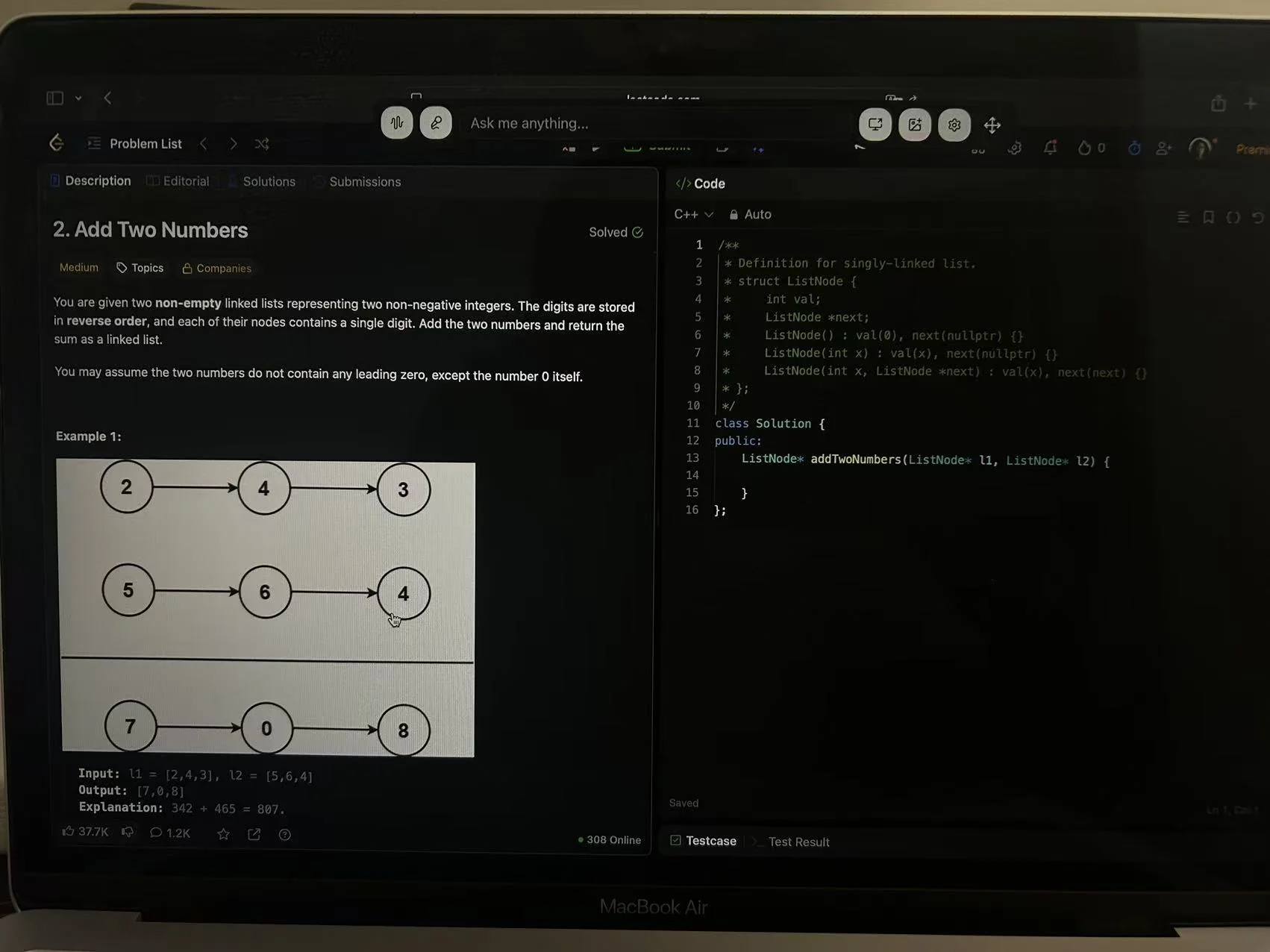
The starting point of this run. The existing Solved badge does not establish a first-ever attempt. View original size.
The Add Two Numbers question extends below the visible area. The user captured the first part, scrolled down, and captured the rest:
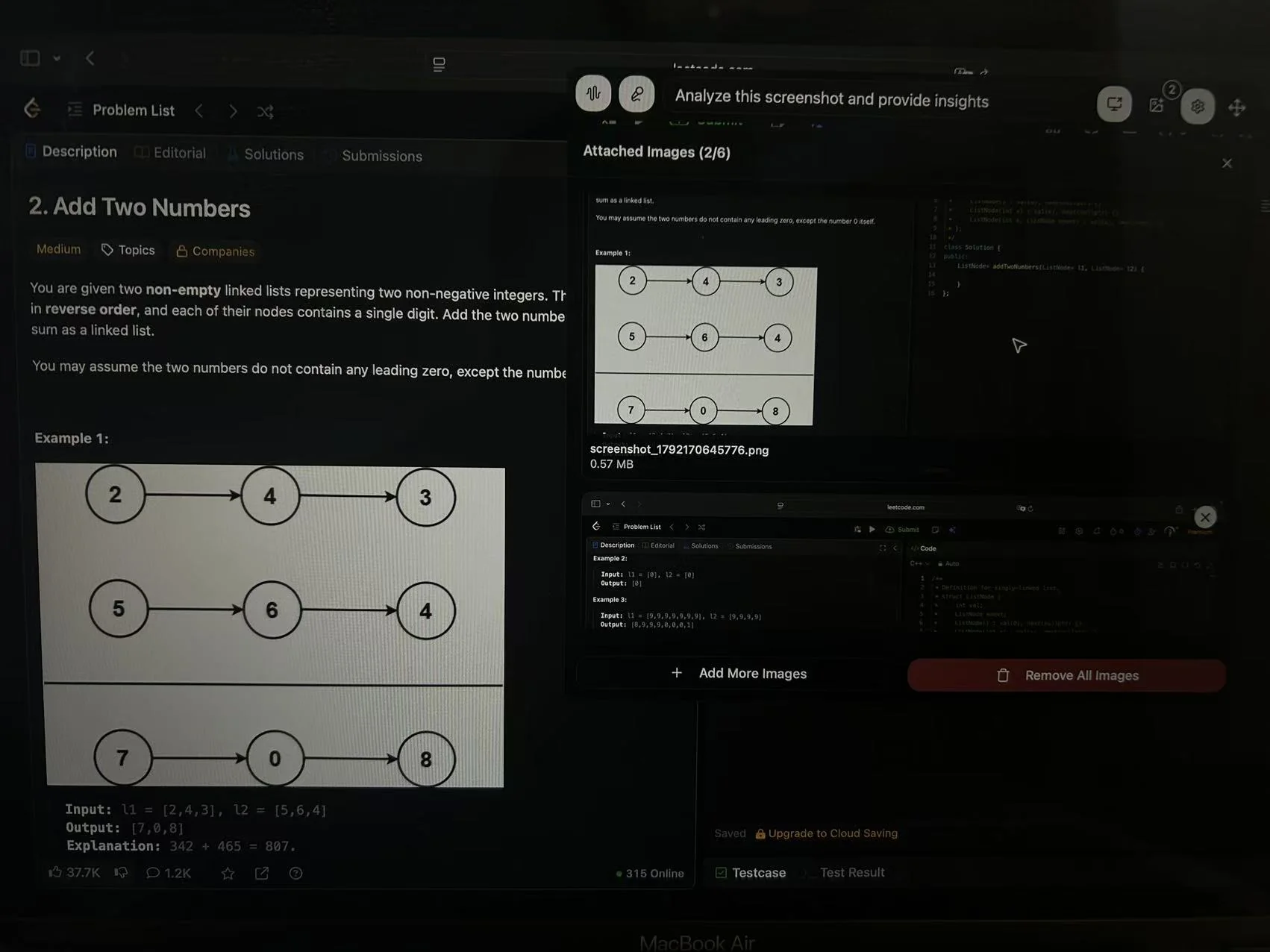
Two captures supplied the remaining material without retyping it. View original size.
Copy the answer and check the result
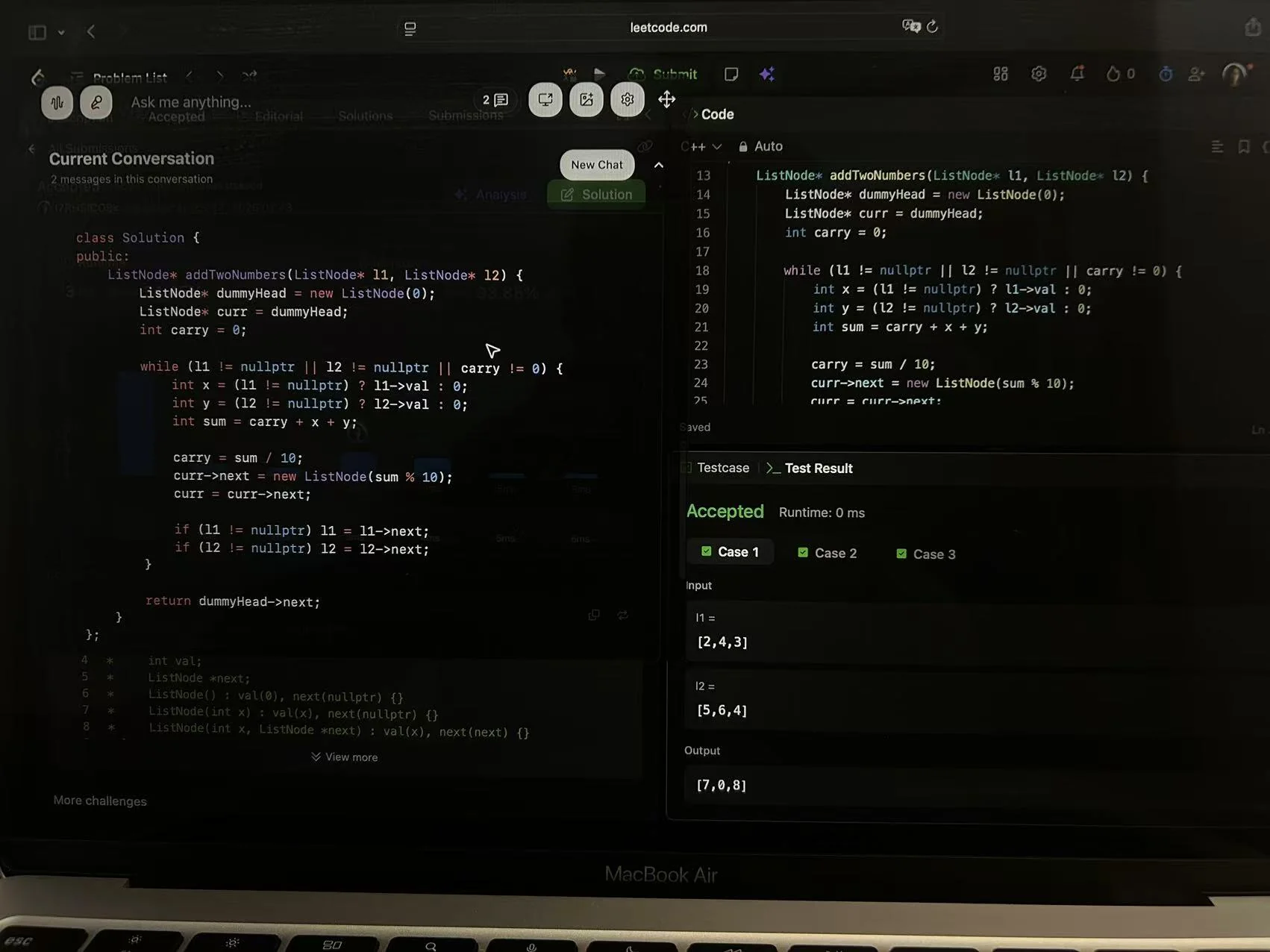
The user reports copying this answer unchanged into LeetCode. The solution tracks a carry while walking the lists. View original size.
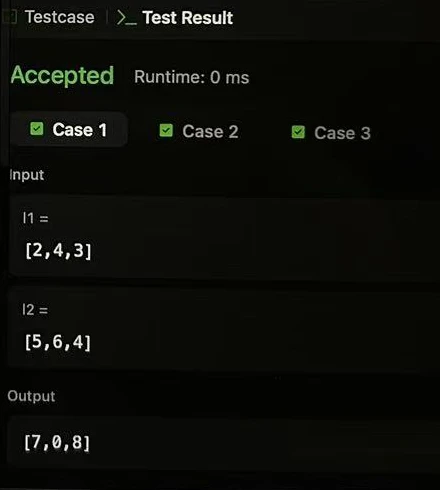
The same result photograph, cropped for readability. The visible example adds [2,4,3] and [5,6,4] to produce [7,0,8].
The unchanged code passed the three visible test cases in this run. This does not prove all hidden submission tests passed. The displayed 0 ms is code runtime, not AI response time. No changed-requirement follow-up or response-speed measurement was recorded.
These are the same images used in our Interview Coder alternative comparison, not a new independent test. We did not run this coding question in LockedIn AI. The example lets you inspect the workflow; it cannot establish better accuracy than LockedIn.
What the retained September 9 test record describes
The project's retained notes describe two LockedIn AI web mocks on Windows, using a fictional Backend Engineer profile at Northstar Labs: a behavioral session and a cache-versioning session with two follow-ups. This update did not rerun those sessions or independently verify the full historical execution. Treat the notes as a dated source, not as a new hands-on comparison.
What the available screenshot supports
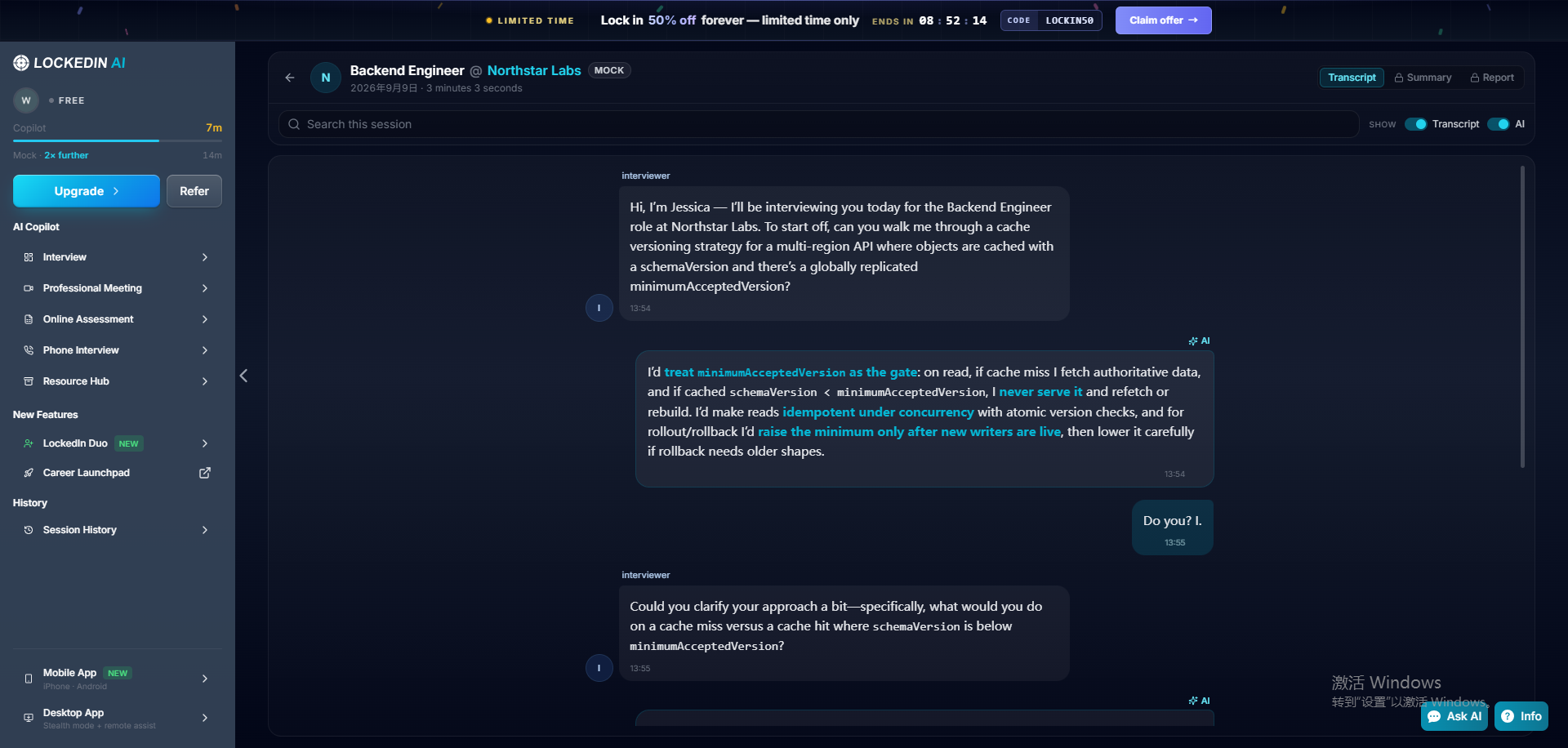
The retained technical transcript screenshot relates to the cache-versioning discussion. It is not evidence of the separate behavioral session, current free allowance, subscription access, or a controlled audio test.
The written notes describe a discussion of stale cache entries and a region that had not received a new minimum version. They report that a follow-up led to a fail-closed suggestion. A screenshot of part of a discussion cannot establish overall answer accuracy, completeness, or performance across sessions.
What remains a historical account
The notes also report that the first behavioral answer preserved supplied project facts, later suggestions introduced extra details, and candidate-side transcription was garbled in a room-speaker setup. Those observations are not independently verified in this update. We therefore do not use them to claim a general weakness in LockedIn's answer quality or transcription.
The same record describes free mocks and transcript access, a Summary link redirecting to pricing, and an extension prompt for coding image analysis. These are historical account observations, not a confirmed description of today's free plan. Check your own current allowance and the specific feature you need before purchasing.
For your decision, the useful next step is to test the workflow you want to replace. Use our interview copilot checklist with one question you understand and one follow-up. Do not infer that another tool is better from these incomplete historical materials.
Compare the first payment and the renewal
A monthly equivalent can hide both a longer commitment and an introductory discount. On October 17, the LockedIn pricing page, with Unlimited / General selected, displayed:
- Monthly: $43.99 for the first payment, then $109.98 every month.
- Three months: $31.99/month equivalent initially, or $95.97 upfront. Renewal is listed at $79.98/month equivalent, or $239.94 every three months.
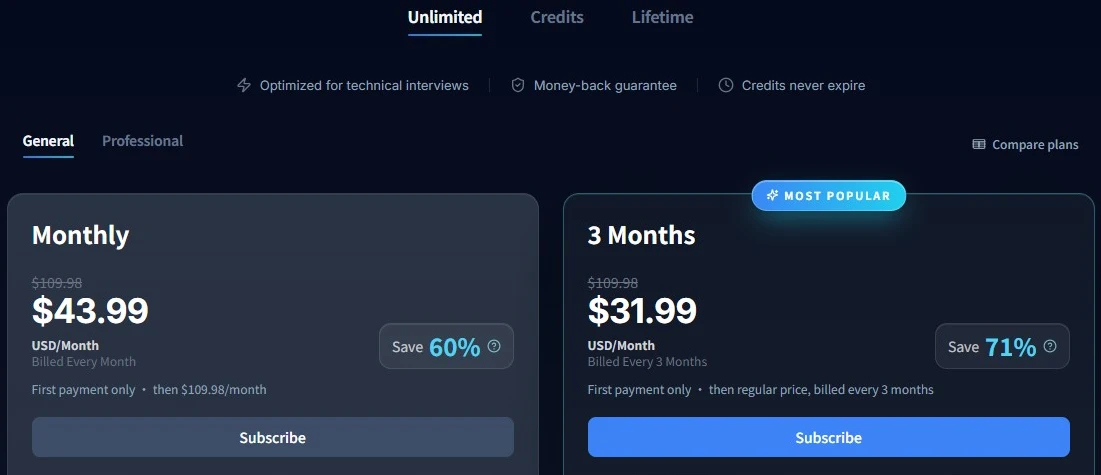
The official pricing page, captured October 17, 2026 with Unlimited / General selected. Both cards label the offer as first-payment pricing. View full size.
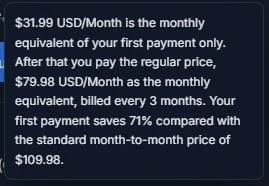
Close-up of the expanded three-month billing explanation from the same page. It states the regular renewal equivalent of $79.98/month, billed every three months. This is a public offer screenshot, not a checkout or paid-account test.
These are the displayed terms for that selection, not Professional, Credits, Lifetime, or app-store prices. The three-month totals are calculated from the displayed equivalents.
SkillCopilotAI subscriptions list $89.90 monthly, $179.70 every three months, or $346.80 yearly. Quarterly and annual equivalents are $59.90 and $28.90 per month; neither is a monthly payment option. Model access differs by tier: the monthly page lists basic models including Gemini 3 Flash and Claude Haiku 4.5; quarterly adds professional-tier choices, and annual adds premium models. The current plan details identify the included models; the user example above used Gemini 3 Flash on a free account.
SkillCopilotAI is not cheaper for the introductory month here: $89.90 is above $43.99. It is below LockedIn's displayed $109.98 monthly renewal. For three months, SkillCopilotAI at $179.70 is $83.73 more than LockedIn's displayed $95.97 introductory quarter, but $60.24 less than its displayed $239.94 renewal quarter. These are cash-payment differences, not an equal-entitlement comparison. Choose your preparation period, then compare the included models and allowances.
Unused access also matters. Another subscription creates overlapping spending if your current plan still covers the rounds you need. Finish the trial before buying a longer replacement plan.
How to switch without rebuilding everything twice
1. Name the problem the replacement must solve
Write a concrete requirement: capture a long question in two images, preserve four project facts, support your audio route, or provide useful session review. A vague goal such as “better AI” is hard to test.
2. Keep a portable copy of your preparation
Keep your resume, job description, project facts, preferred answer language, and practice questions in files you control. Save any old transcript you need using the available account features before changing access. We have not verified a direct LockedIn-to-SkillCopilotAI importer; allow for manual setup and check the resulting context.
3. Check the computer and audio route
The SkillCopilotAI download page lists Windows 10/11 x64 and a universal Mac installer for macOS 14+ on Intel and Apple Silicon. The supplied example shows a MacBook Air, not a Windows test.
Check microphone permissions, the captured audio source, screenshot input, and readable output before spending the trial on a full mock. Use a practice environment where assistance is permitted. A successful text answer does not verify your microphone setup.
4. Reuse one question and one challenge
Give each tool four factual project details, then ask it to revise an answer under a new constraint. Mark invented achievements. For coding, run the code and inspect a boundary case you understand. Our two products were not tested with the same question set; this is a suggested check for your own choice.
5. Separate cancellation from refunds
The LockedIn refund policy, whose body states an October 14 update, says monthly and quarterly subscriptions are non-refundable once started; cancellation preserves access until the cycle ends. It describes partial annual refunds within seven days and separate Apple purchase handling. Check your purchase channel and renewal date. Canceling does not transfer remaining value to another product.
When staying with LockedIn makes more sense
Keep it if its answers help you rehearse, you can correct generated details, your input setup works, and your allowance or paid access covers the next round. The historical notes alone are not a reason to abandon a workflow that works for you.
Try a replacement first if you need a specific unvalidated workflow, such as the two-image coding example. Pay after it handles that task on your computer. This reduces the chance of buying two tools that leave the same problem unsolved.
Questions before switching
Is there an unlimited free LockedIn AI alternative?
The options verified here have limits: SkillCopilotAI advertises 30 minutes, Verve lists session allowances, and Cluely limits responses and notes. A free installer or setup workspace is not unlimited AI access.
Can I transfer my LockedIn history automatically?
We have not verified a direct importer. Keep the preparation materials you need and check the new tool's context. Allow for manual setup rather than assuming history follows your login.
Which alternative has better coding accuracy?
This article cannot establish a winner. SkillCopilotAI passed three visible cases on one problem; the retained LockedIn notes concern behavioral and cache-design discussion and were not independently reverified in this update. Different tasks are not a controlled comparison.
Sources and method
Emma prepared this research-based update from the project's retained September 9 LockedIn notes and technical screenshot, official pages checked October 17, and user-supplied SkillCopilotAI materials received October 17. The historical notes are attributed records, not an independently repeated test. The official pricing screenshots document the displayed offer; the user photographs document the separate coding example. No new paid accounts, controlled audio benchmark, or same-input multi-product coding test was completed. The user's exact macOS version and demonstration date were not recorded.
- LockedIn pricing and refund terms
- SkillCopilotAI subscriptions and installers
- Verve plan limits
- Final Round AI workflow and access
- Cluely pricing
- Parakeet AI
The cover is an editorial illustration. Product and test images support only the dated observations described beside them.
Compare similar tools
Editor selected
Parakeet AI Review 2026: Pricing, Pros, Cons & Verdict
Parakeet AI review covering pricing, credits, live interview features, limitations, and a sourced comparison with SkillCopilotAI to help you choose.
Editor selected
Cluely AI Review 2026: Features, Pricing, Privacy, and Verdict
Is Cluely worth it? This research-based review examines its live meeting features, current pricing, privacy terms, limitations, and best-fit users.
Editor selected
InterviewMan Review 2026: Hands-On Test, Pricing & Drawbacks
Is InterviewMan worth $30 a month? Our hands-on browser test covers answer quality, technical follow-ups, pricing, limitations, and who should try it.
Same content type
CtrlPotato Review: Pricing, Free Trial, and Who It Fits
CTRLpotato review with user-provided coding output, pricing, trial limits, and Lite vs Pro differences. See what the evidence supports before subscribing.
Choose your next step
Compare another tool or move from research into structured interview practice.