

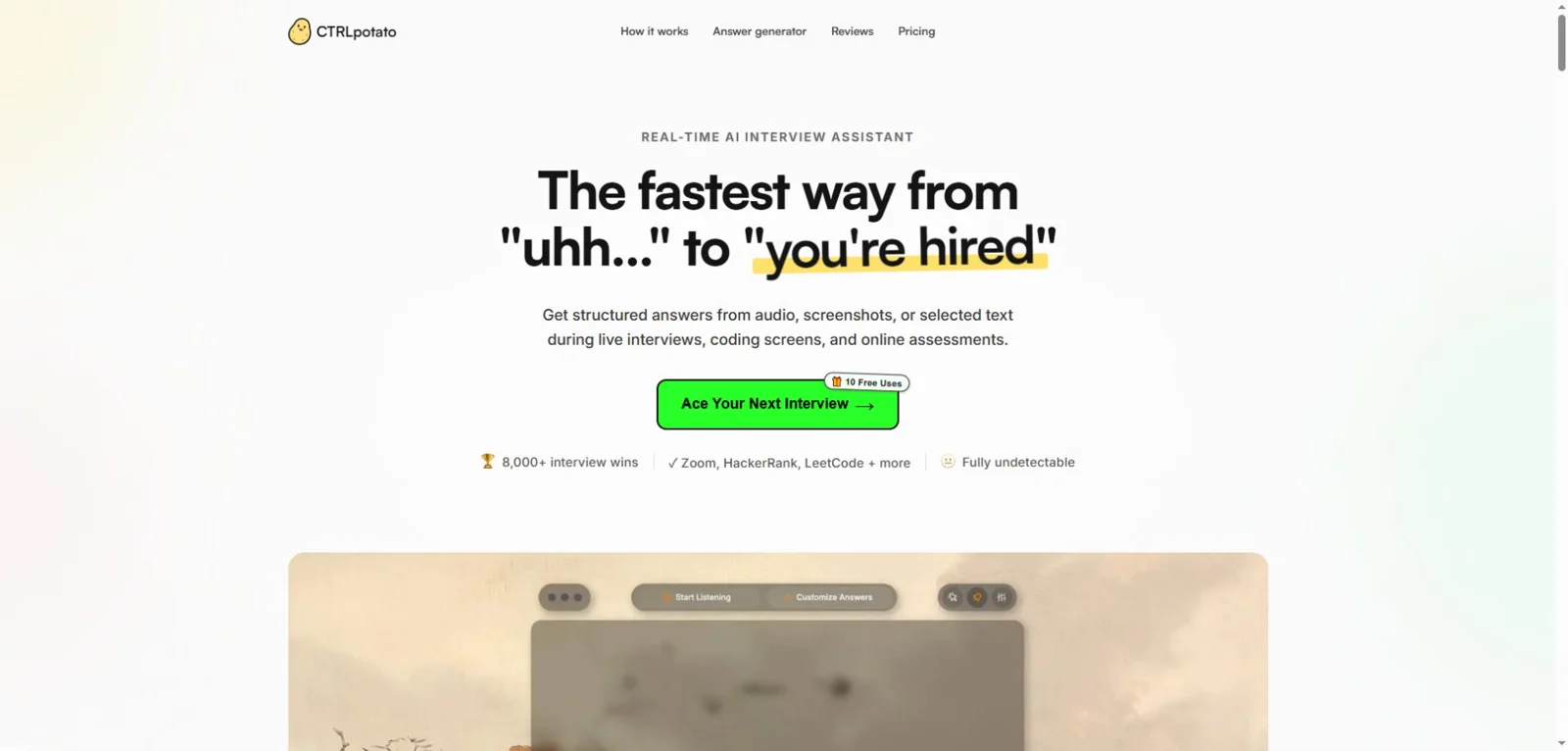
CTRLpotato advertises one desktop workflow for spoken questions, screenshots and selected text. Its 10 free AI answers are the place to check whether that workflow fits your practice. The important buying decision is whether you need manually requested answers or the higher-tier Live Coach and phone controls: the $29 Lite plan does not include those features.
For a single interview week, the $39 Sprint Pass gives seven days of Pro access without renewal. For a longer search, Pro costs $69 month to month or $177 every three months. We would choose the billing period only after confirming that the workflow fits the actual practice setup.
This CtrlPotato review checks the official product page and pricing, terms and privacy policy as of October 18, 2026. Our editorial team has not installed or performance-tested CTRLpotato. A user supplied two CTRLpotato practice photographs on October 19, 2026; we review the visible output below. SkillCopilotAI, the publisher, makes a competing assistant. Its separate example later in this article is not a matched comparison.
Which CTRLpotato plan would you actually need?
The cheapest plan is a reasonable starting point for manual practice, while the pass and Pro subscription serve different time commitments. Here is the amount you buy, rather than a monthly equivalent presented as a one-month purchase.
| Option | Amount paid and access period | Main decision |
|---|---|---|
| Free | $0; 10 AI answers, with a Live Coach preview advertised | Check the input and answer workflow before paying; it is not an unlimited practice plan |
| Lite | $29 billed monthly | Manual Ask AI on standard models; no Live Coach, Mobile Mirror, premium models or full custom AI behavior |
| Pro, monthly | $69 billed monthly | Higher-tier workflow for a month, with flexibility to cancel future renewals |
| Pro, quarterly | $177 billed every three months | $59/month equivalent; useful when you expect to need all three months |
| Sprint Pass | $39 once for seven days | Pro access for one interview week; ends automatically |
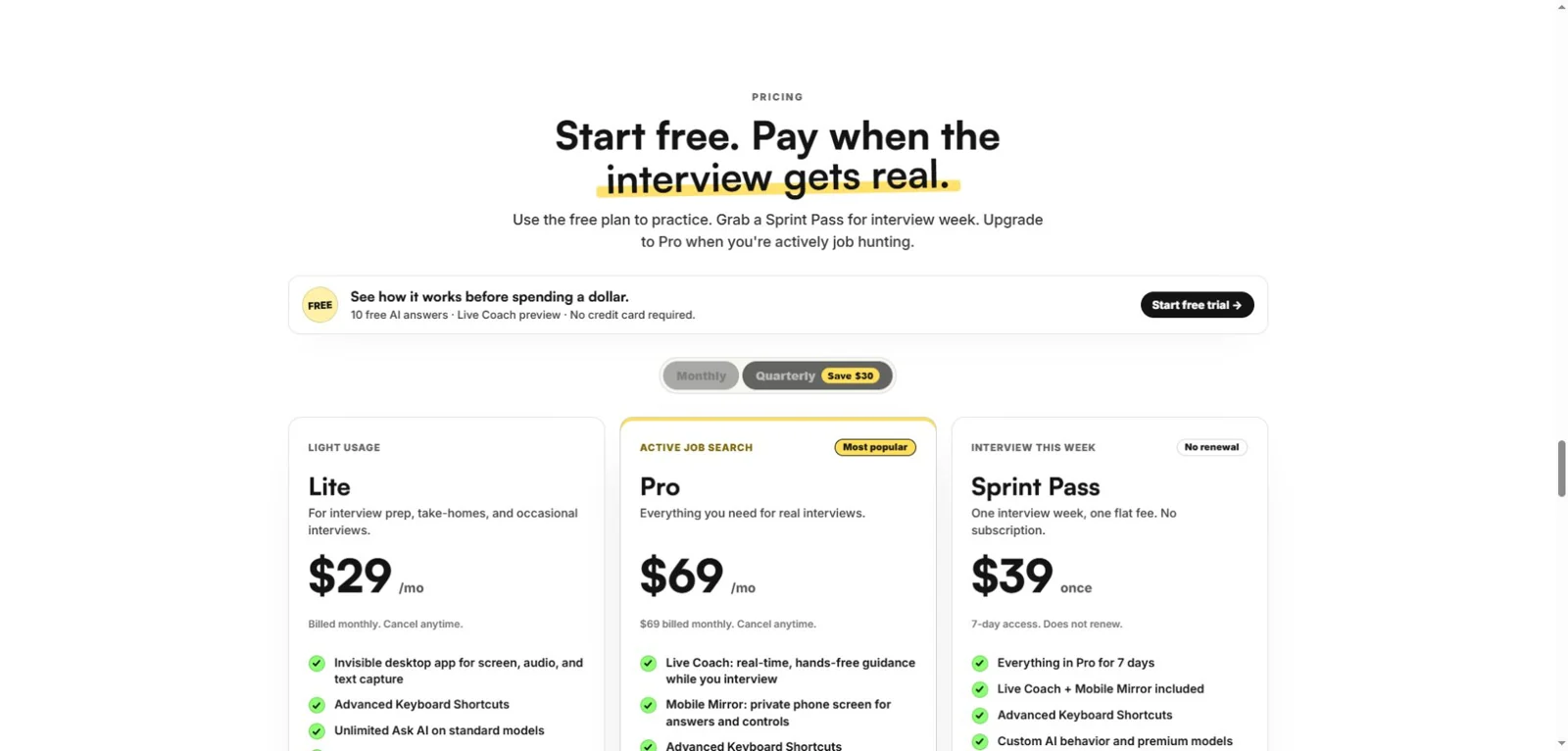
Official website screenshot, October 18, 2026. Open the pricing screenshot.
Lite versus Pro is not just a price difference. The published allowance is 30 transcription hours per month and two screenshots per question on Lite, compared with 60 hours and ten screenshots on Pro. Lite advertises unlimited Ask AI on standard models; that wording does not make transcription unlimited or unlock premium models. Confirm any model-specific allowance at checkout.
The useful cost comparisons are within the period and feature set you need:
- Seven days, and you need Pro features: Sprint costs $30 less upfront than one $69 Pro month. If preparation slips into a second week, the seven-day expiry matters more than the initial saving.
- One month of manual practice: Lite is $29. Paying $39 for a week of Pro would buy different features and a shorter access period, so it is not automatically better value.
- Three full months of Pro: quarterly billing is $177 versus $207 for three monthly payments, a $30 saving at the listed prices. You commit the $177 upfront.
- An uncertain schedule: monthly billing costs more over three complete months, but avoids committing to the quarter before you know your dates.
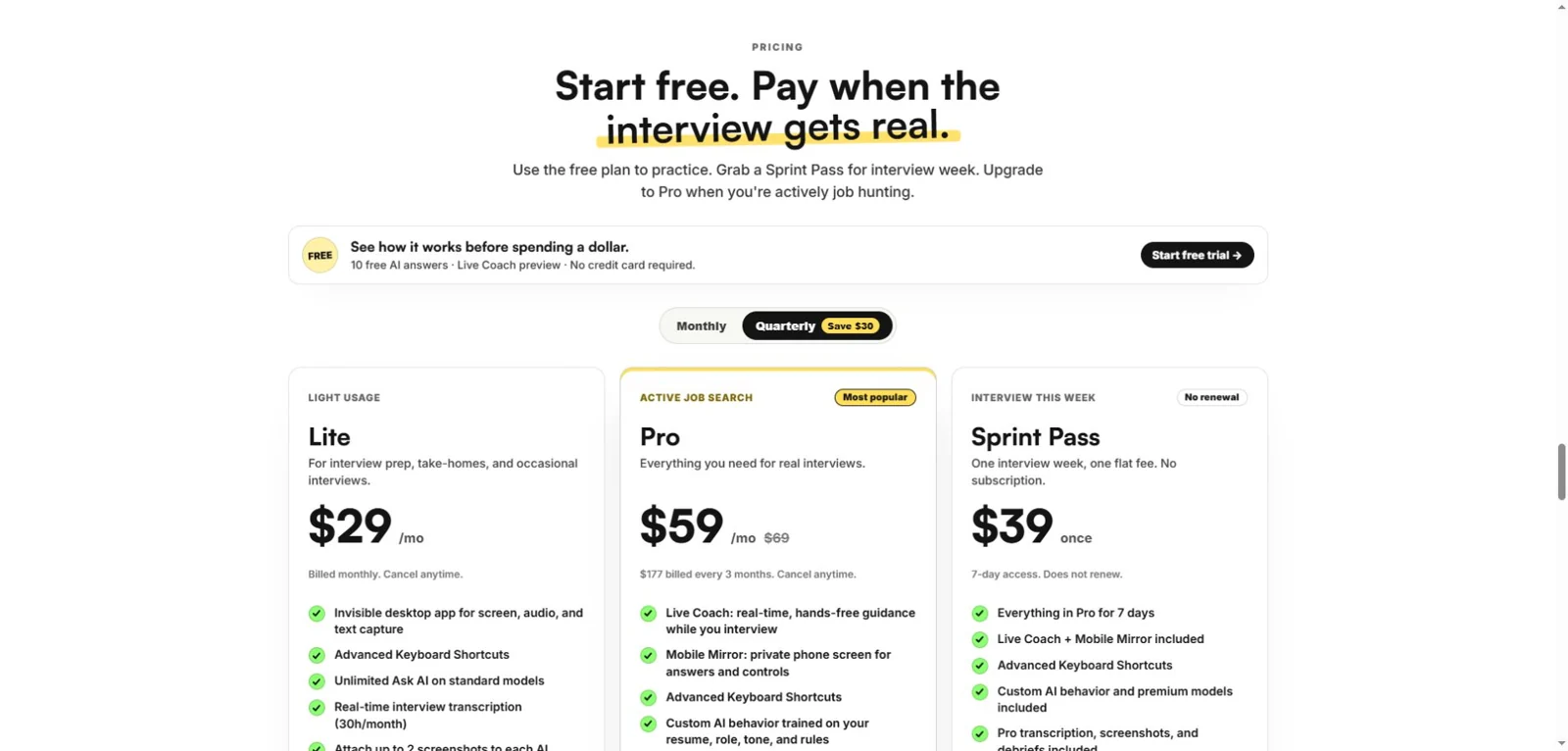
The quarterly option changes Pro's billing commitment. Lite remains monthly and Sprint remains a one-time pass. Prices exclude any checkout-specific taxes or adjustments.
How the workflow is supposed to work
According to CTRLpotato's product description, you gather context from audio, screenshots or selected text, then request an answer. Its context buffer is intended to combine those inputs so a question can include both spoken instructions and material visible on screen.
Ask AI is the manual path: you choose the context and request an answer. Live Coach is the higher-tier option the vendor describes as hands-free, real-time guidance. If automatic guidance is why you are considering Pro, check that mode specifically; a useful manual answer does not verify it.
That is relevant to a coding practice task that spans more than one screen. A solution is only useful if the assistant receives the constraints, examples and required function signature. A screenshot of the first paragraph alone can leave it solving a different problem.
The product also advertises resume and job-description personalization. Lite includes personalized answers from those materials, while full custom behavior and premium model access sit in the higher tier. Before paying for customization, check whether you need basic personal context or control over the assistant's instructions; the pricing page treats those as different capabilities.
Do you have to use a second device?
The current official description presents phone mirroring as an option, not a requirement for desktop answers. Mobile Mirror lets users view answers and control the desktop app through a phone browser after connecting by QR code. It is included in Pro and Sprint, not Lite.
Choose it because a separate view helps your permitted practice setup. If you prefer to keep everything on one computer, test the desktop view first. Older reviews describing trouble on one machine do not establish that every current version requires two devices.
CTRLpotato lists macOS and Windows support. We did not verify minimum OS versions, each installer architecture, screen-sharing behavior or shortcut reliability on either platform. Use the current official download flow and check your exact machine before subscribing.
User-provided CTRLpotato coding practice: what the answer shows
A user identified these two photographs as CTRLpotato and supplied them on October 19, 2026. They show an Add Two Numbers practice conversation and an explanatory answer. The actual test date, app version, subscription tier and operating system were not recorded. The model selector visibly reads Claude Haiku 5.5; that is a UI label, not independent verification of the model serving the response.
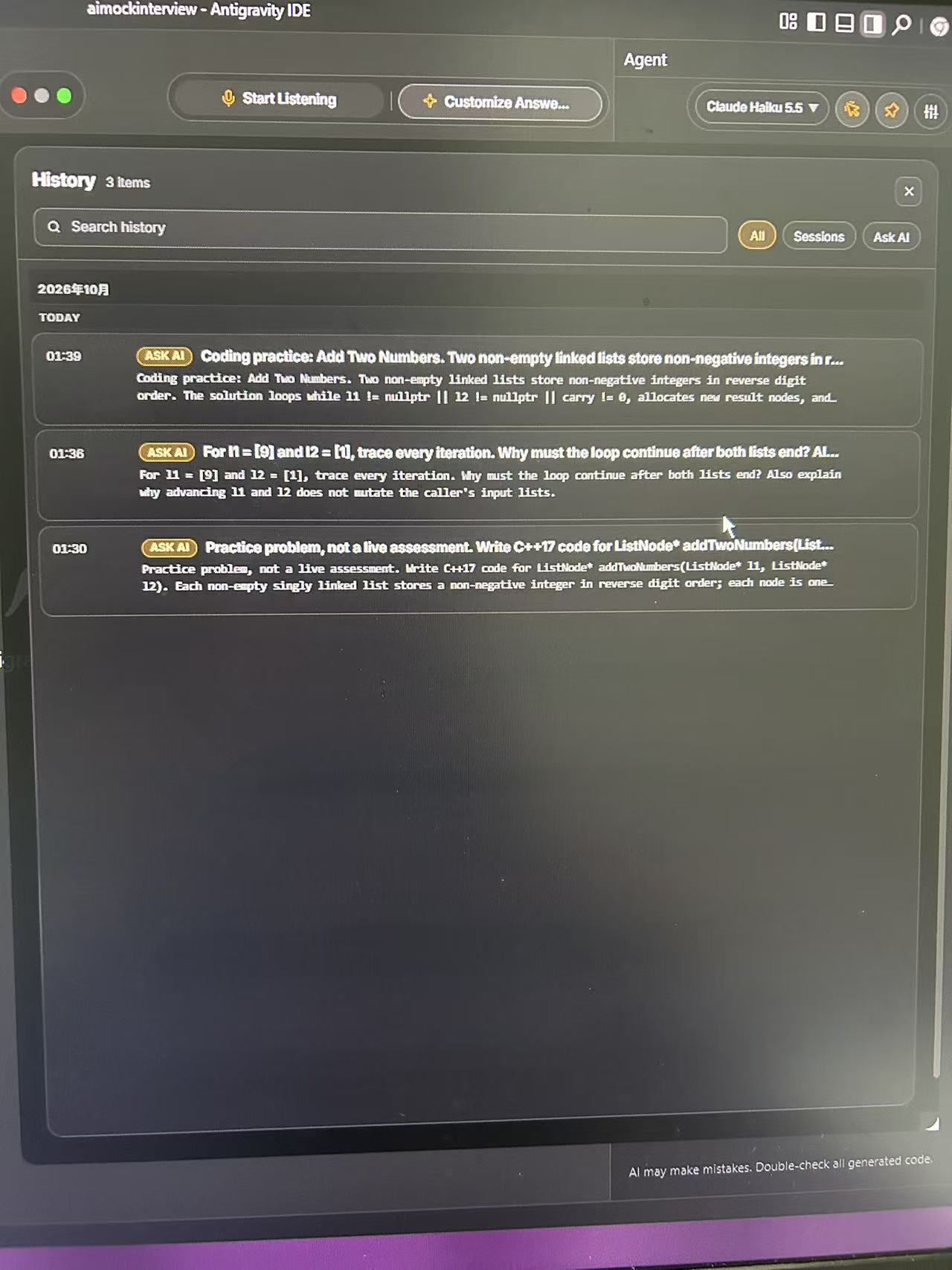
User-provided photograph of the History panel. It lists three Ask AI items, including a practice-only C++17 request and a follow-up asking why a carry must be processed after both lists end. These are history entries, not three passed test cases; their timestamps do not measure response latency.
The carry follow-up: 9 plus 1
The visible history asks the assistant to trace l1 = [9] and l2 = [1], explain why the loop must continue after both lists end, and explain whether advancing the pointers mutates the caller's lists. The displayed answer addresses those explanation requests rather than generating another full implementation.
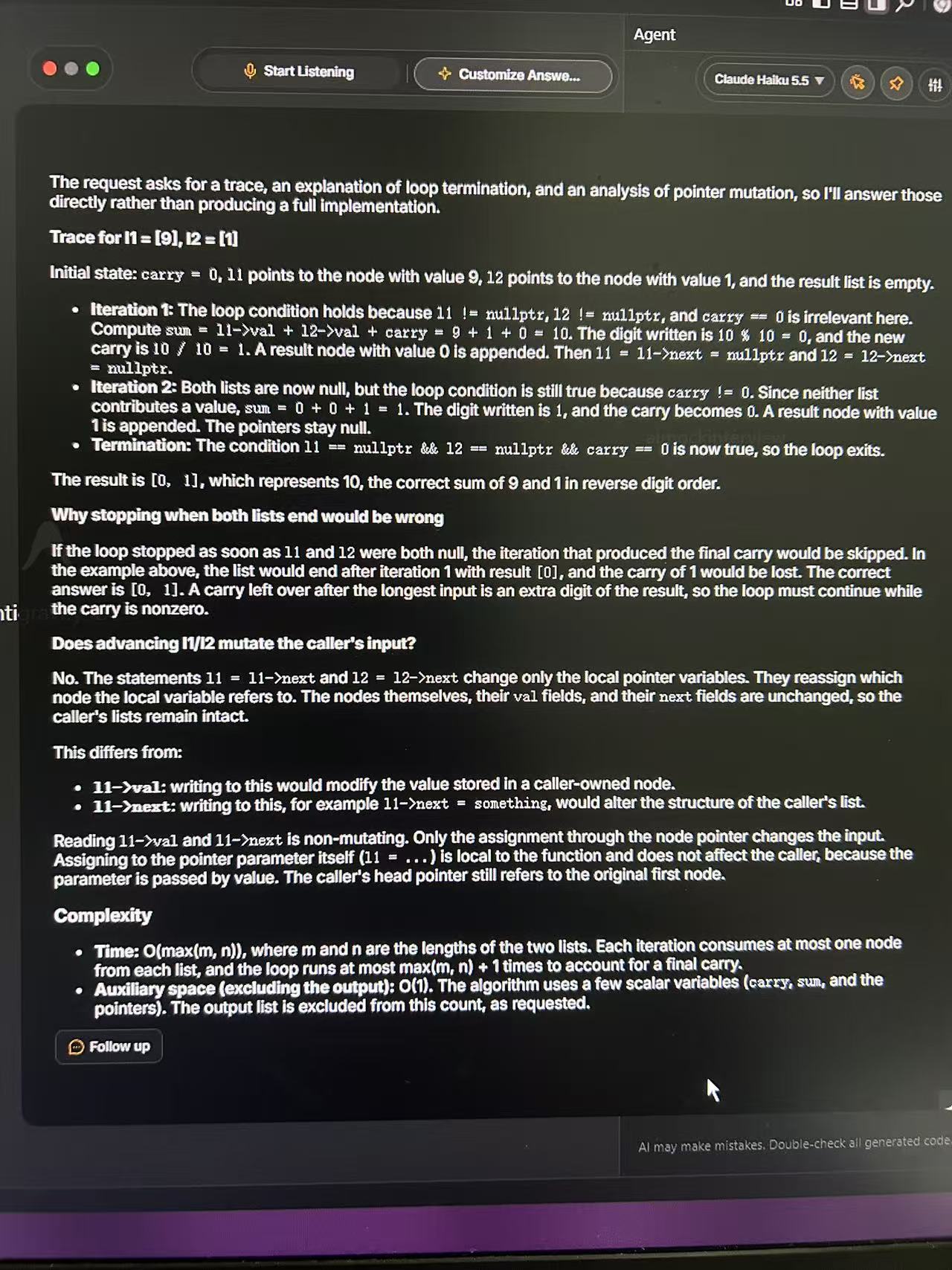
User-provided photograph of the answer. The visible response includes a two-iteration trace, a final-carry explanation, a distinction between pointer reassignment and node mutation, and complexity notes. It does not show compiled code or a judge result.
| Check in the visible answer | Our assessment of this example |
|---|---|
| First iteration | Correctly computes 9 + 1 = 10, appends digit 0, and keeps carry 1. |
| Final carry | Correctly performs another iteration after both pointers become null, appends 1, and returns reverse-order digits [0, 1]. |
| Input mutation | Correctly distinguishes reassigning ordinary pointer parameters passed by value from writing to a node's value or next field. The function declaration itself is not visible in the answer photograph, so this conclusion depends on that parameter convention. |
| Complexity | O(max(m, n)) time and O(1) auxiliary space are appropriate for the described iterative algorithm when the newly allocated output list is excluded. |
For this follow-up, the visible explanation is consistent with the stated linked-list arithmetic. Not producing a full implementation here is not an observed failure: the follow-up asks for a trace and explanation. The earlier code request is visible only as a history entry, so these photographs cannot establish whether that generated code compiled or passed tests.
This gives a concrete reason to try the explanation workflow on a problem you understand. It does not verify Live Coach, audio transcription, phone mirroring, screen-share behavior, response speed or general coding accuracy. The separate SkillCopilotAI example below used a different setup and is not evidence that either product performs better.
What looks useful, and what still needs a trial
The strongest feature on paper is control over the context. Audio, text and screenshots can belong to the same task, rather than forcing you to retype everything. Whether the resulting answer correctly combines them is a separate question that the public feature list cannot settle.
The plan structure also gives a short-term option. A seven-day pass can fit a tightly scheduled interview week better than an ongoing subscription. Conversely, Lite may be enough if your task is to request explanations while working through practice problems yourself.
There are three limits to our recommendation:
- Manual answers and hands-free coaching are different workflows. Do not buy Lite expecting full Live Coach access.
- More context still needs checking. An old screenshot, an inaccurate transcript or an unsupported detail in a resume answer can make an otherwise fluent response misleading.
- Speed and visibility claims need environment-specific evidence. We have not measured response time or verified the site's invisibility claims. The terms also state that compatibility can vary across hardware, operating systems and third-party software.
For a broader selection method, see our guide to choosing an AI interview copilot.
A small trial that can answer your buying question
Use the free allowance on tasks you can evaluate. The following is an original practice protocol, not a report of tests we ran on CTRLpotato and not a set of employer interview questions.
| Check | What to submit | What would make the answer useful? |
|---|---|---|
| Complete coding context | A familiar problem with its examples, constraints and function signature | It solves the supplied task, handles edge cases and explains its approach |
| A changed requirement | A follow-up such as “Keep the same output, but do not mutate the input” | It updates the solution and explanation rather than repeating the old answer |
| Personal facts | A short fictional project with a stated result and an explicit instruction not to invent details | It preserves the facts and separates suggestions from things the profile actually did |
| Spoken input, where available | A question you record or ask in a private practice session | The transcript captures the question; the answer addresses it rather than nearby setup chatter |
| Desktop controls | Your normal editor and call app in a private rehearsal | Shortcuts and answer placement allow you to continue the task comfortably |
Save the exact prompt, selected model, plan, app version and output. For code, check more than the example case: include an empty or smallest valid input, boundary values and a case that exercises the changed requirement. A correct result on one familiar problem does not establish general accuracy.
For a ready-to-use coding task, the original time-window exercise in our ShadeCoder review includes expected outputs, a boundary change and a debugging follow-up. You can use the same task with CTRLpotato; it is not a completed comparison of the two tools.
Decide which paid feature you still need after the trial. If you cannot adequately inspect Live Coach within the advertised preview, that feature remains unverified; do not treat a successful manual answer as proof that hands-free coaching will work equally well.
Refunds and privacy: two details to read before paying
The refund terms describe a possible first-purchase refund requested within seven days, with ten or fewer paid AI responses and no extended transcription or Live Coach sessions. This is a conditional policy, not a seven-day unlimited-use guarantee. The terms exclude renewal and partial-period refunds, subject to applicable rights. Cancelling a subscription stops future renewal while access normally continues through the paid period.
For data handling, the privacy policy distinguishes locally stored history from AI processing. Context submitted for an AI answer travels through CTRLpotato's service to an external provider. Local history therefore does not mean the answer is generated entirely on your computer. If your practice notes contain confidential material, review that data flow before submitting them.
Use AI assistance only where the interview or assessment rules allow it. A compatibility logo or hidden-window claim does not grant permission to use the tool.
When to try SkillCopilotAI as another option
If your immediate question is “Can a screenshot-based assistant help me understand and check a coding answer?”, SkillCopilotAI is another workflow to evaluate. That is a narrower comparison than claiming it replaces CTRLpotato's Live Coach, phone mirroring or debriefs.
One user supplied the example below: LeetCode's Add Two Numbers, captured in two screenshots because the question extended beyond one screen. The user reported using SkillCopilotAI v0.1.12, Google Gemini 3 Flash, and a free account, then copying the generated C++ code unchanged into LeetCode. The visible result shows three cases accepted.
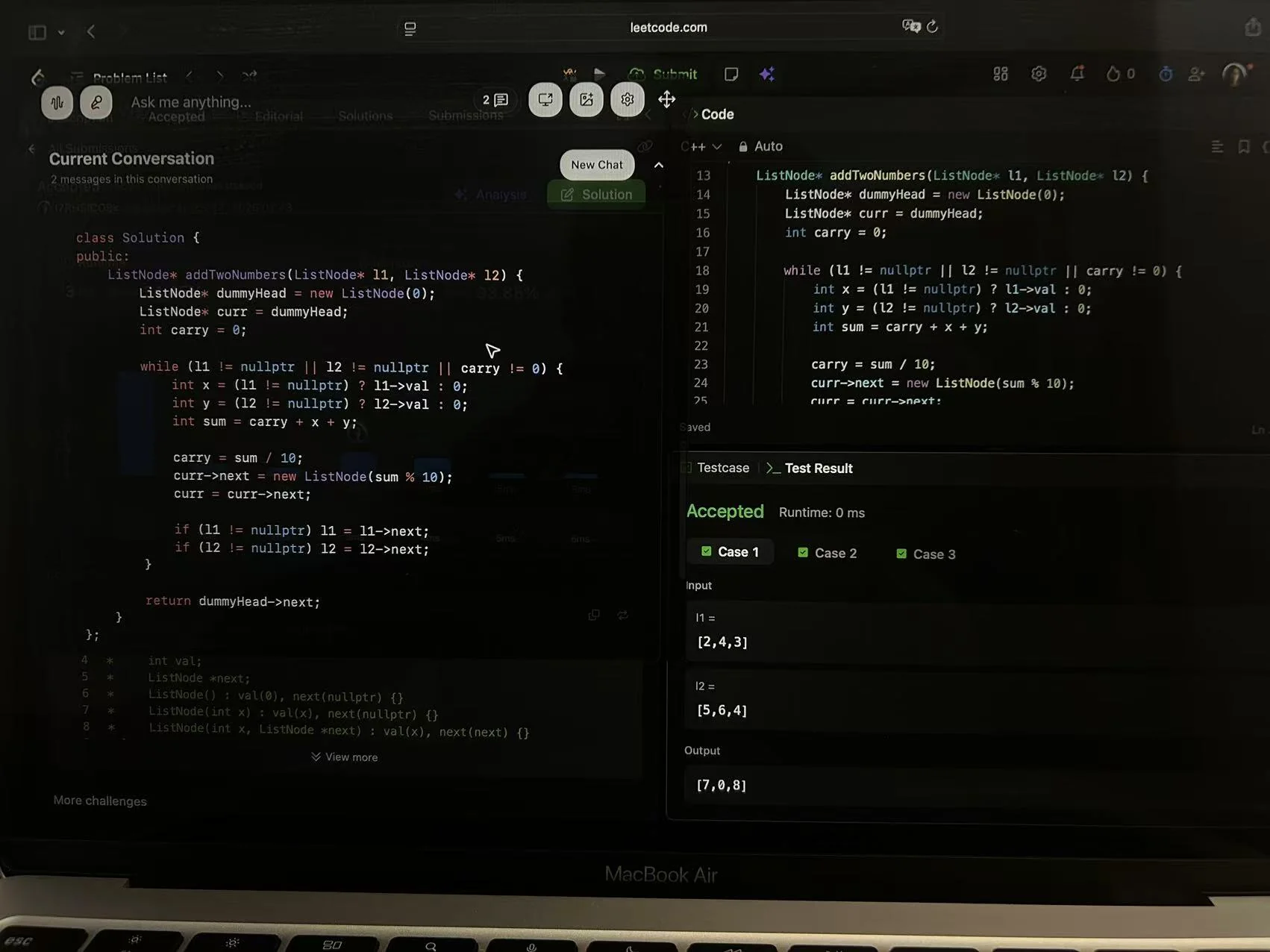
User contribution received October 17, 2026; the actual test date was not recorded. This is the same example used in our Interview Coder comparison. It is not an Emma-run test, a hidden-test pass claim or a matched CTRLpotato comparison. The displayed 0 ms is LeetCode execution time, not AI response latency.
The example shows a concrete output to inspect, while leaving broader reliability unanswered. You can see the input and capture sequence in our Interview Coder alternative comparison, then use the same problem and follow-up constraints when evaluating either product.
Frequently asked questions
Is CTRLpotato free?
The official offer includes ten free AI answers without a card and advertises a Live Coach preview. Continued use requires an appropriate paid plan or pass; do not confuse the separate website answer generator with unlimited desktop access.
Is the $59 Pro price available month to month?
No. It is the monthly equivalent of $177 billed every three months. Pro's monthly billing option is $69 at the prices checked for this review.
Does Lite include phone mirroring or Live Coach?
No. The current pricing page excludes both from Lite. Pro and Sprint list them as included.
Can this review confirm that CTRLpotato works reliably?
It checks the public offer and reviews one user-provided coding explanation. The visible carry trace is correct under the stated assumptions, but this is not a general accuracy benchmark. Response speed, screen-share behavior and reliability on your machine remain unverified. Those are the useful questions to take into a trial.
Sources and review method
Official sources checked October 18, 2026: product and pricing, terms, and privacy policy. The official-site images above are browser captures; the editorial team did not purchase a CTRLpotato account or perform a desktop trial. The article was prepared with AI assistance and source checks. The separately labeled practice protocol is a teaching aid. Two CTRLpotato photographs supplied by a user on October 19, 2026 were added for a limited review of the visible explanation; the test date and environment were not recorded. The SkillCopilotAI photograph is a separate user contribution, not a controlled comparison.
Compare similar tools
Editor selected
Interview Sidekick Review: Pricing, Free Trial, and Alternatives
Interview Sidekick pricing, two-minute free sessions, and a Windows desktop trial: resume accuracy, follow-ups, coding answers, and alternatives.
Editor selected
InterviewMan Review 2026: Hands-On Test, Pricing & Drawbacks
Is InterviewMan worth $30 a month? Our hands-on browser test covers answer quality, technical follow-ups, pricing, limitations, and who should try it.
Editor selected
Cluely AI Review 2026: Features, Pricing, Privacy, and Verdict
Is Cluely worth it? This research-based review examines its live meeting features, current pricing, privacy terms, limitations, and best-fit users.
Same content type
ShadeCoder Review: Pricing, Features & Trial Checks
ShadeCoder review covering paid features, pricing, free-credit limits, and who should try it. Includes an original coding check and clearly stated research limits.
Choose your next step
Compare another tool or move from research into structured interview practice.