

ShadeCoder is worth evaluating if you want a desktop assistant for coding practice and prefer to request help through keyboard shortcuts. Try the free allowance before paying. Its published workflow is relevant to that task, but the public information leaves questions about free-credit renewal, custom prompts, and audio support. Those details matter more than a broad claim that a tool can solve interview questions.
This ShadeCoder review checks official pages on October 22, 2026. It is research-based: we have not run the desktop app, measured answer speed, or tested screen-sharing behavior. SkillCopilotAI, the publisher, develops a competing assistant. The coding exercise below is our original teaching material, with a checked reference solution; it is not ShadeCoder output.
What does ShadeCoder do?
The official website describes a desktop coding-interview copilot with Mac and Windows downloads, global hotkeys, screenshot and diagram interpretation, and structured solutions with follow-up questions. That is the proposed workflow: provide the problem, request assistance, then inspect the explanation and code.
For practice, the useful question is whether it receives the whole problem. A correct-looking answer can still be wrong if a capture omits the required function signature, an input limit, or the sentence defining a boundary case. Check what was captured before judging the solution.
The homepage banner showed version 3.0.3. Its top Windows download pointed to a 3.0.3 installer, while a lower Windows link pointed to 3.0.0. Check the downloaded version rather than assuming every button delivers the same build. We did not install either file.
ShadeCoder pricing: compare the bill and the access period
The current pricing page displayed these US-dollar prices:
| Plan | Listed payment | What to check |
|---|---|---|
| Free | $0; five credits shown | Whether credits renew and what each action consumes |
| Pro Weekly | $39 per week | Renewal date if you only need a short period |
| Pro Monthly | $69 per month | Whether you need more than one week |
| Lifetime | $699 once | Whether the workflow fits before committing |
The vendor describes the three paid options as the same core feature set with different access periods. The paid cards list unlimited credits, access to its advertised advanced coding model, and priority support. Lifetime also lists future updates. These are published entitlements, not features we have performance-tested; the model description does not identify a specific serving model.
The paid cards also list unlimited transcription, but the older terms describe no audio processing. That conflict is explained below. The Free card marks advanced-model access and priority support as excluded, while the FAQ describes signup credits as access to the full experience. Confirm which features those credits unlock in your account.
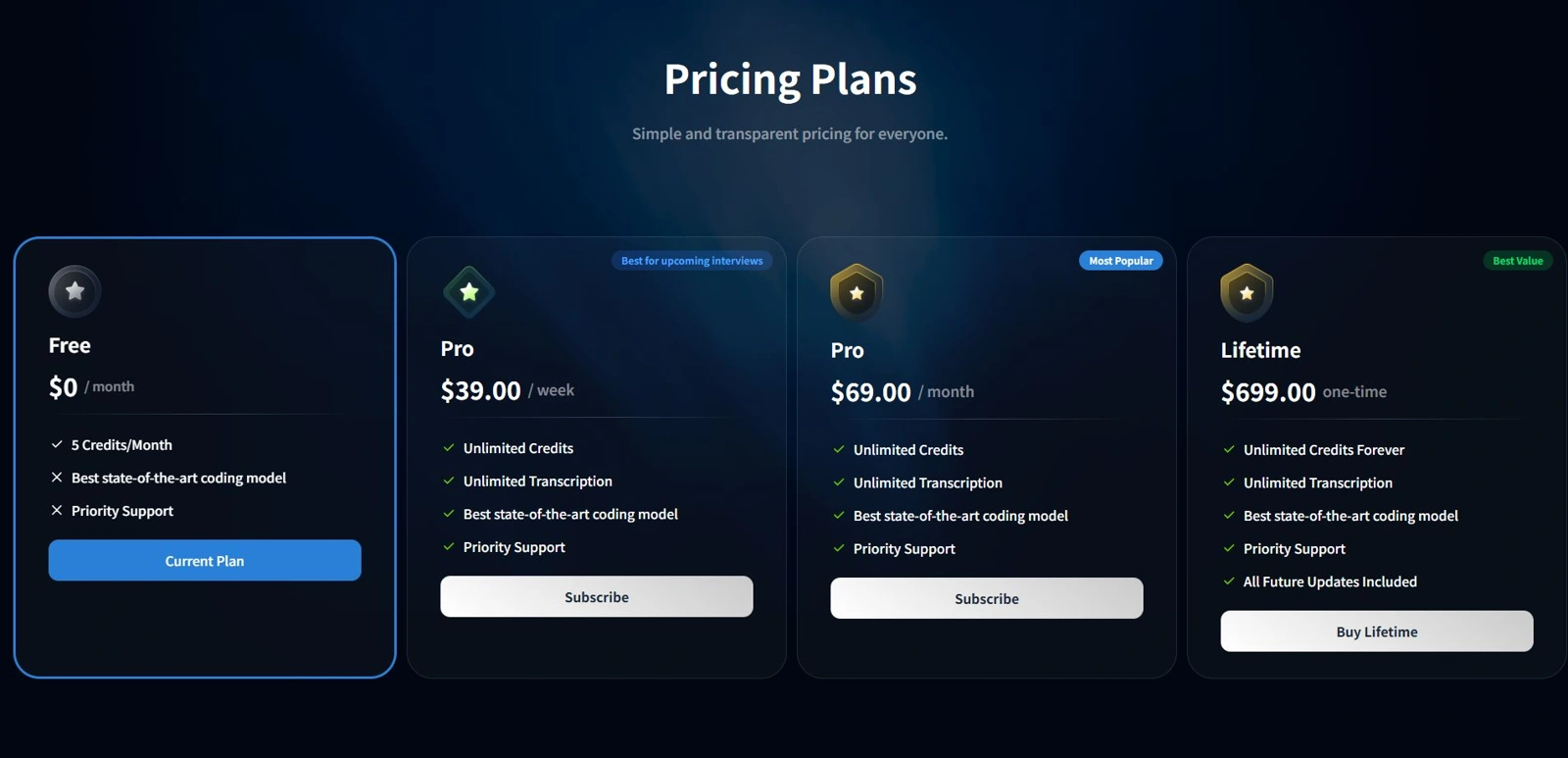
Official pricing screenshot captured October 22, 2026, cropped to the plans without changing their contents. Open the full-page capture. The cover is an AI-generated editorial illustration, separate from this evidence.
Two weekly payments total $78, versus $69 for a month. If you expect to need a second paid week, monthly costs $9 less at these listed rates. Confirm the final amount, access dates, and renewal terms at checkout.
The free card says five credits per month; the FAQ describes five credits on signup and needing a paid plan afterward. It also states a no-refund policy. Confirm renewal and credit consumption before relying on the allowance.
Why do some official details disagree?
The terms page, labeled February 14, 2025, still describes a $29 monthly Pro plan. That differs from today's displayed $69 monthly offer. Do not assume the older figure is available to a new account; ask the vendor to clarify the terms attached to your purchase.
There is a similar documentation gap around audio. The pricing page advertises unlimited transcription on paid plans, while the terms say the service does not process audio. We have not established which description matches the current app. If spoken follow-ups are essential, confirm that workflow separately from screenshot-based coding help.
Who should consider ShadeCoder?
Consider its free entry if you want a coding-focused desktop workflow, are comfortable checking generated code, and can evaluate it on your actual machine. Its documented hotkey and structured-answer approach makes that a reasonable trial question, not a proven performance advantage.
Hold off on paying if persistent prompt customization or spoken follow-up handling is a requirement you have not confirmed. Likewise, do not infer comprehensive behavioral or system-design coverage from a coding demo or a testimonial. Ask for the particular workflow you need.
ShadeCoder markets screen-share invisibility. We have not tested it. The vendor's Basic Checks guide itself recommends checking your device and meeting platform before subscribing. A visibility claim also does not establish permission to use assistance in an assessment; follow that assessment's rules.
Can you change the ShadeCoder prompt?
We could not verify a custom system-prompt editor or its save procedure from the public setup documentation we read. The Getting Started guide mentions programming-language preferences and settings, but does not explain that particular control. This does not establish that the app lacks it.
Changing a preferred programming language, editing the question you supply, and changing a persistent instruction are three different actions. If you are searching for “shade coder prompt change,” first decide which one you need.
For version-specific instructions, contact ShadeCoder support, the address listed on its pricing page. In your installed version, check whether the available control affects just the current question or future answers too. If its scope is unclear, ask support with your version number and operating system. A general article about prompt design is not evidence that a particular menu exists.
An instruction to try in a supported text input
The following is our own practice instruction. Use it only through an input or customization field your version actually provides; it is not a claimed ShadeCoder setting or a tested workaround.
Use Python 3. Preserve the required function signature.
State the input assumptions and explain the approach briefly.
Then provide code, time and space complexity, and three edge cases.
If the task leaves a boundary rule ambiguous, ask before choosing it.
For follow-ups, name the changed requirement and update only what it affects.
Keep the problem unchanged when trying a new instruction. Save the original answer and the revised answer, then compare correctness and explanation separately. A tidier format does not prove better code. If you are testing a persistent preference, check a fresh session as well as the current one.
A coding check you can run before subscribing
Use a problem with an answer you can independently verify. This original exercise has three stages: solve the initial task, change one boundary rule, and debug the resulting mismatch. It is not an employer question or a completed ShadeCoder test. Allowance consumption varies, so do not assume five credits will cover every attempt.
1. Check duplicates and an exact boundary
Give the assistant this complete task:
Implement
window_counts(times, window)in Python 3.timesis a nondecreasing list of integer timestamps, andwindowis a positive integer. For each indexi, count events among indices0throughiwhose timestamps fall in(times[i] - window, times[i]]. Count duplicate events separately. Return an empty list for empty input. Target O(n) time without modifying the input.
For times = [1, 1, 4, 7] and window = 3, the answer is [1, 2, 1, 1]. At timestamp 4, events at timestamp 1 are excluded because the left boundary is open. The second event at timestamp 1 counts the first duplicate and itself; future events are never included.
Open the reference solution and executable checks
Here is our reference solution:
def window_counts(times, window):
    if window <= 0:
        raise ValueError("window must be positive")
    left = 0
    counts = []
    for right, timestamp in enumerate(times):
        while left <= right and times[left] <= timestamp - window:
            left += 1
        counts.append(right - left + 1)
    return counts
Both pointers move forward, so the total work is O(n). The returned list uses O(n) space; auxiliary space excluding that result is O(1). The sorted-input assumption is essential.
Run these checks on the assistant's function, not just on the reference:
assert window_counts([], 3) == []
assert window_counts([1, 1, 4, 7], 3) == [1, 2, 1, 1]
assert window_counts([5, 5, 5], 1) == [1, 2, 3]
assert window_counts([-2, -1, 0], 2) == [1, 2, 2]
An answer that counts only unique timestamps fails the duplicate case. An answer that repeatedly scans every previous event may get the values right while missing the requested complexity.
2. Change the requirement without changing the example
Now ask:
Make the left boundary inclusive: use
[times[i] - window, times[i]]. Keep the other requirements. Explain the smallest code change and recalculate the example.
The removal condition changes from <= to <. The expected example becomes [1, 2, 3, 2]. Look for agreement between the revised code, explanation, and output. Leaving any one of them on the old rule is a useful failure to record.
3. Ask for a diagnosis
Supply the old <= implementation while requesting the inclusive interval. Explain that the result should be [1, 2, 3, 2] but remains [1, 2, 1, 1]. Ask for the cause and a minimal patch.
A useful diagnosis identifies the exact-boundary comparison and verifies the fix. Merely returning different code gives you less evidence that the assistant understood the bug.
How the reference was checked and what to record
For this article, our reference implementations were checked against an independent prefix-scanning solution across 17,160 combinations of sorted timestamps, window sizes, and boundary modes. That validates this teaching fixture within the checked domain. It does not measure ShadeCoder accuracy.
Keep a short record
| Check | What to record |
|---|---|
| Setup | App version, OS, plan, and any visible model label |
| Input | Complete question and instruction actually supplied |
| Initial answer | Unedited output, execution result, and failed assertion |
| Follow-up | Whether code, example, and explanation all adopt the new rule |
| Usability | Capture corrections and manual actions needed to finish |
This gives you a reason to subscribe—or a specific reason to keep looking. You can reuse the same task with another assistant. Keep the conditions comparable, and treat a visible model name as a UI label unless the serving model is independently confirmed.
When to compare SkillCopilotAI
SkillCopilotAI's coding workflow describes help with problem breakdowns, debugging, and explanations. If those are your priorities, run the same original task and follow-up in its trial, rather than comparing one product's marketing with another product's output. We have not performed that matched comparison here and do not name an accuracy or speed winner.
Our copilot selection guide helps organize a broader evaluation; Interview Coder alternatives covers another coding-tool choice.
Remaining questions
Is ShadeCoder free?
There is a free entry, but its published credit descriptions differ. See the pricing discussion above and verify the allowance shown in your account. A free download does not imply unlimited answers.
Does ShadeCoder produce correct coding answers?
We have not measured its accuracy. Use executable checks, an exact-boundary example, and a changed requirement to inspect your own results. Passing one exercise does not establish general reliability.
Should you buy lifetime access immediately?
We would first verify the workflow and features you need with the available trial. A long access period has little value if the input method or answer behavior does not suit your practice.
Sources and review method
Official sources checked October 22, 2026: product and downloads, pricing and free-access FAQ, Getting Started, Basic Checks, and terms. SkillCopilotAI's trial details and supported installers were checked separately.
This article was prepared with AI assistance and public-source checks. Emma's byline denotes article editing and website operations, not a claim that Emma ran a desktop test. The screenshot records the public offer; the original coding fixture provides a reproducible practice method. Product accuracy, response latency, audio behavior, prompt persistence, and screen-sharing compatibility remain untested in this review.
Compare similar tools
Editor selected
CtrlPotato Review: Pricing, Free Trial, and Who It Fits
CTRLpotato review with user-provided coding output, pricing, trial limits, and Lite vs Pro differences. See what the evidence supports before subscribing.
Editor selected
Interview Sidekick Review: Pricing, Free Trial, and Alternatives
Interview Sidekick pricing, two-minute free sessions, and a Windows desktop trial: resume accuracy, follow-ups, coding answers, and alternatives.
Editor selected
InterviewMan Review 2026: Hands-On Test, Pricing & Drawbacks
Is InterviewMan worth $30 a month? Our hands-on browser test covers answer quality, technical follow-ups, pricing, limitations, and who should try it.
Same content type
LockedIn AI Alternative
Choose a LockedIn AI alternative by free access, coding workflow, renewal price, and switching effort, with dated tests and a practical migration checklist.
Choose your next step
Compare another tool or move from research into structured interview practice.