

InterviewMan was useful for turning supplied project notes into an answer outline in our browser trial. Its main drawback was factual control: it added project actions we had not supplied, and a technical follow-up presented a proposed design as completed experience. We would try it for preparation in a subject we can verify, rather than depend on its answers in an unfamiliar technical topic.
Disclosure: SkillCopilotAI publishes this review and develops a competing interview assistant. InterviewMan did not pay for, review, or approve it. The browser findings below come from our September 7, 2026 trial. An October 19 desktop audio check is documented separately with a user-provided result photograph.
| Reader question | What our test supports |
|---|---|
| Who might find it useful? | Someone with true project notes who wants a structured draft and can check added details. |
| What was the main problem? | Unsupported additions to the project story and unjustified certainty in a technical design answer. |
| What did we test? | Four typed prompts in Chrome on Windows: one project answer, one cache-design question, and two follow-ups. A separate brief check showed transcription activity. On October 19, one synthetic spoken question also produced a visible desktop transcript and answer. |
| What remains unverified? | Spoken follow-ups, sustained sessions, headset versus speaker behavior, combined audio and screenshot use, response latency, and visibility claims. The desktop audio check covered one prompt only. |
| What did it cost? | We used the account's remaining free minutes. The trial screen showed $30 monthly or $144 annually; those are September 7 observations, not a fresh checkout quote. |
The project reply retained the supplied 18-to-3-second improvement and individual-contributor role. The technical replies exposed why an outline still needs review. See the original project output and final technical follow-up, with the input and interpretation below.
We finished the trial without subscribing. A short paid period would be easier to evaluate than an annual commitment, but the recorded trial does not establish that InterviewMan fits a complete live-call workflow.
Our first session: an upgrade screen, but no purchase required
We used the browser app on Windows with an account that was already signed in. InterviewMan also offers desktop and mobile downloads, but we stayed in Chrome for this trial.
The home screen showed 20 minutes remaining. Clicking Start Interview brought up the paid plans before we reached the assistant. Fortunately, the page also had a Continue with 20 min option. We used it, chose Standard Mode, and continued without subscribing. We liked being able to inspect an actual answer before making a payment decision.
For the questions, we had entered a backend-engineer role and a short practice profile in Settings. We kept the fictional project simple: a PostgreSQL report improved from 18 to 3 seconds on synthetic data. The person was an individual contributor, not a manager. We also asked InterviewMan not to invent employers, revenue, or team size. That gave us a few concrete facts to look for in the answer.
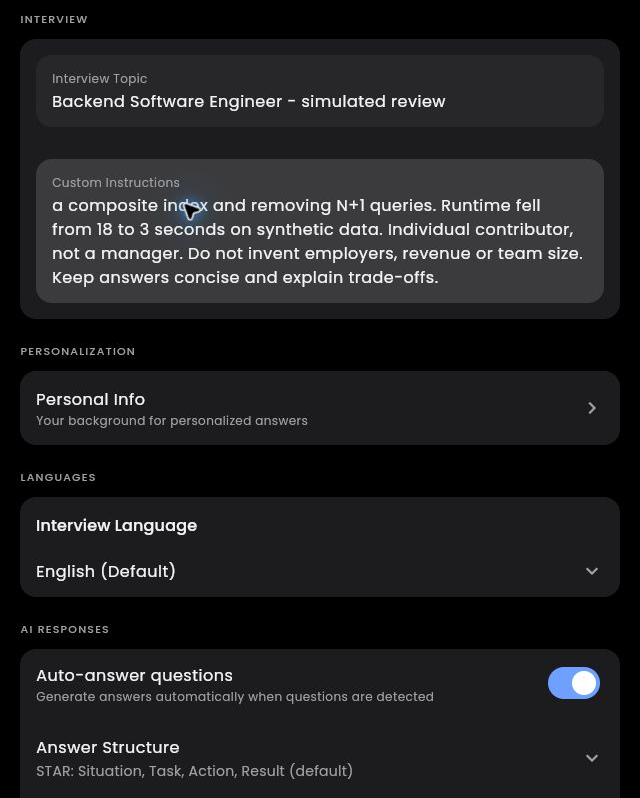
Our trial setup. The instructions field is scrolled within a longer practice profile.
The custom-instructions field was useful here. We could supply the project, our intended role, and restrictions in one place instead of working with a job title alone. It still took some preparation on our side, but we preferred that to getting an answer with no personal context.
We left the displayed STAR and bullet-point settings in place and submitted our questions through Custom Input. Automatic answers were enabled in Settings, although we used typed questions for the four-answer test.
We liked the project outline more than the finished wording
We asked InterviewMan to explain the reporting project: what changed, what the result was, and whether the person managed a team. It returned four labeled STAR sections, preserving the improvement from 18 to 3 seconds and the individual-contributor role.
This was the most immediately useful output in our session. The labels made it easy to find the problem, the work, and the result. We had supplied the facts; InterviewMan had done the organizing. As a starting point for rehearsal, that was a better result than another loose paragraph of notes.
Reading it more closely changed our assessment. InterviewMan had added execution-plan analysis, sequential scans, and other implementation steps we had not supplied. None looked obviously out of place in a database project, which made the additions easy to overlook. But they were still additions.
We would keep this outline. We would not read the answer aloud unchanged. It gave us a useful draft, with a fact-checking pass still left to do. That is a fair trade for organizing familiar material; it is less reassuring if the reason for opening the assistant is that we do not know what to say.
View the project answer from our trial.
The short outline was easy to scan; the technical replies took more reading
The four-part project answer was straightforward to scan in the browser. With the technical replies, we had more to work through: a diagram, design choices, and qualifications spread across several bullets. Earlier output and new questions also shared the answer view as the conversation grew.
Keeping the earlier material in view helped us compare the replies. Still, the longer responses felt more useful as material to read and work through than as a short cue for what to say next. Our preference after inspecting them was to take the structure and put the useful points into our own words.
Custom Input gave us a direct way to continue the exchange. Assist, Think, and Screenshot were visible alongside it, but the typed-question route was the one we used throughout this answer test.
Two follow-ups showed us where the help stopped
For the technical question, we asked how to design a product-price cache and prevent it from serving old data. The first reply looked promising as an outline. It covered database updates, invalidation, and version checks—enough to get a discussion started.
Then we reached a number we could not account for: it said stale data would typically last less than 100 milliseconds. We had not supplied measurements or assumptions that supported that figure.
“…typically under 100 milliseconds.”
This was a claim inside its generated design, not a response-speed measurement.
We challenged it with a 30-second update delay. InterviewMan acknowledged that its earlier timing expectation would no longer hold. We liked that response: it followed the changed scenario and revised the claim instead of repeating its original answer.
But we still had to point out another missing case and suggest the kind of safeguard to discuss. The next reply used the STAR format we had left selected in Settings, so the format itself was not surprising. The problem was what InterviewMan put inside it: the proposed mechanism became something already implemented in our fictional project.
Action: “Implemented a durable tombstone mechanism…”
Result: “Ensured strict linearizability…”
We had asked for a design explanation. We had not said the person in our profile had built this mechanism, and the reply had not fully justified its strong guarantee. The wording sounded like a finished project story when we were still trying to establish whether the design worked.
We could keep the conversation going, but we were doing the quality control. That changed how we would use InterviewMan. We were comfortable taking an outline and challenging it in a subject we could evaluate. The same exchange did not give us confidence that it could guide us safely through a subject we did not understand.
View the initial cache answer or the final follow-up answer.
One simulated audio question produced a transcript and answer
On October 19, 2026, we generated an English practice question with Windows text-to-speech using Microsoft Zira Desktop at rate -1 and played it on the user's computer. The user had InterviewMan's Windows desktop client open and supplied the result photograph below. Automated window capture did not succeed, so the visible transcript and answer are documented through that user-provided image. The client's version, model, selected audio device, and capture route were not recorded for this run.
The exact synthetic prompt was:
This is a fictional practice interview. In a practice project, a report took eighteen seconds. After your changes, it took three seconds on synthetic data. You were an individual contributor. How would you verify the improvement? Please separate the facts provided from any implementation steps you would suggest.
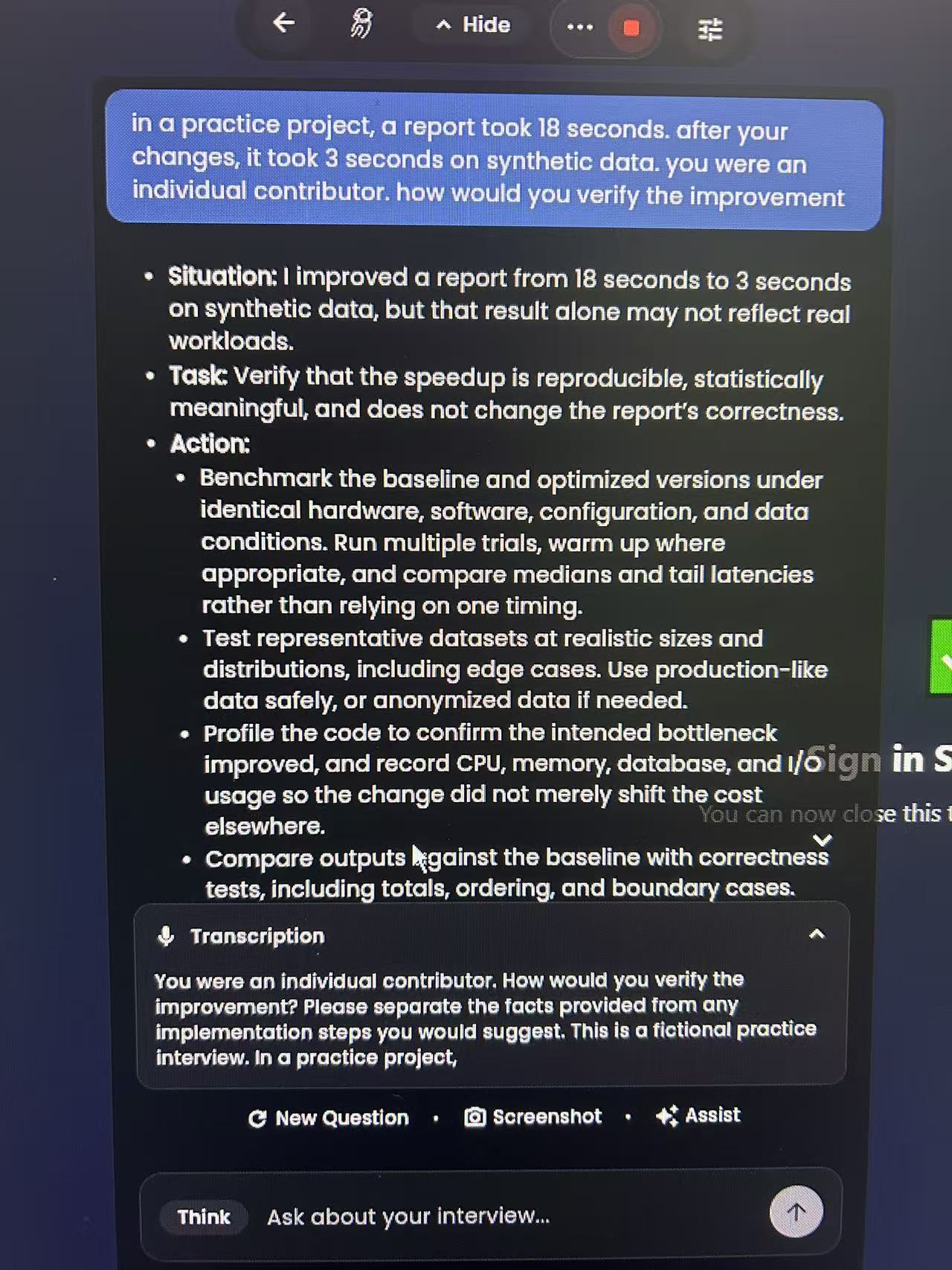
User-provided result photograph, received October 19, 2026 after playback of the synthetic question. It shows a captured question, part of the answer, and the transcription panel. The answer extends beyond the visible area; this is not a recording of a real hiring interview.
The question bubble preserves the key facts: eighteen seconds, three seconds, synthetic data, and an individual contributor. The visible answer proposes a sensible verification approach: compare versions under matched conditions, repeat measurements, check representative data, inspect resource use, and compare output correctness. It also explicitly warns that synthetic-data results may not reflect real workloads.
| Observation | What it supports in this run |
|---|---|
| Core numbers and context appear in the question | The main performance scenario reached the application. |
| A relevant answer appears below it | The audio input was followed by an answer addressing verification. |
| The final instruction appears in the transcription panel but not the question bubble | The photograph does not establish whether the whole instruction was included in the answer request. |
| The response uses STAR headings | It organizes the response, but the visible portion does not explicitly separate supplied facts from proposed steps. |
The transcription panel shows the end of the question followed by the introductory wording. A single photograph cannot establish whether this reflects a rolling transcript, repeated capture, or another display behavior. We have not assigned a transcription error rate from that partial view.
This run adds evidence of desktop audio input leading to a relevant answer. It does not establish response latency, speaker-versus-headset compatibility, repeated-session reliability, or performance with accents and background noise. No spoken follow-up or audio-plus-screenshot test was completed. We did not measure an accuracy percentage or make a stability claim.
The September browser observation remains separate: that version's home screen described device-microphone capture and warned about headphones. We did not establish the capture route used in the October desktop check, so the two observations should not be treated as a device comparison.
Would we pay? A month makes more sense to us than a year
The upgrade screen showed $30 billed monthly or $144 billed annually, advertised as $12 per month. Paid plans listed unlimited minutes and session duration. Our account's remaining free minutes were sufficient to complete the four text prompts without buying a plan; the 20-minute balance we saw is not a promise of the same allowance for every user.
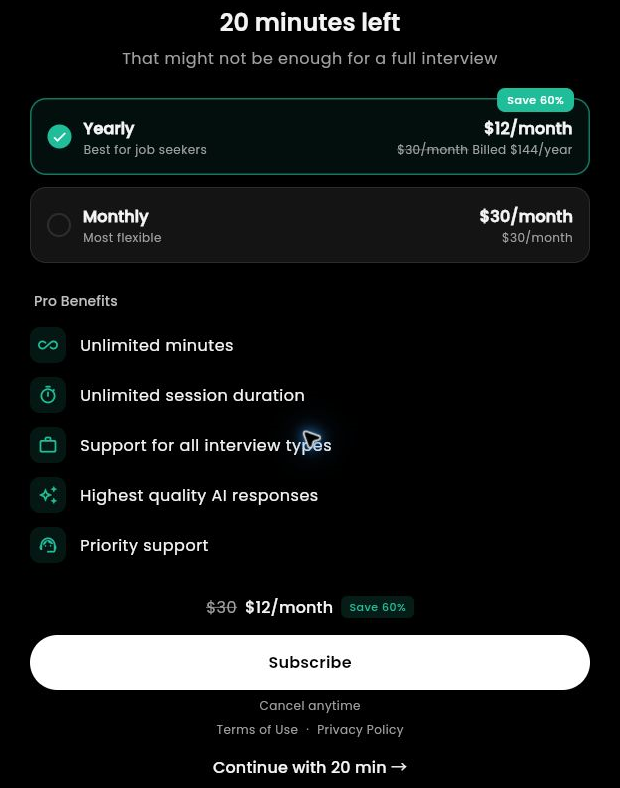
The upgrade options shown during our September 7 trial. We continued with the free allowance.
For a two-month search, monthly payments total $60, compared with $144 upfront for the year. Five monthly payments total $150. On those listed prices, annual billing becomes cheaper at the fifth paid month, before taxes or discounts.
We liked the simplicity of unlimited minutes on the paid plans. But our trial had not yet made a year of use an obvious choice. The benefit we saw was a structured draft, with editing still needed. If we were paying for a short period of preparation, we would rather spend $30 on a month than commit $144 for the lower advertised monthly equivalent.
Who we would recommend trying InterviewMan to
InterviewMan made the most sense to us for someone who knows their own projects but wants help turning notes into a clearer answer. A technically experienced user may also get value from using it as a second starting point, provided they are willing to challenge the reasoning.
We would be more cautious if the main goal were to solve questions outside our knowledge or depend on an untested live audio-and-screenshot workflow. For a short job search, the free allowance and then a monthly plan provide a lower-commitment way to decide whether the editing work is worthwhile.
Comparing the workflow with SkillCopilotAI
Both InterviewMan and SkillCopilotAI offer desktop applications. Our September InterviewMan trial used its browser app; the October audio check used its Windows desktop client. These are the channels we tested, rather than evidence that desktop access distinguishes the products.
For a useful comparison, check how each product uses your resume and role context, captures the full coding question, and handles a follow-up without adding unsupported personal details. SkillCopilotAI's AI interview assistant describes its approach to those tasks; the InterviewMan observations above show the limited cases we actually checked.
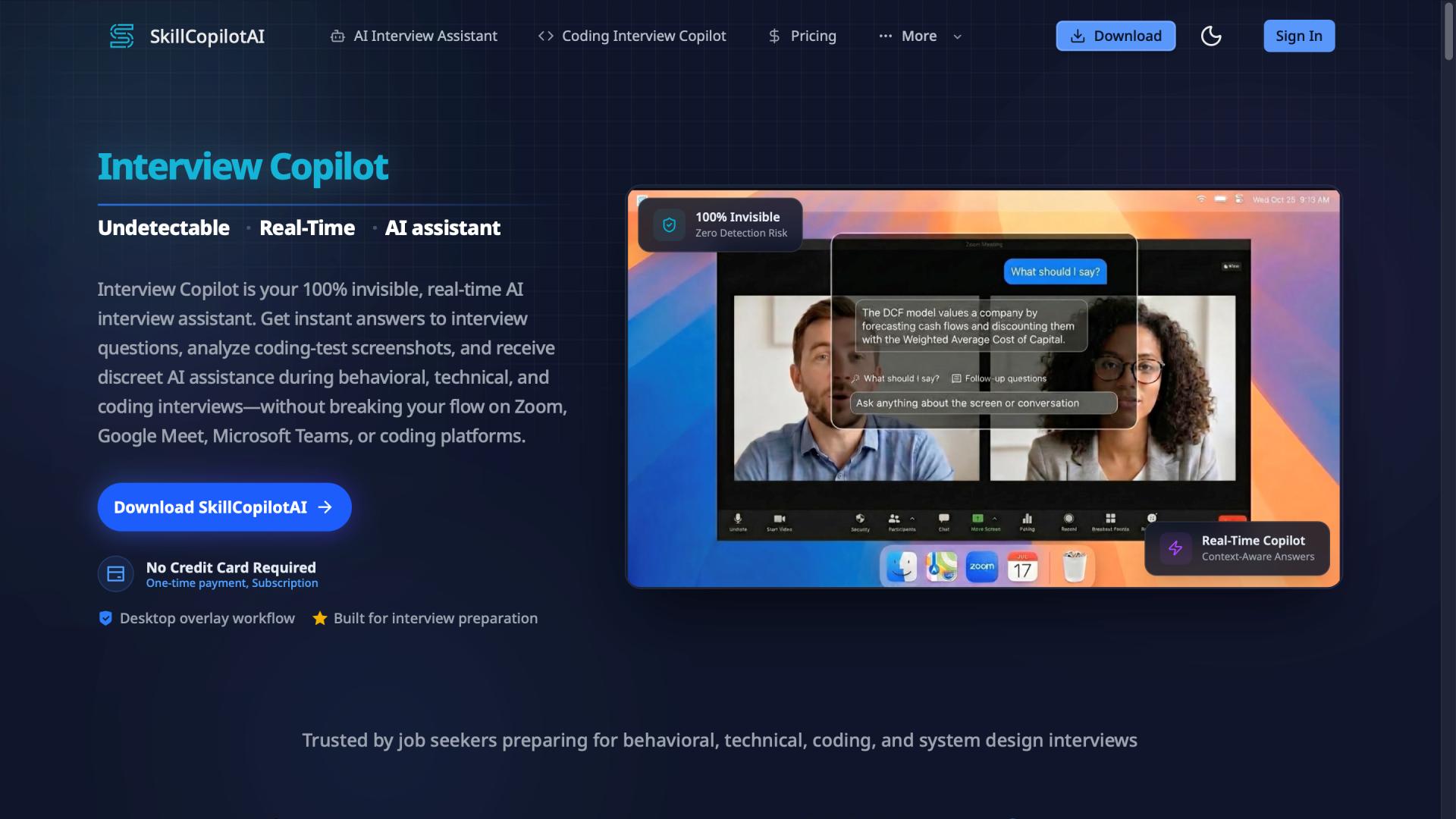
SkillCopilotAI website overview, included to show the product's intended workflow.
We have not tested both products with the same inputs, settings, and audio setup. The SkillCopilotAI illustration shows its intended workflow, not a measured advantage over InterviewMan. Compare context handling, answer fidelity, capture controls, and billing against your own preparation needs; this review does not establish a speed or answer-quality winner.
You can inspect the desktop option on our download page and compare its plans. We also tested another browser-based product in our Parakeet AI review.
Is InterviewMan worth it?
We came away liking InterviewMan most when it organized facts we had already supplied. The technical exchange answered our follow-ups and revised one assumption, but by the final reply it was describing proposed work as completed experience. That left us treating the output as an editable draft rather than a finished answer.
We would consider a paid month for answer preparation; we would not buy the annual plan on the strength of this trial. InterviewMan gave us a useful starting point, but it did not take over the judgment. Whether that is worth $30 depends on how much help someone needs with organizing their own material.
InterviewMan FAQ
For a second example of how interview assistants handle supplied experience, our Interview Sidekick review includes a separate desktop project-answer test and coding follow-ups. The products were not tested head to head.
Can I try InterviewMan without purchasing a plan?
We did. The upgrade page offered a way to continue with the minutes remaining on our account. Check your current allowance and trial conditions before planning a session.
Does InterviewMan use my project background?
In our trial, it retained the supplied improvement figures and individual-contributor role. It also added actions we had not provided. Treat the result as an editable draft of your experience.
Can InterviewMan handle technical follow-ups?
It responded to both of ours and revised one earlier assumption. The final response still made claims we could not accept as written. It was useful for continuing a discussion we could evaluate, not a substitute for understanding the topic.
Is InterviewMan undetectable?
We did not test that claim. Compatibility depends on the app, operating system, sharing mode, and assessment environment. A visibility claim does not establish permission to use assistance.
For a screenshot-based coding example and a comparison of billing commitments, see our Interview Coder alternative comparison.
About this review
Emma prepared this review from our September 7, 2026 browser trial, version 2.7.0 (187), and public documentation. We used a fictional backend-engineer profile and completed one project question, one technical question, and two technical follow-ups. A separate brief browser connection check confirmed transcription activity. For that September trial, we did not purchase a plan or test the desktop app. On October 19, a synthetic spoken question was played on the user's computer, and a user-provided photograph documented a desktop transcript and answer. We did not benchmark response time or complete a controlled audio-and-screenshot workflow test.
The setup and pricing images are our September trial captures. The October desktop audio result is a separately attributed user-provided photograph. Linked answer screenshots preserve the recorded text; unrelated floating browser icons were removed from blank areas. The cover is an editorial illustration. InterviewMan did not sponsor or approve this review.
Official references reviewed September 6; the displayed in-app prices were also checked September 7:
Editorial update October 19, 2026: moved the trial findings and competing-product disclosure to the opening, retained the original answer images, and added one synthetic desktop-audio observation with a user-provided result photograph. No new price verification or accuracy, latency, or stability benchmark was performed.
Compare similar tools
Editor selected
Parakeet AI Review 2026: Pricing, Pros, Cons & Verdict
Parakeet AI review covering pricing, credits, live interview features, limitations, and a sourced comparison with SkillCopilotAI to help you choose.
Editor selected
Cluely AI Review 2026: Features, Pricing, Privacy, and Verdict
Is Cluely worth it? This research-based review examines its live meeting features, current pricing, privacy terms, limitations, and best-fit users.
Same content type
CtrlPotato Review: Pricing, Free Trial, and Who It Fits
CTRLpotato review with user-provided coding output, pricing, trial limits, and Lite vs Pro differences. See what the evidence supports before subscribing.
Useful next step
Netflix Layoffs: October 2026 Facts and Interview Preparation
What we know about the October 2026 Netflix layoffs, with practical examples for explaining a layoff and preparing for your next job interview.
Choose your next step
Compare another tool or move from research into structured interview practice.