


Cluely is useful when you want live help during a meeting and everyone involved is comfortable with that help being present. It can listen to a conversation, suggest answers, and produce notes without adding a visible bot to the call. That combination makes the free plan worth testing for routine, low-risk meetings.
The harder question is whether Cluely is appropriate for interviews, sales calls, or confidential discussions. Its marketing leans heavily on being “undetectable,” yet its own documentation describes compatibility limits. More importantly, its current privacy policy and Free/Pro terms appear to say different things about using customer data for model training. Those issues keep this from being an unqualified recommendation.
This is a research-based review, not a hands-on product test. We checked Cluely's official product pages, pricing, documentation, privacy policy, and terms on August 1, 2026, then compared those claims with independent reporting. Features and prices can change, so verify the checkout page and policies before paying.
Cluely review: the short verdict
| Question | Answer |
|---|---|
| What is Cluely? | A desktop and mobile AI meeting assistant that can listen, use screen context, suggest responses, and create notes. |
| Best for | People who want transparent, consented assistance during frequent online meetings. |
| Main strength | Real-time help during a call instead of only a transcript afterward. |
| Main weakness | Live suggestions can be distracting or generic, and “undetectable” behavior depends on the setup. |
| Free plan | Yes. Starter includes limited AI responses and limited meeting notetaking. |
| Paid plans | Pro is $19.99 per month; Pro + Undetectability is $149.99 per month on the monthly pricing page. |
| Privacy verdict | Read both the privacy policy and terms before using sensitive data; their model-training statements currently appear inconsistent. |
| Overall verdict | Worth a careful free trial for permitted meeting assistance, but not a sensible shortcut for covert use in high-stakes situations. |
What is Cluely?
Cluely is an AI assistant designed to help while a conversation is happening. The desktop app listens to meeting audio, considers on-screen context, and can generate a response when the user asks for help. It also creates notes and lets users ask questions about previous meetings.
That puts Cluely in a different category from a conventional meeting recorder that mainly summarizes a call after it ends. It is also different from a practice-first AI interview assistant, where the goal is to rehearse answers before a real interview. Cluely's main value proposition is immediate support inside the live event.
The company's current positioning is broader than its early “cheat on everything” reputation. Its website now emphasizes meetings, sales conversations, classes, and everyday questions. The old controversy still matters because it explains why the product's invisibility claims receive so much attention, but the practical question today is simpler: does live assistance improve the conversation enough to justify the distraction, privacy exposure, and policy risk?
How Cluely works
Real-time answers
Cluely's Live Insights documentation describes a session-based workflow. The app listens during a call, uses available context, and generates help when the user presses a keyboard shortcut. This can be useful when someone needs to recall a product detail, organize a multi-part answer, or turn a messy discussion into a concise next step.
The output still needs human judgment. A fast response is not automatically a good response, and reading a generated answer word for word can make a speaker sound detached from the conversation. The best use is as a quiet prompt: take the useful idea, then answer in your own language.
Meeting notes and history
Cluely can produce notes and preserve meeting context for later questions. This is the least controversial part of the product and probably the most broadly useful. People who spend much of the day in online meetings can use a searchable record to recover decisions, action items, and details that would otherwise be buried in handwritten notes.
The official pricing page says the free Starter plan limits meeting notetaking, while Pro makes it unlimited. That makes the free tier a realistic way to test transcription quality and the review workflow before committing to a subscription.

AI-generated illustration; not a Cluely product screenshot or test result.
Screen and file context
Users can customize instructions and upload files, allowing the assistant to work with more than the spoken conversation. Screen context can also help it understand the application or document being discussed. That may improve relevance for demos, sales calls, and technical conversations.
It also raises the sensitivity of the data involved. A meeting may contain customer names, internal metrics, source code, health information, or an employer's confidential material. The fact that software can process that context does not mean a user has permission to send it to an outside service.
No meeting bot
Cluely says it works without adding a bot participant to the call. That can reduce the friction and clutter associated with bot-based notetakers. It should not be confused with consent, however. A tool can be absent from the participant list while still processing other people's audio and information.
Cluely pricing in 2026
Cluely's official monthly pricing page listed three desktop tiers when checked on August 1, 2026:
| Plan | Price | What the public page includes |
|---|---|---|
| Starter | Free | Limited AI responses, limited meeting notetaking, instruction customization, up to three file uploads, and questions about past meetings |
| Pro | $19.99/month | Unlimited AI responses, unlimited meeting notetaking, unlimited access to current AI models, unlimited files and customization, and priority support |
| Pro + Undetectability | $149.99/month | Everything in Pro plus hiding from meeting screen-sharing software |
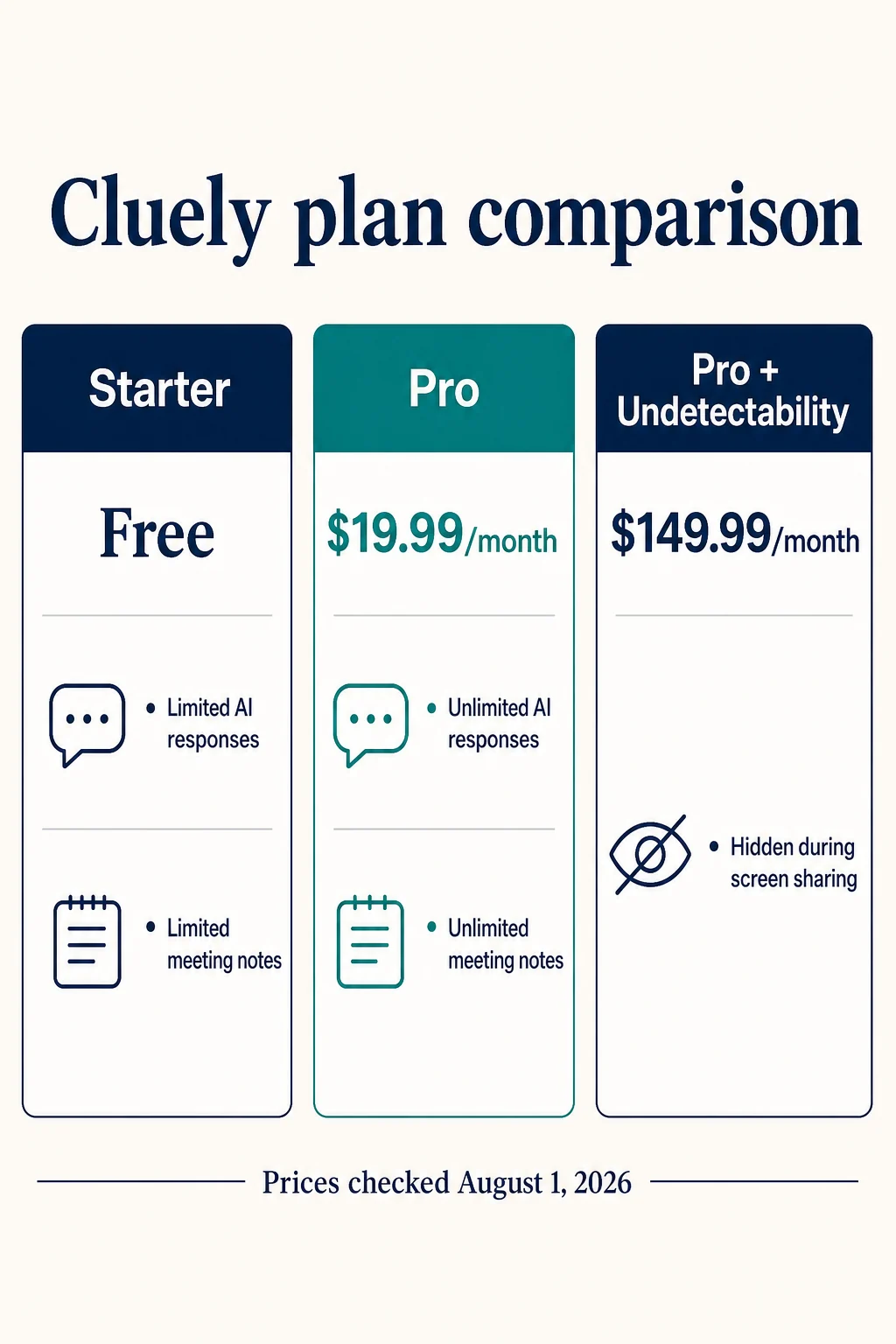
AI-generated editorial infographic based on Cluely's official pricing page, checked August 1, 2026.
The pricing decision is fairly straightforward at the lower end. Starter is appropriate for testing whether live prompts and notes fit your attention style. Pro may be reasonable for someone who uses the product in frequent meetings and regularly reaches the free limits.
The $149.99 tier needs a much higher bar. It costs $130 more per month than Pro for one central benefit: screen-share invisibility. Before paying, confirm that the feature works with your operating system, device, meeting platform, and screen-sharing mode. Also ask whether invisibility is actually necessary. For a disclosed and permitted assistant, it may offer little practical value.
Annual pricing, promotions, taxes, and mobile plans may differ from the monthly desktop view. Treat the figures above as a dated snapshot, not a permanent promise.
Is Cluely really undetectable?
Cluely's pricing page says the highest tier is hidden from meeting screen-sharing software. Its homepage uses even broader invisibility language. The company's documentation is more qualified.
The Live Insights documentation says the app may not be invisible in some full-screen meeting configurations and lists limitations affecting Windows 10, Windows 11 Home, and Apple devices made before 2020. It also notes that the app can remain visible in places such as the taskbar or Activity Monitor.
This does not mean the feature never works. It means “undetectable” is conditional, not an absolute guarantee. Software updates, capture methods, device management, and meeting-platform changes can all affect visibility. Test the exact setup in a low-stakes call before relying on it, and do not treat technical concealment as permission to break a workplace, school, or interview rule.
What Cluely appears to do well
It helps during the meeting, not only afterward
Most notetakers are retrospective. Cluely's live response layer can be more useful when the challenge is finding the right detail or structure while speaking. For someone handling a complex demo or a long sequence of customer questions, that is a meaningful distinction.
The free plan lowers the cost of evaluation
You do not have to judge the product from a polished landing page. Starter lets you test response relevance, transcription, latency, and note quality with your own accent, microphone, device, and meeting platform.
It combines several tools in one workflow
Real-time assistance, uploaded context, meeting notes, and searchable history would otherwise require several products or browser tabs. Keeping them in one desktop workflow can reduce setup time.
It avoids a visible meeting bot
Some teams dislike bots joining every meeting. A local desktop interface can feel less intrusive, especially for personal notes, provided participants and the organization permit the processing.
Where Cluely can fall short
Live suggestions compete for attention
Listening, thinking, reading a generated prompt, checking its accuracy, and maintaining eye contact all happen at once. That extra cognitive load can make a conversation worse even when the suggestion itself is correct.
An independent Atlantic account of testing Cluely reported that suggestions were often generic and that the timing could distract from the interaction. That is one reviewer's experience rather than a universal benchmark, but it matches a predictable usability risk: a second stream of words can interrupt active listening.

AI-generated illustration; not a Cluely product screenshot or test result.
Generated answers can sound generic
Context files and custom instructions may improve relevance, but they cannot guarantee authenticity. In an interview or client call, a plausible answer that does not match your real experience is more dangerous than a short honest answer. Follow-up questions quickly reveal whether the speaker understands the material.
Compatibility claims require testing
Cluely's download page publishes operating-system and hardware requirements, while the feature documentation describes additional visibility limitations. A supported operating system is not the same as guaranteed behavior in every capture mode. Test audio routing, keyboard shortcuts, full-screen sharing, multiple monitors, and device performance before an important call.
The premium tier is expensive for a narrow benefit
At $149.99 per month, Pro + Undetectability costs more than many full productivity suites. The value depends almost entirely on a concealment feature that has documented conditions. Users who mainly want notes or occasional prompts will find much better value in Starter or Pro.
Cluely privacy: the policy conflict to understand
Cluely's privacy policy says the company does not sell user data or train on user data. The same policy describes collecting information that can include audio recordings, transcripts, screenshots, account details, payment information, and usage data, and it says service providers may help process that information.
The current Terms of Service create an important complication. The Free and Pro terms grant Cluely and its subprocessors permission to use Customer Data to train models, while the Enterprise section says customer data is not used for training unless an order form states otherwise.
Those two public statements appear inconsistent. We cannot determine from the pages alone which wording controls a specific account, whether a technical setting changes the answer, or whether one document has not been updated. For sensitive use, ask Cluely support for a written explanation that covers your plan, data types, retention, deletion, subprocessors, and model-training status before uploading real material.
Practical precautions include:
- Use fictional or low-sensitivity content for the first test.
- Remove unnecessary identifiers from uploaded files.
- Do not expose confidential employer, customer, medical, financial, or source-code data without authorization.
- Check whether encryption settings require a support request and what those settings actually cover.
- Review the current terms again whenever the app or plan changes.
Cluely's terms also place responsibility on the customer to ensure they have the legal right to transfer data to the service. This review is not legal advice, but the operational rule is sensible: obtain required participant and employer permission before processing someone else's conversation.
Should you use Cluely in a job interview?
Only when the assistance is explicitly allowed or appropriately disclosed. Secretly using live answer generation in an interview that prohibits outside help can misrepresent a candidate's ability and violate the interviewer's rules. Recording or processing another person's audio may create additional consent and privacy obligations.
There are safer ways to use AI in a job search:
- rehearse common questions with a mock interview tool;
- prepare real examples from your experience using the STAR structure;
- practice explaining solutions with a coding interview copilot;
- study role-specific interview question guides; and
- use live tools only for an agreed accessibility accommodation, permitted notes, or another clearly authorized purpose.
If your goal is stronger independent performance, start with practice rather than concealment. Our guide to the best AI interview practice tools compares products designed for rehearsal. You can also compare this review with our research-based Parakeet AI review, which examines another live-assistance workflow. For a concrete example of the independent judgment a demanding hiring loop evaluates, use the Stripe software engineer interview guide.
Who should consider Cluely?
Cluely is most likely to be useful if you:
- attend many online meetings and want help during the call;
- value notes and searchable history as much as live answers;
- are willing to test suggestions instead of reading them blindly;
- can obtain the necessary permission for audio and screen processing; and
- will avoid uploading sensitive material until the policy questions are resolved.
It is a poor fit if you:
- want a guaranteed invisible overlay on every device and meeting platform;
- plan to use it covertly in interviews, exams, or regulated conversations;
- need verified assurances that Free or Pro data is never used for training;
- struggle to divide attention between a conversation and on-screen prompts; or
- only need post-meeting transcripts and can use a simpler notetaker.
Cluely alternatives by use case
There is no single “best” alternative because Cluely combines several jobs.
| Your main need | Better category to compare |
|---|---|
| Transparent meeting transcripts and summaries | Bot-based or consent-forward AI notetaker |
| Private personal notes without live answer generation | Local or manual note-taking workflow |
| Interview preparation | Mock interview platform with feedback and repeatable practice |
| Coding interview preparation | Coding practice tool that asks follow-up questions and explains tradeoffs |
| Human communication improvement | Manager, coach, mentor, or peer role-play |
| Permitted live prompts | Real-time assistant tested on the exact meeting setup |
SkillCopilotAI is our own product, so this comparison is not neutral. Its clearer fit is preparation and interview workflows rather than promising invisible assistance. Review the product features, pricing, and downloads directly before deciding.
How to evaluate Cluely before paying
Use the free plan for a realistic but low-risk test:
- Create a fictional meeting with the same device and platform you normally use.
- Ask easy, ambiguous, and domain-specific questions rather than only polished demo prompts.
- Record how often suggestions are correct, specific, and early enough to help.
- Notice whether reading the panel reduces eye contact or active listening.
- Review the notes for missing decisions, incorrect names, and invented details.
- Test screen sharing in the precise mode you expect to use.
- Confirm consent, workplace policy, and data handling before moving to real conversations.
- Upgrade only when free limits—not curiosity—are blocking a useful workflow.
The important measure is not how impressive the interface looks. It is whether the tool helps you communicate more clearly without making the conversation less honest, less attentive, or less secure.
Frequently asked questions
Is Cluely free?
Yes. The Starter plan is free and includes limited AI responses and limited meeting notetaking. It also includes instruction customization, file uploads, and questions about previous meetings. Limits can change, so verify the current pricing page.
How much does Cluely Pro cost?
The monthly desktop pricing page listed Pro at $19.99 per month and Pro + Undetectability at $149.99 per month on August 1, 2026. Annual, promotional, tax, and mobile pricing may differ.
Can Cluely be seen during screen sharing?
Cluely sells a plan intended to hide the app from meeting screen sharing, but its documentation lists device, operating-system, and full-screen limitations. Treat invisibility as setup-dependent and test it rather than assuming it is guaranteed.
Does Cluely record meetings?
Cluely processes meeting audio and creates transcripts or notes. Its limitations documentation says it stores transcripts rather than screen recordings or audio recordings as part of the described meeting workflow, while its privacy policy lists audio recordings and screenshots among data it may collect. Ask support what is captured and retained for your exact platform and settings.
Does Cluely train on user data?
Its privacy policy says it does not train on user data, but the Free and Pro section of its terms grants permission to use Customer Data to train models. Because those statements appear inconsistent, users with sensitive data should request a plan-specific written answer from Cluely.
Is Cluely safe to use in interviews?
It may be technically usable, but that does not make covert assistance appropriate. Use it only when the interview's rules allow AI help or the interviewer has agreed to it. For most candidates, preparation with realistic practice is the lower-risk route.
Final verdict: is Cluely worth it?
Cluely is worth trying on the free plan if your real need is consented, real-time meeting assistance. Live prompts, notes, uploaded context, and searchable history form a useful package, and Pro's $19.99 monthly price is understandable for someone who uses those features frequently.
The recommendation stops short of the premium tier. Paying $149.99 per month for undetectability is difficult to justify without a verified need, exact compatibility testing, and clear organizational permission. The conflicting model-training language in Cluely's privacy policy and terms is also a material concern for any meeting involving sensitive information.
Use Cluely as an aid to your judgment, not a substitute for it. In transparent, low-risk meetings, that can be productive. In covert or high-stakes situations, the ethical, privacy, and attention costs outweigh the convenience.
Research notes and sources
This review prioritizes Cluely's homepage, pricing, Live Insights documentation, limitations, download requirements, privacy policy, and terms. Independent context came from The Atlantic's reported product test. The supplied Linkjob review helped identify common reader questions, but it is a commercially interested comparison page and displayed older pricing, so it was not used as the authority for current prices or our verdict.
Compare similar tools
Editor selected
Parakeet AI Review 2026: Pricing, Pros, Cons & Verdict
Parakeet AI review covering pricing, credits, live interview features, limitations, and a sourced comparison with SkillCopilotAI to help you choose.
Same content type
5 Best LockedIn AI Alternatives (Free and Cheaper Options)
Our hands-on LockedIn AI test covers free limits, answer quality, technical follow-ups, and five free or cheaper alternatives for interviews.
Same content type
InterviewMan Review 2026: Is It Worth It? Pricing, Pros and Cons
Is InterviewMan worth $30 a month? Our hands-on browser test covers answer quality, technical follow-ups, pricing, limitations, and who should try it.
Useful next step
Best AI Interview Practice Tools 2026: How to Choose and Use Them Ethically
Compare AI interview practice tools in 2026 and learn how to use them ethically for coding, behavioral, system design, and technical interview preparation.
Choose your next step
Compare another tool or move from research into structured interview practice.