

Choose SkillCopilotAI as an Interview Sidekick alternative when you want model choice, screenshot-based coding help and repeated practice in one desktop app. Its 30-minute trial gives you room to check your own questions before subscribing; paid plans include unlimited use of their included interview, mock-interview, coding and screenshot features.
The practical reason to switch is a workflow you will use: compare how available models explain a problem, submit a coding prompt across multiple screenshots, and rehearse the follow-ups without reserving a fixed number of paid attempts. The sections below show what to try and which plan boundaries matter.
For other needs, consider Interviews Chat's lower published dollar subscriptions, Parakeet AI's credit packs or Verve AI's limited free sessions. Sidekick remains a reasonable choice if your current setup already does what you need.
Disclosure and method: SkillCopilotAI publishes this comparison and is one of the products discussed. Emma handles article editing and website operations. This AI-assisted guide uses linked official product and pricing pages checked on October 27, 2026, plus product-team information on SkillCopilotAI screenshot workflows and usage allowances. We did not purchase these plans or run the products through the same questions. Prices and feature descriptions are published offers, not checkout quotes or measured performance. The cover is an AI-generated editorial illustration. The pricing images capture Sidekick's public offers, not product tests.
Choose an alternative by the reason you want to switch
| Your priority | Start here |
|---|---|
| Models, screenshots and repeat practice | SkillCopilotAI |
| Lower dollar subscription | Interviews Chat |
| Credit packs for occasional calls | Parakeet AI |
| Limited free rehearsals | Verve AI |
| Keep a setup that already works | Interview Sidekick |
Check your computer first. The current SkillCopilotAI download page lists a universal Mac installer for Intel and Apple Silicon on macOS 14 or later, and Windows 10/11 x64 installers. These are the published requirements, not results from our testing on every supported machine. Confirm the available installer before buying if your device falls outside those requirements.
If you are still deciding whether Sidekick itself suits you, our Interview Sidekick review covers a separate, dated desktop trial. This guide concentrates on choosing a replacement.
Prices and free trials: compare what you actually receive
The offers below were checked on October 27, 2026. Dollar and euro amounts remain in their displayed currencies. Taxes, promotions and account-specific terms may change the final total.
| Product | Published payment |
|---|---|
| Sidekick | $80/month; $159/3 months with SAVE50 |
| SkillCopilotAI | $89.90/month; $179.70/3 months; $346.80/year |
| Interviews Chat | $19/month Starter; $29/month Booster; $69/quarter Pro |
| Parakeet AI | 3 credits: €51; 1 credit: €33; unlimited: €129.90/month |
| Verve AI | Paid amounts not shown in the inspected comparison |
Sidekick's displayed list prices were $160 monthly and $318 quarterly; the table uses its advertised SAVE50 promotion. Confirm renewal and regional eligibility. Interviews Chat Starter includes 1,000 credits; Booster and Pro advertise unlimited credits. Parakeet states that 0.5 credit covers 30 minutes of calls or mock sessions, with other preparation features consuming credits too.
These are the Sidekick monthly and quarterly screens used for the comparison:
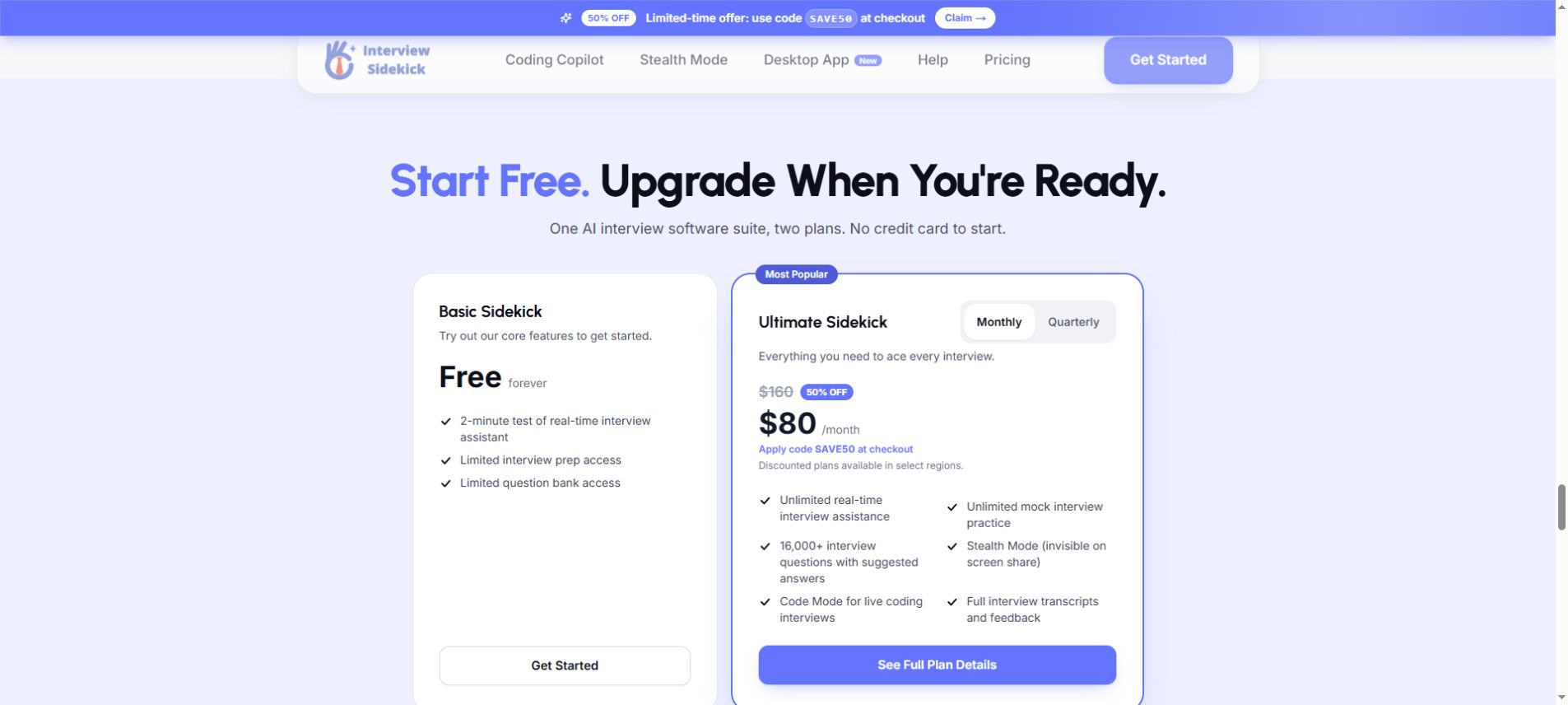
Official homepage, monthly selected, October 27, 2026. The price requires the displayed promotion. Open the full-size monthly capture.
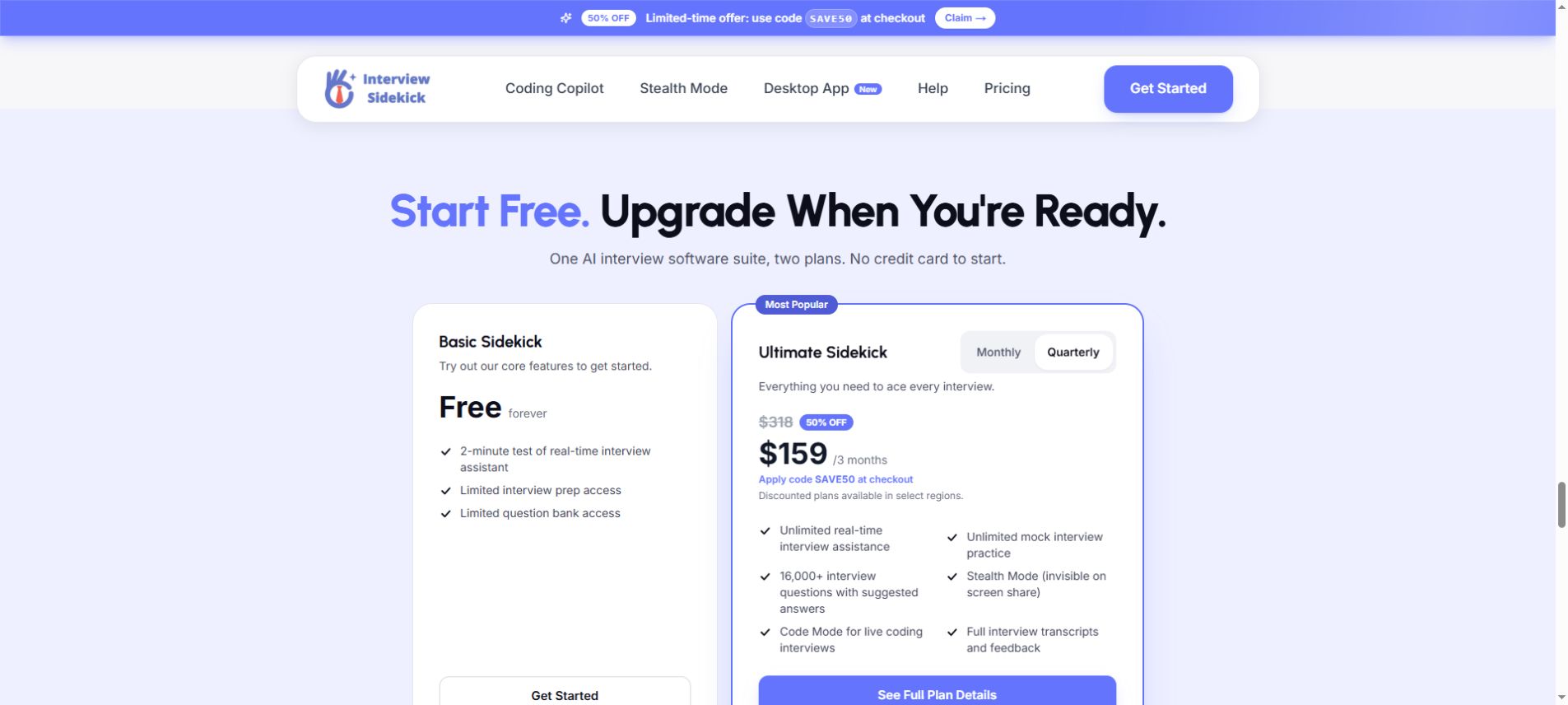
Same page, quarterly selected, October 27, 2026. This records the advertised offer, not a completed purchase. Open the full-size quarterly capture.
For a one-month comparison, SkillCopilotAI costs $9.90 more than Sidekick's observed promotion. The quarterly totals differ by $20.70. Those are arithmetic comparisons of the displayed prices, not judgments about answer quality or feature equivalence.
Annual billing deserves a separate decision. SkillCopilotAI's $28.90 equivalent requires $346.80 for the year. It does not make one month cost $28.90. Likewise, a credit pack can leave you paying for unused capacity; check the minimum purchase as well as the per-credit rate.
How much can you try for free?
| Product | Free entry |
|---|---|
| Sidekick | 2-minute real-time test; limited prep |
| SkillCopilotAI | 30-minute trial |
| Interviews Chat | 30 credits; no card |
| Parakeet AI | 10-minute session; first mock free |
| Verve AI | 3 × 15-minute Copilot sessions/month; 5 mocks |
These allowances use different units. SkillCopilotAI's comparison lists 30 minutes against several features; do not add the rows together or assume every paid model is included. Interviews Chat lists credit charges for minutes and suggestions. Verve's Copilot and mock allowances are separate, and Parakeet's free access remains subject to eligibility.
Use the trial to check your intended audio source, one factual follow-up and a screenshot question. SkillCopilotAI's 30-minute allowance gives more room for those checks than Sidekick's two-minute real-time sample.
Why switch from Interview Sidekick to SkillCopilotAI?
SkillCopilotAI is worth trying if you expect to move between behavioral practice, technical follow-ups and visual coding questions during the same preparation period. Its interview assistant, coding copilot and paid-plan features bring those tasks into one desktop workflow.
Choose models for the kind of explanation you need
SkillCopilotAI offers supported models from OpenAI (GPT), Anthropic (Claude) and Google (Gemini). In the pricing catalog observed on October 27, monthly included three models, quarterly six, and yearly ten. The longer plans expand the selection as well as the payment period.
Which models were listed for each subscription?
- Monthly — $89.90 billed monthly: GPT-5.6-Luna, Claude Haiku 4.5 and Gemini 3 Flash.
- Quarterly — $179.70 every three months: the monthly set, plus GPT-5.6-Terra, Claude Sonnet 5 and Gemini 3.5 Flash.
- Yearly — $346.80 billed yearly: the quarterly set, plus GPT-5.6-Sol, Claude Opus 5, Grok 4.6 and Gemini 3.1 Pro.
These are dated product-catalog labels, not an independent model benchmark. The catalog can change; verify the model you want on the current pricing page before paying. Free-trial access is separate.
The useful part is having another approach to try when an answer does not fit your practice. With the same project facts, compare whether one available model gives a concise behavioral outline while another explains a technical trade-off at the depth you need. Keep the question and response instructions consistent, then choose the explanation you can understand and defend.
That is a proposed way to use model choice, not a result from a head-to-head test. Other assistants also offer multiple providers. Check the exact models in the plan you would buy rather than assuming a provider name gives you every model it sells.
Give screenshot questions their full context
SkillCopilotAI supports full-screen and selected-area capture with automatic answers, plus manual submission of multiple screenshots together. This is particularly relevant when a practice problem spans a statement, constraints and examples on separate views.
For example, capture the statement and the constraints before manually submitting them together with the sample input. Then ask for an approach and the edge cases it should handle. The practical benefit is less manual transcription of the material you want the assistant to consider. Check that every image is readable and included before judging the response.
This workflow is a reason to try the coding copilot if visual prompts are part of your preparation. Sidekick also advertises coding assistance; the decision is whether our capture and submission workflow suits you, not a claim that screenshots are exclusive to us.
Repeat the difficult parts throughout your paid period
On a monthly, quarterly or annual subscription, included features can be used an unlimited number of times while the subscription is active. That covers interview assistance, mock practice, coding help and screenshot workflows, including manual multi-screenshot submissions. Model availability still depends on the selected plan.
For a week of preparation, that can mean revisiting a behavioral answer, working through a coding mistake, then returning to a follow-up the next day without budgeting a fixed number of attempts for those included features. The value is the freedom to repeat your practice process. We have not measured an improvement in interview performance from doing so.
Sidekick's Ultimate plan also advertises unlimited assistance and mock practice. Unlimited use alone is therefore not a unique reason to move. The stronger case is wanting that usage pattern together with SkillCopilotAI's available models, screenshot inputs and desktop workflow.
Decide whether the combination justifies the price
The question is whether those model and screenshot workflows solve a problem you expect to encounter repeatedly. Try your own project question and a visual coding problem before committing. If your priority is a lower bill, use the other options in the price table; the observed monthly and quarterly SkillCopilotAI subscriptions cost more than Sidekick's promotion.
Other Interview Sidekick alternatives by workflow
Interviews Chat: consider its browser option and subscription structure
Interviews Chat offers a web version, an optional Chrome extension and a desktop Copilot app. Its FAQ distinguishes browser access from support for desktop meeting apps through the desktop app.
That distinction matters if your interview moves between a browser meeting and an installed client. Test the path you will use. A web login alone does not demonstrate that the assistant can hear a call in another application.
The Starter allowance is worth examining alongside the unlimited-credit plans. Ask how both minutes and suggestions are deducted before estimating what a longer practice exchange costs. A low entry price is useful only if the plan covers the session you need.
Parakeet AI: consider credits for a short interview period
Parakeet AI publishes both credit packs and an unlimited subscription. Credits may suit someone with a small number of scheduled calls, but the minimum pack and the balance left afterward affect the actual cost.
For an illustrative budget, two 45-minute calls and one 30-minute rehearsal total two hours. At the published call-time conversion, that is two credits before any other credit use or billing rounding. A three-credit pack still costs €51; this example is not a tested bill. Confirm expiry, rounding and whether setup time counts before paying.
Its browser, desktop and mobile-browser options are useful to investigate when device flexibility matters. Check the capture method on your actual device rather than assuming these entry points behave identically.
Verve AI: consider it for several limited rehearsals
Verve AI's plan comparison provides a concrete free-session allowance. The paid Standard and Pro columns also distinguish session counts from session length: five 60-minute Copilot sessions for Standard, and unlimited sessions with a 90-minute length limit for Pro.
That makes session length a useful purchase question. Unlimited session count does not mean one uninterrupted session can last indefinitely. If your rehearsal or interview runs longer than the stated cap, check what happens at that boundary before relying on it.
When keeping Interview Sidekick makes sense
Sidekick's current site describes preparation, live assistance and review across desktop and browser entry points. If those steps already work together for you, replacing the answer panel alone may leave other useful parts behind.
Write the reason for changing in one sentence: “I need a longer trial,” “I need a different billing period,” or “I need help capturing the question from my meeting app.” Then choose a test that would settle that question.
If you cannot identify what the replacement must improve, first check your existing profile, input source and session settings. That may be less work than rebuilding the setup elsewhere.
What switching actually costs you
The subscription difference is only part of the decision. Budget for the work of recreating a usable setup, and for any overlap between two paid plans.
Before leaving your current tool:
- Check renewal and cancellation. Record the next charge and remaining paid access; stopping use does not cancel a subscription.
- Keep your own materials. Bring your resume, job description, verified project facts and preferred answer format.
- Check transcript transfer. Confirm export formats and the replacement's import support before relying on them.
- Recheck input setup. Verify headphones, microphone, system or tab audio, permissions and meeting client.
- Preserve your practice notes. Carry over questions and mistakes you want to revisit.
Sidekick's pricing FAQ says cancellation leaves access until the billing period ends and keeps transcripts and preparation data available. That is not a promise of cross-product export or import. Keep your own materials and check the available controls before depending on a transfer.
We did not establish a one-click migration between these products or measure migration time. Re-entering a short profile and transferring a large archive are different jobs.
Try this original comparison exercise before committing
This is a proposed practice method, not a test we have already run across the products. Use fictional details or a project you are allowed to share, and keep the input identical.
- Supply a short project record: your role, two actions, one measurable outcome and one limitation. Ask for a concise answer to “What did you contribute?” Check every first-person claim against the record.
- Correct a fact: “The improvement was 12%, not 20%, and I did not lead the team.” Ask a follow-up. Does the answer retain the correction without inventing new experience?
- Speak the next question through the meeting setup you plan to use. Check the transcript before evaluating the generated response. A mistranscribed question and an unsupported answer are separate failures.
- If coding matters, use a problem you can verify locally. Run the suggested solution, include an empty or boundary input, and ask for an explanation you can repeat without the assistant.
Record what passed, what needed correction and what you could not test within the free allowance. If a product solves your stated problem and the payment period fits, you have a reason to switch. If the comparison is still inconclusive, avoid a long commitment just for the smaller monthly equivalent.
Questions before you choose
Is there a free alternative to Interview Sidekick?
The options above offer limited free access in different units: minutes, credits or sessions. Use the free-access table to match the allowance to your test. None of these observations establishes unlimited free live assistance.
Which Interview Sidekick alternative is cheapest?
Among the dollar subscriptions whose prices we verified here, Interviews Chat lists the lowest starting amount at $19/month, with a credit limit. That is a starting-price comparison, not an equivalent-usage ranking. Parakeet's observed euro offers should be compared in their own currency and with the purchase size included.
Can a replacement guarantee it will not be detected?
We have not tested screen-sharing behavior, and a vendor's visibility claim is not a guarantee across every device, meeting app or assessment environment. Use assistance only where permitted. A tool being hidden from a recording would not establish permission to use it.
Should I switch just for a different AI model?
Model choice is a useful reason to try SkillCopilotAI when you want another explanation or response style for the same practice task. Pair it with the screenshot and repeat-practice workflows you actually need, and check which models your plan includes. Choose after comparing relevant sample answers; a longer model list does not establish higher accuracy.
Compare similar tools
Editor selected
Interview Sidekick Review: Pricing, Free Trial, and Alternatives
Interview Sidekick pricing, two-minute free sessions, and a Windows desktop trial: resume accuracy, follow-ups, coding answers, and alternatives.
Editor selected
5 Parakeet AI Alternatives: Free Options & Paid Plans
Compare 5 Parakeet AI alternatives, including a 30-minute SkillCopilotAI trial, multi-model answers, multi-screenshot help and free or open-source options.
Editor selected
Best Verve AI Alternatives (2026): Pricing & Free Trials
Compare Verve AI alternatives by pricing, free trial limits, and interview workflow. See who each option fits and what to check before switching.
Same content type
Best Linkjob AI Alternatives in 2026: Costs, Trials & Who Each Fits
Best Linkjob AI alternatives in 2026 compared by subscription cost, free trial limits, and workflow. See cheaper options, who should switch, and who should stay.
Choose your next step
Compare another tool or move from research into structured interview practice.