

Looking for a Parakeet AI alternative? Start with the reason you want to switch: a different monthly cost, a screenshot workflow you can try, limited free preparation, or code you can run yourself. This guide compares five options and explains where each fits.
Want a free Parakeet AI alternative instead? Below, we compare five options across managed desktop software, limited free preparation and GitHub projects. Keet is an MIT-licensed candidate for readers comfortable with developer setup. A hosted trial has an allowance; free source code may still require paid providers or suitable local hardware.
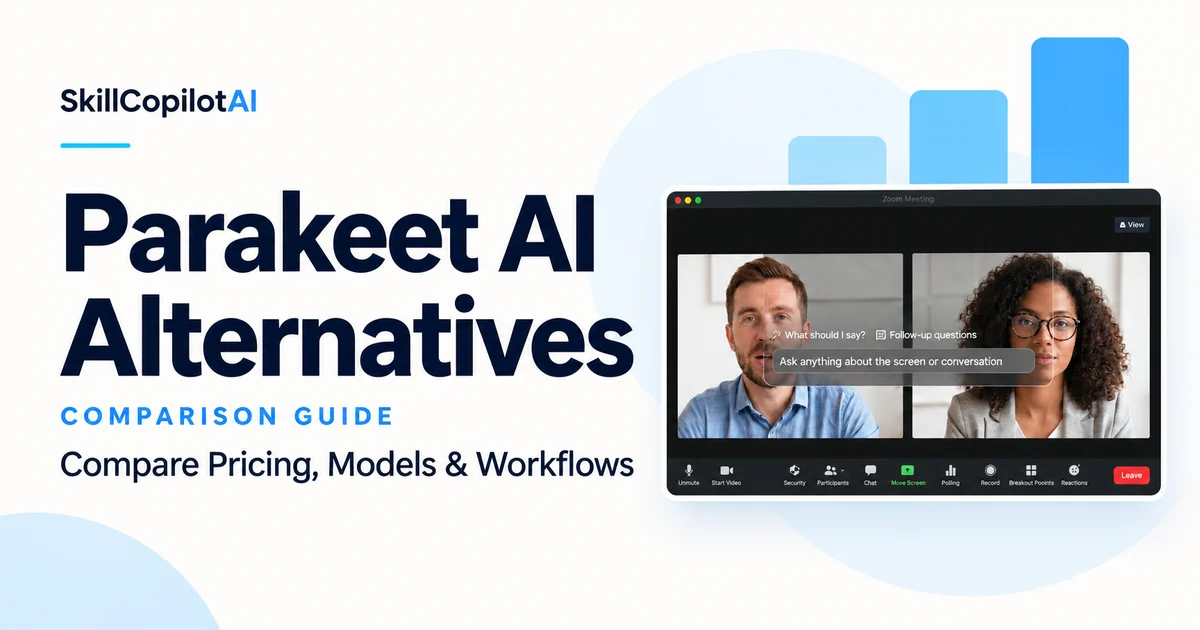
Disclosure and method: SkillCopilotAI publishes this comparison and sells an interview assistant. We checked the linked product pages and repository documentation on October 20, 2026. We did not purchase or run a controlled comparison of these tools. Product-owner guidance informs the SkillCopilotAI screenshot workflow. The cover is an editorial illustration based on existing product material, not a test screenshot. Use assistance only where it is permitted, or keep it to private practice.
Why consider SkillCopilotAI instead of Parakeet?
Try SkillCopilotAI if you want to evaluate model selection and multi-screenshot answers in a managed desktop app before subscribing. Its limited 30-minute trial provides a way to check that workflow. At the prices checked, its flexible monthly payment is $60 below Parakeet's; the detailed plans and price screenshots follow the comparison. Both products offer multiple model providers, so that feature alone is not a reason to switch.
Parakeet AI vs five alternatives: feature comparison
Compare the workflow you need before choosing a plan or installing a project. SkillCopilotAI is highlighted as our managed desktop option, alongside other routes that may suit you. On a phone, expand a product to read its features; on a larger screen, compare the table by feature.
Scroll horizontally to compare all products.
| Feature | Parakeet AI | SkillCopilotAI | Interview Sidekick | Keet | Open-Cluely | Natively |
|---|---|---|---|---|---|---|
| Live question assistance | Advertised | Supported | Advertised; confirm free live allowance | Documented in README | Documented in README | Documented in README |
| Model choice | OpenAI, Google, Anthropic | OpenAI (GPT), Google (Gemini), Anthropic (Claude); plan-dependent | Current provider selection not verified here | BYOK providers or local Ollama | Gemini; requires provider key | BYOK providers or local Ollama |
| Screenshot input | Advertised | Full screen or selected area; automatic answers or manual multi-image submission | Exact capture controls not verified here | Screenshot/OCR on roadmap | Screenshot context documented | Screenshot understanding documented |
| Mock interview / preparation | Mock mode and preparation tools | Mock practice listed in plans | Limited free prep and question-bank access | Interview persona; dedicated mock workflow not verified | Dedicated mock workflow not verified | Dedicated mock workflow not verified |
| Free access | 10-minute session; first free mock | Limited 30-minute trial | Limited free tier; confirm feature limits | MIT software; local or cloud running costs | Public source; provider usage costs | Personal/non-commercial use; local or provider costs |
| Price or cost basis | $149.90/month; prepaid credits also available | $89.90 billed monthly | Check current plan and local offer | No app subscription listed; manage your setup | No app subscription listed; keys and setup required | Personal-use source license; check provider costs |
| Paid usage limits | Unlimited subscription or usage-based prepaid credits | All included features: unlimited uses during active monthly, quarterly or annual subscriptions | Confirm current paid-plan limits | Self-managed; hardware and provider limits apply | Self-managed; provider limits and costs apply | Self-managed; license and provider limits apply |
| Code access | Not evaluated as a source project | Managed commercial product | Not evaluated as a source project | MIT license | Reuse license not established in this research | Source-available; explicitly not open-source |
| Main fit | Keep a working setup or use occasional credits | Try model selection and screenshot workflows in a desktop app | Preparation and question-bank access | Developers wanting an MIT-licensed starting point | Users prepared to configure its documented provider workflow | Personal-use source access and local-model options |
Parakeet AILive assistance and prepaid credits
- Live question assistance
- Advertised
- Model choice
- OpenAI, Google, Anthropic
- Screenshot input
- Advertised
- Mock interview / preparation
- Mock mode and preparation tools
- Free access
- 10-minute session; first free mock
- Price or cost basis
- $149.90/month; prepaid credits also available
- Paid usage limits
- Unlimited subscription or usage-based prepaid credits
- Code access
- Not evaluated as a source project
- Main fit
- Keep a working setup or use occasional credits
SkillCopilotAIUnlimited paid use · 30-minute trial
- Live question assistance
- Supported
- Model choice
- OpenAI (GPT), Google (Gemini), Anthropic (Claude); plan-dependent
- Screenshot input
- Full screen or selected area; automatic answers or manual multi-image submission
- Mock interview / preparation
- Mock practice listed in plans
- Free access
- Limited 30-minute trial
- Price or cost basis
- $89.90 billed monthly
- Paid usage limits
- All included features: unlimited uses during active monthly, quarterly or annual subscriptions
- Code access
- Managed commercial product
- Main fit
- Try model selection and screenshot workflows in a desktop app
Interview SidekickLimited free preparation
- Live question assistance
- Advertised; confirm free live allowance
- Model choice
- Current provider selection not verified here
- Screenshot input
- Exact capture controls not verified here
- Mock interview / preparation
- Limited free prep and question-bank access
- Free access
- Limited free tier; confirm feature limits
- Price or cost basis
- Check current plan and local offer
- Paid usage limits
- Confirm current paid-plan limits
- Code access
- Not evaluated as a source project
- Main fit
- Preparation and question-bank access
KeetMIT-licensed developer setup
- Live question assistance
- Documented in README
- Model choice
- BYOK providers or local Ollama
- Screenshot input
- Screenshot/OCR on roadmap
- Mock interview / preparation
- Interview persona; dedicated mock workflow not verified
- Free access
- MIT software; local or cloud running costs
- Price or cost basis
- No app subscription listed; manage your setup
- Paid usage limits
- Self-managed; hardware and provider limits apply
- Code access
- MIT license
- Main fit
- Developers wanting an MIT-licensed starting point
Open-CluelyProvider keys and setup required
- Live question assistance
- Documented in README
- Model choice
- Gemini; requires provider key
- Screenshot input
- Screenshot context documented
- Mock interview / preparation
- Dedicated mock workflow not verified
- Free access
- Public source; provider usage costs
- Price or cost basis
- No app subscription listed; keys and setup required
- Paid usage limits
- Self-managed; provider limits and costs apply
- Code access
- Reuse license not established in this research
- Main fit
- Users prepared to configure its documented provider workflow
NativelyPersonal-use source access
- Live question assistance
- Documented in README
- Model choice
- BYOK providers or local Ollama
- Screenshot input
- Screenshot understanding documented
- Mock interview / preparation
- Dedicated mock workflow not verified
- Free access
- Personal/non-commercial use; local or provider costs
- Price or cost basis
- Personal-use source license; check provider costs
- Paid usage limits
- Self-managed; license and provider limits apply
- Code access
- Source-available; explicitly not open-source
- Main fit
- Personal-use source access and local-model options
Sources checked October 20, 2026: Parakeet AI, SkillCopilotAI plans, Interview Sidekick pricing, Keet README, Open-Cluely README, and Natively README. SkillCopilotAI's capture details and unlimited paid-use policy also reflect product-owner confirmation. “Not verified” means this research did not establish the feature; it does not mean the product lacks it. This table is not a hands-on accuracy or screen-share visibility ranking.
What Parakeet already offers
Do not switch because a comparison says Parakeet has no mock interviews or monthly plan. Its current official site advertises both. It also lists models from OpenAI, Anthropic and Google, plus desktop, browser and mobile access. Model choice alone is therefore not an exclusive advantage of an alternative.
The same page lists a $149.90 monthly subscription, a $599.90 annual subscription and a $78 weekly option. Its $59 credit pack contains three credits; the published call rate is half a credit per 30 minutes. The free interface describes a 10-minute session, and the mock section offers a first free mock interview. Confirm what your account includes before starting.
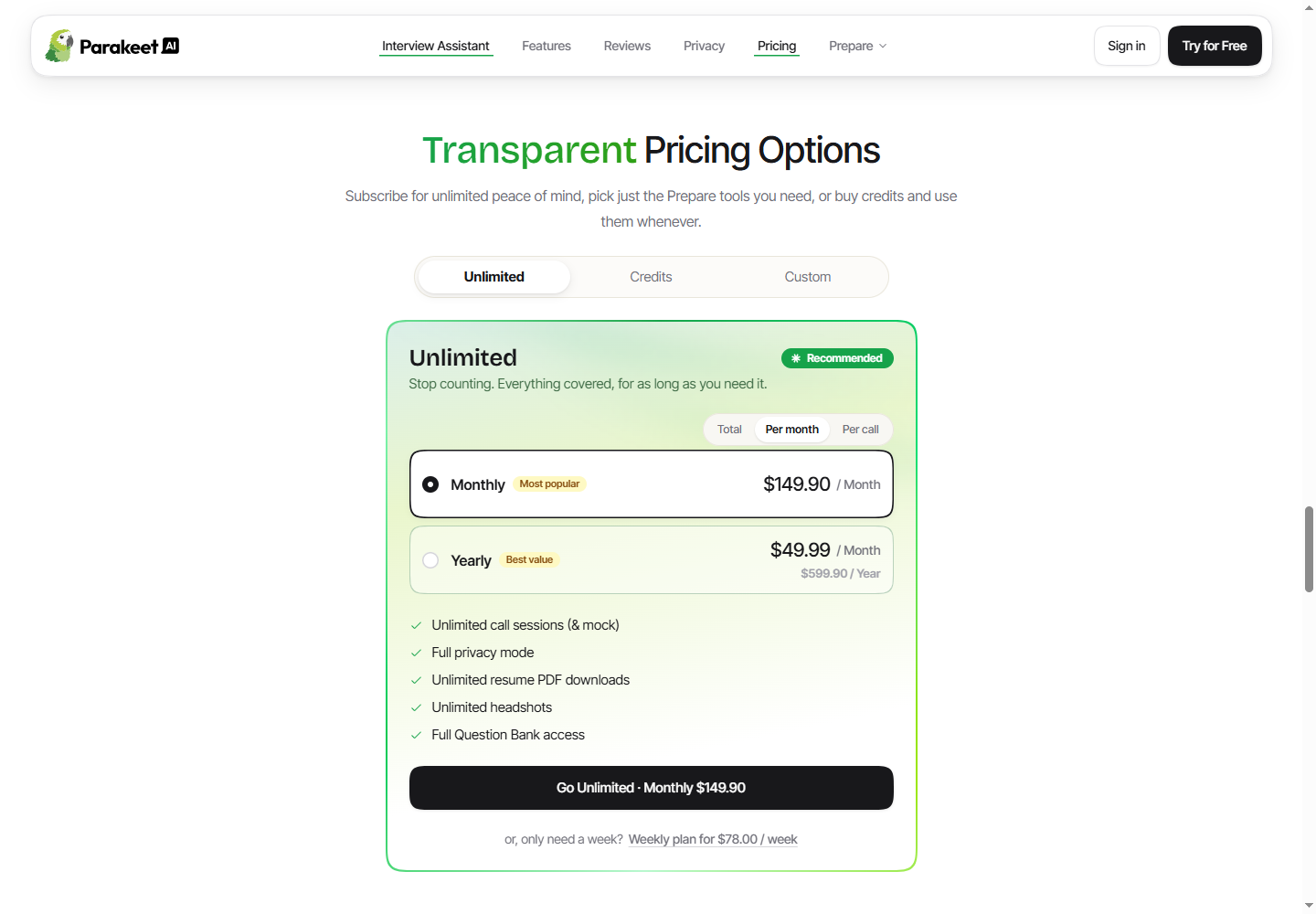
Parakeet AI's public website, captured October 20, 2026, with Unlimited and monthly billing selected. The annual offer is shown separately with its upfront total. This is the displayed offer, not a completed checkout. Check current pricing.
View the full-size Parakeet pricing screenshot.
If credits suit your occasional use, keep that option in the comparison. An unlimited subscription is not automatically cheaper for someone who only needs a few hours. Our Parakeet AI review explains the broader workflow; use the current official page for today's offer.
SkillCopilotAI: a managed desktop alternative to evaluate
SkillCopilotAI combines live question input, resume and role context, and screenshot-based help. You can choose among supported models from OpenAI (GPT), Google (Gemini) and Anthropic (Claude); supported models are updated over time, and the selection depends on the plan. Parakeet also has multiple providers, so compare the actual models available in the plans you would buy.
The screenshot workflow is worth testing if a coding prompt spans several views. SkillCopilotAI supports full-screen or selected-area capture with automatic answers, as well as manual submission of multiple screenshots together. For example, include a problem statement, the constraints and an example before asking for an approach. This describes the workflow, not evidence that another product cannot handle the same input.
The pricing page lists $89.90 billed monthly and a limited 30-minute trial.
Unlimited use of all included features during your paid period
Whether you pay monthly, quarterly or annually, every feature included in your plan can be used an unlimited number of times while your subscription is active. This includes interview assistance, coding assistance, full-screen and selected-area screenshot answers, and manual multi-screenshot submissions. You do not have to reserve a fixed number of uses for these workflows. This usage policy was confirmed by the product owner.
The 30-minute limit applies only to the free trial, not paid subscriptions. Unlimited usage does not mean every plan includes the same models; check the model selection for your chosen plan.
That monthly payment is $60 below Parakeet's currently listed monthly subscription, but it is not a feature-equivalent cost comparison. Included models and billing commitments differ. Check the amount actually payable rather than comparing a yearly monthly equivalent with a flexible monthly plan.
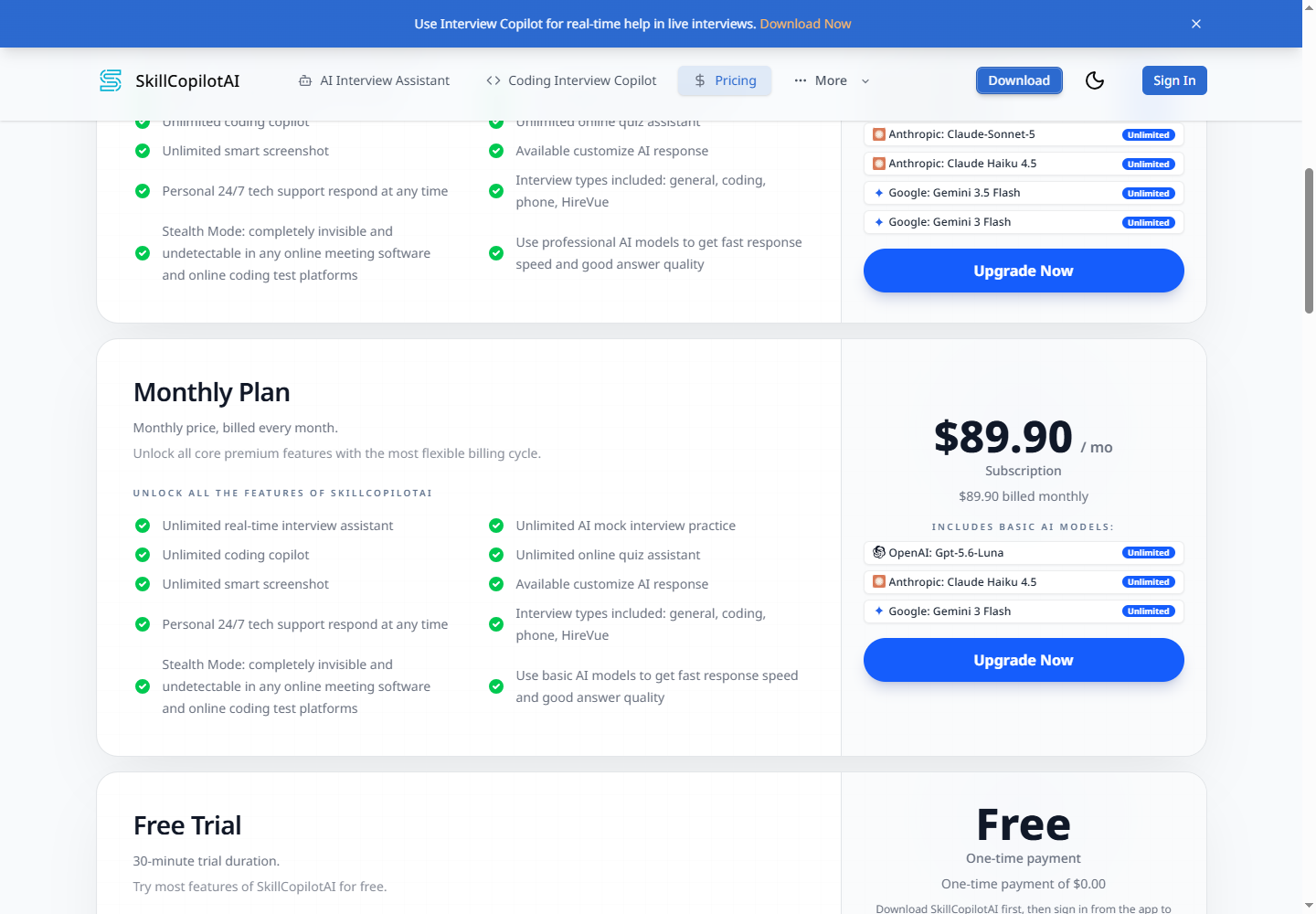
SkillCopilotAI's public pricing page, captured October 20, 2026. The Monthly Plan card lists its included models; other plans have different selections. The 30-minute trial is a separate offer below. Check current plans.
View the full-size SkillCopilotAI pricing screenshot.
Start at the download page, then sign in from the application to authorize the trial. The current Mac download requires macOS 14 or later and does not require a chip-specific installer choice. The Mac setup checklist covers permissions and the additional Zoom screen-capture setting for that workflow.
Choose this route if you want to evaluate a managed application rather than build one. If an MIT license, self-hosting or a permanently free allowance is essential, the trial does not satisfy that requirement.
Watch the SkillCopilotAI coding interview demo
This demo from the Coding Interview Copilot page introduces the coding-assistance workflow. Use it as a starting point, then check your chosen model and screenshot inputs during the trial.
Existing SkillCopilotAI coding-page demo, reused here as a product illustration. It is not a new Parakeet comparison test or evidence of every currently available model and multi-image setting.
Open the coding interview demo directly.
Which free Parakeet AI alternatives are actually free?
“Free” can refer to four different things. Match the offer to the task you need:
SkillCopilotAI's free trial and paid subscriptions are different offers: the trial lasts 30 minutes; monthly, quarterly and annual subscriptions allow unlimited uses of all included features while the paid subscription is active. The trial row below does not describe paid-plan usage limits.
| Type of access | Example from the checked sources | What remains to verify |
|---|---|---|
| Hosted trial | SkillCopilotAI's limited 30-minute trial | Included modes, models and remaining allowance |
| Limited preparation tier | Interview Sidekick's free pricing FAQ | Whether live assistance is included and its current limits |
| Open-source software | Keet's MIT-licensed repository | Installation, hardware and local or paid provider setup |
| Personal-use source access | Natively's current source license | License restrictions, provider usage and the selected local setup |
Interview Sidekick's pricing FAQ explicitly mentions limited preparation sessions, question-bank access and basic insights without a credit card. Do not read that as a promise of unlimited free live answers. Ask about the exact feature you need if the allowance is unclear.
For a self-managed app, calculate the whole cost: software fee, transcription, answer-generation usage and the time needed to configure it. A local-model route may avoid per-request cloud charges, but it still needs suitable hardware and a successful rehearsal. We have not benchmarked that route here.
Interview Sidekick: preparation, live assistance and review
Interview Sidekick is worth investigating if you want preparation and post-session review alongside live assistance. Its homepage presents desktop, Chrome and phone workflows, plus coding help. These are vendor descriptions rather than results from our own device tests.
Its Ultimate plan description lists mock interviews, a question bank advertised at 16,000+ questions, practice transcripts and feedback. The free tier covers limited preparation, question-bank access and basic insights. This makes it a candidate for readers who prioritize a structured practice library rather than maintaining a GitHub project.
The trade-off to resolve is which modes your chosen plan actually includes. The pricing page we inspected did not establish a clear paid amount in its accessible text, and its free FAQ did not specify a live-call allowance. Confirm the current total, renewal terms, live access and device support before paying. We therefore do not label it cheaper than Parakeet or promise unlimited free live answers. Our Interview Sidekick review provides additional background with its own dated research scope.
GitHub alternatives: open-source and source-available options
If you want an open-source Parakeet AI alternative, check the actual license first. The projects below include one MIT-licensed option, one whose reuse license we have not established, and a personal-use source-available option. They are different categories, even when search results group them together.
Keet: an MIT-licensed starting point
Keet's repository identifies an MIT license and documents local Whisper transcription, optional local Ollama answers and bring-your-own-key cloud providers. Its quickstart requires Node.js 20 or later. This is a developer setup route, not the same onboarding as a hosted trial.
Read the distinction between available features and the roadmap. At this check, screenshot/OCR support and coding-screen capture appear in the roadmap. If screenshots are your main reason for leaving Parakeet, do not assume this project already replaces that workflow. We reviewed its documentation, not a running build.
InvisiBrain and Open-Cluely: check the current repository
A Reddit developer showcase names InvisiBrain and links a release under the Open-Cluely repository. It is a project introduction by its creator, not an independent product test.
The current README describes Gemini answers, AssemblyAI transcription and screenshot input, with Windows 10/11 as the primary development target. It requires keys for those providers. We did not establish a clear reuse license from the material inspected, so verify the current license before treating it as a licensed open-source dependency. Public code and “no subscription” wording do not resolve provider costs or reuse rights.
Natively: source-available is a different category
Natively's README license notice explicitly says source-available, not open-source. It permits specified personal and non-commercial uses; commercial use requires permission. Its documentation describes both bring-your-own-key providers and a local Ollama option.
It can be a candidate for someone seeking personal-use source access, but it should not be labeled an unrestricted open-source alternative just because a search result uses that phrase. Check the license of the version you intend to use.
Before you replace Parakeet, check the complete workflow
Shortlist one managed option and, if relevant, one self-managed project. Use a fictional background and the same practice material for both.
- Capture the actual question. Have a practice partner speak through your intended meeting app while you wear your normal headphones. Typed input does not verify meeting audio.
- Check all the screenshots. Use a problem statement and constraints on separate images. Confirm that the chosen workflow receives both before judging the answer.
- Inspect the suggestion. Does it preserve the constraints and avoid inventing personal experience? Use our copilot evaluation checklist for a reusable test pack.
- Check the bill and license. Record the trial limit, total subscription payment or provider usage, renewal and applicable source license.
- Keep the working tool until the replacement passes. Save the relevant background and notes you are permitted to retain; do not assume accounts, credits or session history transfer between products.
If Parakeet already handles your calls, its credits match your usage and the alternatives do not solve a concrete gap, staying with it is a reasonable outcome. Switching has a setup cost too.
Frequently asked questions
Is there a completely free Parakeet AI alternative?
There are limited hosted offers and self-managed projects. Neither category automatically means unlimited free live assistance. For cloud-backed projects, check both transcription and model charges. For local models, check hardware requirements and whether the required features are implemented.
Is SkillCopilotAI open source?
It is presented here as a managed commercial desktop product with a limited trial, not as an open-source project. If source modification is your requirement, evaluate a project with a suitable verified license.
Are the Parakeet speech models the same as Parakeet AI?
No. This guide compares the Parakeet AI interview product. A speech-to-text model alone does not replace the interview interface, answer generation, context and screen-input workflow. Check which of those components a GitHub project actually supplies.
Should Reddit recommendations decide which alternative I use?
Use them to find candidates and specific problems to investigate. Check whether the author is the developer, a customer or an unidentified promoter, then verify the current release, pricing and license at the official source. A discussion is not proof of accuracy, invisibility or reliability on your device.
Compare similar tools
Editor selected
Parakeet AI Review 2026: Pricing, Pros, Cons & Verdict
Parakeet AI review covering pricing, credits, live interview features, limitations, and a sourced comparison with SkillCopilotAI to help you choose.
Editor selected
Best Interview Coder Alternative for Coding Interview Preparation
Compare SkillCopilotAI as an Interview Coder alternative: a free-trial coding example, screenshot workflow, and monthly, quarterly, and annual costs.
Same content type
Cluely Alternatives for Interviews: Context, Costs & Switching
Compare Cluely alternatives for interview preparation, resume context and live support. Check actual billing, free access and what to move before switching.
Same content type
Final Round AI Alternative: Compare Trials, Costs & Workflows
Compare Final Round AI alternatives by unlimited paid-plan features, included AI models, trial access, billing periods and switching workflow.
Choose your next step
Compare another tool or move from research into structured interview practice.