


Choose a Sensei AI alternative around the part of your interview workflow you want to change. SkillCopilotAI is worth trying if you want desktop interview and coding assistance, paid-period unlimited use, and a phone screen for answers, screenshots and follow-up questions. Interviews Chat offers lower published monthly prices, Parakeet AI offers credit packs for occasional sessions, and Final Round AI organizes preparation and debriefs around a target job.
This guide compares those four options by payment, usable trial access, inputs, phone workflow and switching costs. A tool earns a place here for a specific replacement task. We have not ranked answer quality or response speed.
Disclosure and method: SkillCopilotAI publishes this guide and sells one of the alternatives. Public competitor offers and Sensei's expanded FAQ were checked on November 9, 2026; SkillCopilotAI's product and plan descriptions were also checked against this project's current content on November 10. We did not purchase these plans or run a controlled product-performance or paired-device comparison. The cover is an AI-generated editorial illustration. Use assistance for private practice or sessions where it is permitted.
Decide what a replacement must keep
Before comparing prices, identify the task you need to finish:
- Interview or project questions: check that the tool receives the question and uses your resume or role context accurately. A different model name does not establish better answers.
- Coding and screenshots: check whether your chosen plan includes those inputs, and try a problem whose constraints and answer you can verify.
- Answers on a phone: distinguish a phone browser that shares a running desktop session from a standalone mobile assistant. Check the controls you actually need.
- Repeated practice or occasional sessions: compare the full payment and usable allowance. A low-cost credit pack and unlimited access for a paid period serve different usage patterns.
These are selection criteria, not claims that Sensei fails each task. Keep Sensei if it already meets your requirements and moving would mainly recreate the same setup.
Which Sensei alternative fits your reason for switching?
| Your replacement task | Candidate | Relevant offer or workflow | Cost or condition to accept |
|---|---|---|---|
| Lower the month-to-month bill | Interviews Chat | Published $19 Starter or $29 Booster plan | Starter credits cover usage; reproduce your actual call setup |
| Pay for a few sessions | Parakeet AI | Credit packs with a published time conversion | Estimate total hours; frequent use can cost more than a subscription |
| Use desktop interview/coding tools with answers and controls on a phone | SkillCopilotAI | Unlimited core assistants during the paid term, Mobile Mirror and a choice of model tier | Requires a running Windows/Mac app; $89.90 monthly, with model access varying by plan |
| Keep preparation, sessions and debriefs tied to a target job | Final Round AI | A job-specific Goal and session review | Free preparation access excludes live sessions; verify the complete paid billing period |
The candidates are grouped by the problem they address, without an overall winner. If your requirements are still unclear, use the interview copilot selection checklist to narrow them before subscribing.
Understand what Sensei already includes
Sensei's homepage lists Pro at $89 monthly, or $24 per month billed annually. The annual figure implies $288 for a year, calculated as $24 × 12; confirm the final charge before paying. Pro lists unlimited copilot sessions, coding assistance and customization.
Two details matter when choosing a replacement:
- The free allowance is not simply 15 minutes total. Sensei's FAQ says you can start more sessions, with each ending after 15 minutes and requiring reactivation. A longer rehearsal will therefore require restarting the session. The free pricing card excludes Coding Copilot and AI Playground.
- Cancellation does not return the current payment. Its FAQ says there are no refunds; cancellation leaves access active until the billing cycle ends.
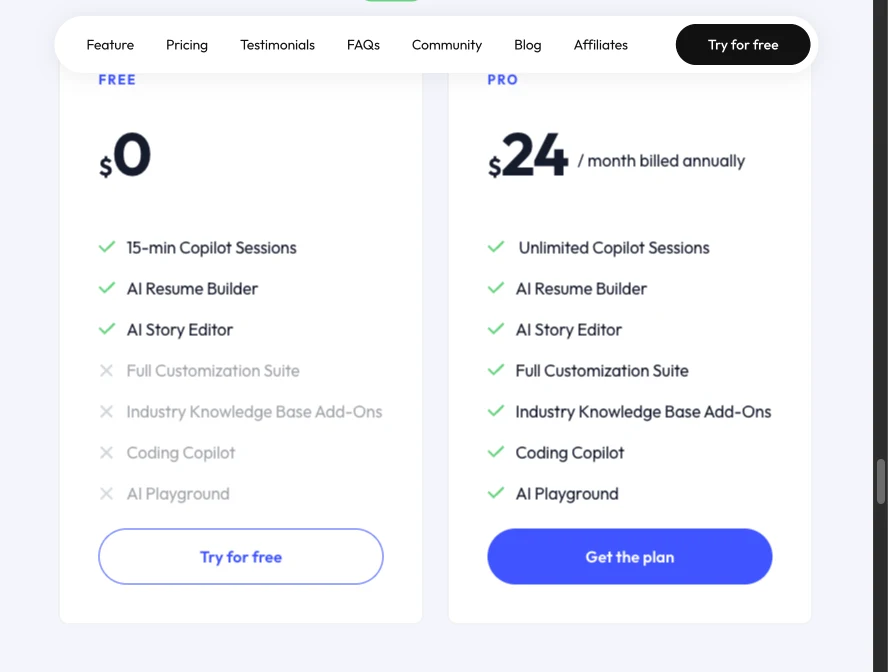
Sensei's public pricing cards, captured November 9, 2026. The annual view shows a monthly equivalent. This is documentation of the displayed offer, not a checkout or performance test. Open the full-size capture.
If coding is the reason you are switching, compare the paid workflow and the coding access available to test. Sensei already lists coding support and unlimited sessions on Pro; those labels alone do not distinguish a replacement.
Compare what you will actually pay
The following USD offers were visible on official pages on November 9. Taxes, account-specific offers and checkout terms can change the final bill. Annual equivalents are not month-to-month prices.
| Product and official source | Short-term or monthly offer | Longer-term offer | Free access to check |
|---|---|---|---|
| Sensei AI | $89/month | $24/month billed annually; calculated $288/year | Repeatable 15-minute copilot sessions; paid features differ |
| Interviews Chat | Starter $19/month; Booster $29/month | Pro $69/quarter | 30 free credits; check how minutes and suggestions consume them |
| Parakeet AI | 1 credit $38; 3 credits $59 | 8 credits $118; 15 credits $177 | Check the current free allowance before using paid credits |
| SkillCopilotAI | $89.90/month | $179.70/quarter or $346.80/year | A limited 30-minute trial; download, then sign in from the app |
| Final Round AI | Homepage advertises Pro from $25+/month, without a full billing period in that headline | Confirm your selected plan and total before comparing | Goals and preparation materials are free; live sessions require Pro |
Do not read Final Round's starting headline as a verified one-month price. For that product, the billing period remains part of the buying check.
A credit pack can cost less, until your usage changes
Parakeet publishes 0.5 credit per 30-minute call or mock session. For illustration, assume each session lasts exactly one hour:
| Planned use | One listed purchase that covers it | Price |
|---|---|---|
| One one-hour session | 1 credit | $38 |
| Three one-hour sessions | 3-credit pack | $59 |
| Six one-hour sessions | 8-credit pack, leaving 2 credits | $118 |
These are examples using listed packs, not a minimum-cost purchasing algorithm. They exclude any free allowance and do not establish how an overrun is rounded.
One or three sessions can fit below Sensei's $89 monthly payment. The six-session example exceeds it. Whether either option is useful still depends on the input and output you need. Check renewal, expiry and the provider's current purchase terms separately.
Try the desktop-and-phone workflow before choosing a plan
SkillCopilotAI fits a specific choice here: interview assistance, mock practice, coding and screenshots in one desktop app, with Mobile Mirror for phone access. Its paid-period unlimited allowance is separate from the 30-minute trial. Download, sign in from the app, then try one question from your own preparation and check the desktop-to-phone flow described below.
Interviews Chat: a lower monthly payment, with usage to check
Interviews Chat publishes a $19 Starter plan with 1,000 credits and a $29 Booster plan advertising unlimited Copilot time and suggestions. Its FAQ describes a web workflow, an optional Chrome extension and a Desktop app for desktop meeting clients.
Shortlist it when lowering the monthly charge is the deciding requirement. Before replacing Sensei, confirm that the cheaper plan supports the input route and coding tasks you intend to use; this guide has not established feature parity or better output.
What to verify: its credit descriptions cover both Copilot minutes and suggestions. Do not assume 1,000 credits means 1,000 minutes plus unlimited answers. Reproduce your actual call setup with the client you would use, then check the plan's current conditions.
What you give up or rebuild: recreate the background, instructions and settings you rely on in Sensei. A different client may also change the audio setup. Neither the lower price nor a longer feature list establishes better answers.
Parakeet AI: credit packs for occasional sessions
Parakeet AI offers credits alongside subscription plans. Its public documentation describes Windows and macOS desktop clients, desktop Chrome and a phone-browser workflow. The phone browser and desktop do not support identical inputs, so confirm the route you need.
Its attraction here is payment flexibility: you can compare a small credit purchase with a month of access, as in the worked example above. It is not automatically the cheaper option for frequent practice.
What to verify: whether your intended session uses credits, whether practice consumes the same balance, and how extensions or overruns are charged. Check remaining credits before choosing a pack.
What you give up or rebuild: continuous access without watching a credit balance, unless you buy a subscription. Prepare your background again, and confirm that any feature you depend on is available in the selected client. See our Parakeet alternatives guide if you are also comparing its payment model with other options.
SkillCopilotAI: unlimited desktop tools with a phone companion
Choose SkillCopilotAI for the combination of interview assistance, mock practice, coding, screenshots and phone access. The published paid plans include unlimited use of the core assistants during the paid term. That makes repeated practice and coding follow-ups easier to budget than buying credits session by session. Sensei Pro also lists unlimited sessions, so choose on the workflow and included tools you need.
Read answers and control the session from your phone
Mobile Mirror opens the running desktop session in a phone browser. You can:
- Read live AI answers on the phone while leaving the desktop focused on your practice call or coding problem.
- Request a desktop screenshot from the phone after allowing remote screenshots in the desktop app. Captures follow the desktop settings.
- Type a follow-up question from the phone and send it to the session's current AI model.
This gives you a second screen for answers and controls without installing another phone app. The desktop must stay running. It does not turn the phone into an independent interview-capture app, and phone sharing does not establish invisibility in every screen-sharing setup. See the Mobile Mirror demonstration for the published connection flow; we did not run a paired-device test for this article.
Choose the model tier and the full payment together
The core-tool allowance is unlimited during the subscription term, while the included model tier changes with the plan:
| Subscription | Full listed payment | Included model tier |
|---|---|---|
| Monthly | $89.90 each month | Basic |
| Quarterly | $179.70 every three months | Professional |
| Yearly | $346.80 each year | Premium |
The quarterly and yearly monthly equivalents are $59.90 and $28.90 respectively; those amounts require the full payment above. Check the current model entitlement before paying. The tier labels describe access, not a measured answer-quality ranking. The 30-minute trial does not establish access to every model in a higher paid tier.
SkillCopilotAI costs $0.90 more per month than Sensei's $89 monthly offer and $58.80 more per year than Sensei's calculated $288 annual offer. The reason to pay the difference is a useful combination of desktop tools, phone controls and the model access you select.
Setup and switching cost: the download page lists Windows 10/11 64-bit and macOS 14 or later. Install the desktop app, authorize the required permissions and recreate your resume, role context and answer settings. If incoming audio matters, check that path in a partner call; installation alone does not prove it works. The Mac setup checklist covers permissions and that check.
Try this before subscribing: ask one question whose facts you know. Confirm the desktop receives it, read the answer on the connected phone, then send one follow-up. For screenshot use, allow remote capture and check that the captured problem and its constraints reach the intended session. These are proposed acceptance checks, not test results. Use the 30-minute allowance to establish fit before committing to a longer billing period.
Final Round AI: preparation and debriefs organized by job
Final Round AI describes a Goal for each target job, bringing together the role, resume, materials and sessions. Its practice and live-session workflow includes automatic debriefs that feed into preparation for the next round.
Consider it when organizing job-specific materials and debriefs is the requirement your current setup leaves unmet. That organizational offer does not establish better live answers or replace a check of coding and phone inputs.
What to verify: the selected plan's full payment, renewal period and included access. Its free offering covers Goals and materials; the homepage explicitly says live sessions have no free trial. Read the Final Round review for additional buying questions, then return to the current official offer.
What you give up or rebuild: set up the job and materials again. We have not established an automatic migration of Sensei stories, settings or session history. The value of the extra organization depends on whether you will use it.
Test a replacement against the problem that made you switch
Use the same task on Sensei and your shortlisted replacement. A useful comparison needs known facts, not a prompt that allows either tool to invent a more impressive candidate.
For a short private rehearsal, use this original fictional profile:
I helped build an internal ticket-search pilot on a four-person team. I compared two approaches and documented limitations. A teammate handled deployment. The pilot shipped in two weeks. I have no measured revenue, latency or customer-satisfaction result.
Ask three questions:
- “Explain your contribution to the pilot in about a minute.”
- “Why did you choose that approach, and what evidence is missing?”
- “Now assume external hosting is prohibited. How would you revisit the decision?”
Check whether the answer separates your contribution from your teammate's, avoids invented metrics and responds to the changed constraint. Keep the actual output, including failures. These questions are a proposed comparison exercise, not results from testing the products in this article.
For a coding round, use one original practice problem with fixed examples, then change a boundary condition. Check the generated code against those examples and ask for an explanation. A typed question tests generation; it does not test speech capture or screenshot input.
If incoming audio matters, use a consenting partner in a private call with your normal headphones. Have them ask the question while you remain silent. Check the received question before blaming an incorrect answer on the model. Our Zoom audio guide explains the separate paths.
Before cancelling Sensei
Keep your resume, role description and personal stories in a format you can reuse. Record the settings you rely on, then rebuild the necessary context in the replacement. Do not assume saved sessions, stories or prompts transfer automatically.
Run the replacement on your final computer and call setup before ending access to a working tool. Read the selected plan's renewal and refund terms, cancel unwanted renewals through the provider's process and keep the confirmation. Sensei's FAQ distinguishes cancellation from a refund, so remaining access may be useful for a comparison before the current period ends.
Keep Sensei if it already handles the tasks you need and switching would mainly reproduce the same setup. Choose a replacement when it resolves a specific problem at an acceptable total cost.
Questions before you choose
Is there a free Sensei AI alternative?
The options here offer different kinds of free access, rather than the same free service. Interviews Chat lists credits; SkillCopilotAI has a limited 30-minute trial; Final Round's free access covers preparation, not live sessions. Sensei itself permits repeated 15-minute sessions. Compare the task you can finish, not just the word “free.”
Can I read AI answers on my phone?
SkillCopilotAI's Mobile Mirror shares answers from a running desktop session with a phone browser. It also lets you send questions and request authorized desktop screenshots. Keep the desktop app running; choose a different setup if you need an independently operating phone assistant. We have not established phone-feature parity across all the products in this guide.
Which Sensei AI alternative is cheaper?
Interviews Chat's published $19 and $29 monthly plans are below Sensei's $89 monthly price. Parakeet credits can cost less for a small amount of use. SkillCopilotAI is slightly more expensive monthly at $89.90. Check the chosen plan's features and full billing period before deciding.
Should I change tools because another one claims to be undetectable?
That claim does not establish compatibility with every capture method or permission to use the tool. Verify the exact allowed workflow and the view received in a private rehearsal. This article does not rank detection performance.
Can I move my Sensei stories to another tool?
We have not verified an automated transfer. Keep your own source material, rebuild the background and check the resulting answers against your facts before relying on them.
Compare similar tools
Editor selected
Best Parakeet AI Alternatives in 2026: Free & Paid Options Compared
Compare the best Parakeet AI alternatives on price, free plans, Mac/Windows, Zoom/Teams support and screen-share claims, plus when Parakeet credits still win.
Editor selected
Final Round AI Alternative: Compare Trials, Costs & Workflows
Compare Final Round AI alternatives by unlimited paid-plan features, included AI models, trial access, billing periods and switching workflow.
Editor selected
Final Round AI Reviews: Trustpilot Ratings, Pricing, Refunds and Who It Fits (2026)
Final Round AI reviews checked on November 3, 2026: a 2.8/5 Trustpilot score from 280 reviews, two pricing layouts ($150 monthly or $125/mo every two months), the October 2026 refund policy, and who should pay.
Same content type
Best CtrlPotato Alternative in 2026: 5 Options Compared by Price and Workflow
Looking for a CtrlPotato alternative? Compare SkillCopilotAI, InterviewMan, Parakeet AI, Interview Coder and Cluely on price, free access, Mac/Windows and meeting apps.
Choose your next step
Compare another tool or move from research into structured interview practice.