

A Beyz AI alternative is worth considering when the plan or input workflow you need does not fit the way you prepare. SkillCopilotAI is one option for Windows and Mac users who want coding, mock practice and screenshots in the paid desktop bundle, with a phone browser for reading answers and controlling the same session. It is more expensive than Beyz's monthly offer, and it is not a verified replacement for every Beyz file-upload or phone feature.
Start by checking whether changing your Beyz plan would solve the problem. Its $49.99 Monthly plan excludes Coding Assistant, while its quarterly and semiannual plans include it. Beyz also already lists phone assistance. Neither coding nor phone access should be treated as a feature missing from Beyz altogether.
Disclosure: SkillCopilotAI publishes this guide and sells the alternative discussed here. This is public-source research checked on November 11, 2026, not a controlled comparison of answer quality, latency or capture reliability. We did not purchase a Beyz plan or perform a paired-device product test. The cover is an AI-generated editorial illustration. Practice privately or use assistance only where the session permits it.
Check the Beyz plan before replacing the tool
The Beyz homepage separates its plans by coding access, assistant count and the files you can upload:
| Beyz plan | Published billing | Coding Assistant | Context files | Other listed access |
|---|---|---|---|---|
| Monthly | $49.99 each month | Not supported | Resume only | 5 assistants; phone and meeting support; unlimited Mock Interview and 90s Prep |
| God | $32.99/month, billed quarterly | Supported | Additional files, 5MB each | Unlimited assistants; phone and meeting support |
| Titan | $24.99/month, billed semiannually | Supported | Additional files, 25MB each | Unlimited assistants; phone and meeting support |
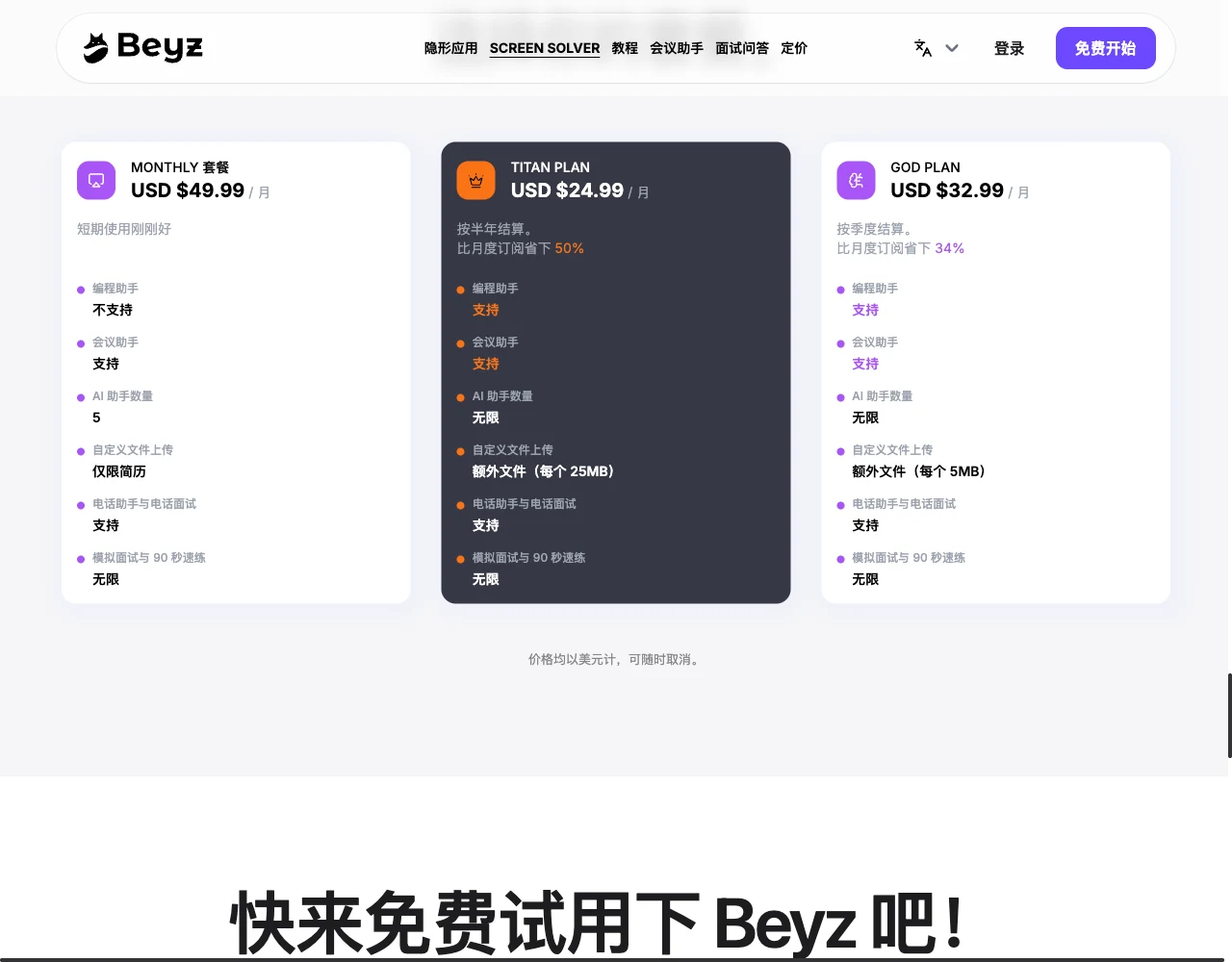
Beyz's public pricing cards, captured November 11, 2026. The browser served its Chinese localization with USD pricing; the plan amounts and eligibility match the English homepage read separately. The English table above summarizes the displayed terms. Open the full-size capture.
The quarterly amount implies $98.97 every three months; the semiannual amount implies $149.94 every six months. Those are calculations from the displayed monthly equivalents, not verified checkout totals. Check taxes, renewal and the final selected plan before paying.
This distinction changes the replacement decision. If the only obstacle is missing coding on Monthly, an eligible Beyz upgrade may address it. If you need a job brief or technical document as context, check the file allowance as well as coding. A replacement with a screenshot button has not necessarily replaced document uploads.
Beyz advertises a free start, but the public material read for this guide did not establish a precise free usage allowance. A free desktop download does not by itself establish free AI access or the rights included in a paid plan.
Map the input you need to the device that handles it
An interview assistant has to receive the right information before its answer can be useful. Separate these requirements:
| Requirement | What Beyz documents | What to check in SkillCopilotAI |
|---|---|---|
| Spoken interview questions | Interview hints; browser and desktop workflows described in its guides | Whether your actual incoming audio reaches the installed app; test with headphones and a partner |
| An on-screen coding problem | Coding Assistant on the eligible plans; desktop overlay | Coding and smart screenshots in the paid bundle; verify the captured constraints |
| Resume plus supporting documents | Upload allowances vary by plan | Rebuild needed background; equivalent file types, limits and import are not established here |
| A phone surface for answers | Phone Assistant & Phone Interview listed on all three plans | Mobile Mirror shares the running desktop session; verify answers, typed follow-ups and authorized screenshot requests |
| A supported desktop | macOS 14+ or Windows 11 22H2+ on the desktop page | Download page lists macOS 14+ and Windows 10/11 64-bit; actual input compatibility still needs checking |
The Beyz context guide explains preparing files and choosing Interview or Meeting mode. Its desktop page describes an overlay with opacity, hide and click-through controls. Those documented options mean a comparison should not assume Beyz is limited to one browser tab.
A vendor's screen-sharing claim is not evidence that every capture method excludes its interface. This guide does not rank either product's invisibility. Choose a permitted workflow and verify the actual view if sharing matters.
Compare the payment for your intended period
SkillCopilotAI's subscription plans include unlimited interview assistance, mock practice, coding and smart screenshots during the paid term. The model tier changes with the plan.
| SkillCopilotAI subscription | Full listed payment | Included model tier |
|---|---|---|
| Monthly | $89.90 each month | Basic |
| Quarterly | $179.70 every three months | Professional |
| Yearly | $346.80 each year | Premium |
The quarterly and yearly monthly equivalents are $59.90 and $28.90. They require the full payment above. These are subscriptions; do not confuse them with separately offered one-time plans. Current model entitlements are listed on the pricing page. A tier name does not prove better answers for your task.
For a one-month comparison, SkillCopilotAI costs $39.91 more than Beyz Monthly. However, Beyz Monthly excludes coding. For three months with coding, Beyz God's calculated $98.97 compares with SkillCopilotAI Quarterly's $179.70: a difference of $80.73. These figures compare payment commitments, not equal features or measured performance.
Choose SkillCopilotAI because the desktop tools, phone controls and selected model access solve a need you have verified. It is not the lower-price recommendation in these comparisons. If Beyz already handles your inputs at an acceptable cost, retaining or upgrading it may be the simpler decision.
Try the required input before choosing a paid plan
SkillCopilotAI has a limited 30-minute trial, separate from paid-period unlimited use. Download the app and sign in from it to authorize the trial. Use that allowance on your actual question, audio route or screenshot task before committing to a longer term.
When SkillCopilotAI is a useful Beyz alternative
SkillCopilotAI suits a candidate who wants interview questions, repeated mock practice and coding screenshots in one desktop workflow, and wants to work with the same session from a phone. Those are specific reasons to investigate it beyond a lower advertised monthly equivalent.
Use a phone to view and control the desktop session
Mobile Mirror opens the existing SkillCopilotAI session in a mobile browser. You can read live answers, send typed questions to the current model and request desktop screenshots. Remote screenshots must first be allowed in the desktop app and follow its capture settings. Keep the desktop running; no separate phone app is required for that companion view.
This can be useful when you want the computer focused on a practice call or coding problem and the phone available for answers and follow-ups. It is a desktop companion, not a claim that the phone independently captures an entire interview.
Beyz already documents phone interview assistance. Its guide describes prepared context, cheat sheets and suggestions on the phone. Do not infer that the two products have identical phone controls, or that one lacks a feature because the reviewed guide did not describe it. Check the exact action you need: reading an answer, submitting a follow-up, requesting a desktop screenshot or receiving call audio.
Budget repeated use and select the model access you need
The paid-period unlimited core tools let you repeat coding explanations, practice questions and screenshots without choosing a new credit pack for each session. That does not make unlimited access unique to SkillCopilotAI: Beyz also lists unlimited mock practice, and its eligible plans list unlimited assistants. Those labels measure different things, so compare the actual task allowance.
SkillCopilotAI's Monthly, Quarterly and Yearly subscriptions include Basic, Professional and Premium model tiers respectively. Check the named models on the current pricing page. The trial does not establish access to every model in a higher paid tier, and a larger model menu does not establish a performance win.
Accept the setup and context-rebuilding cost
SkillCopilotAI requires its Windows or Mac desktop app for this workflow. Install it, allow the permissions required for your chosen inputs, and rebuild your resume, role context and response instructions. The Mac setup guide explains permissions and a partner-call check.
We have not established automatic import of Beyz assistants, cheat sheets, files or conversation history. If additional-file support or Beyz's meeting summaries and translation are essential, verify an equivalent before cancelling. The comparison here does not certify SkillCopilotAI as a complete replacement for those functions.
Check three input paths with one practice problem
Use a question whose requirements and result you know. This original exercise makes missing input easier to notice:
Given a list of order records with an ID and amount, return the total amount for each ID. Preserve the order in which IDs first appear. Duplicate IDs must be combined. Explain what should happen for an empty list.
For example, [(A, 4), (B, 3), (A, 2)] should produce [(A, 6), (B, 3)]; an empty list should produce an empty result. Then add a new rule: ignore records with a negative amount. Check that the revised answer preserves the original ordering rule.
- Typed input: submit the complete problem. Check whether the answer retains ordering, duplicates and the empty case. This checks the supplied text, not audio or screenshot capture.
- Incoming audio: in a private call, have a consenting partner read the same problem while you stay silent. Check the received question before judging the answer. Use your normal headphones; our Zoom audio guide explains why microphone and incoming-call audio are different paths.
- Screenshot and phone: display your own problem, capture it through the intended desktop route and inspect which constraints arrived. If using Mobile Mirror, confirm the answer appears on the phone and a follow-up reaches the same session. Allow remote screenshots before requesting one from the phone.
These are proposed checks, not results from testing either product. Keep failures and the original input. A good typed answer does not prove that a call or screenshot will work, and viewing an answer on a phone does not prove that phone-call audio was received.
When to keep Beyz, upgrade it or switch
Keep Beyz when its current input paths and prepared context work for your tasks. Its phone support, meeting tools and eligible coding plans are reasons to check your existing options before moving.
Consider a Beyz upgrade when the missing capability is coding or additional files available in another plan, and the longer payment commitment is acceptable. Check that your file size and assistant needs fit the actual plan.
Try SkillCopilotAI when you want the documented desktop-and-phone controls, unlimited paid core tools and model tier that match your preparation. Verify the input on your computer, rebuild the required context and use the limited trial before paying.
Before ending Beyz access, save your own source materials and record settings you need. Confirm the selected provider's renewal, cancellation and refund terms directly; cancellation and refund are separate questions. No automatic migration or refund is promised here. For a broader shortlist, the interview copilot selection guide helps identify which requirements matter; the Sensei alternatives comparison addresses a different provider's plans and switching choices.
Questions before replacing Beyz
Does Beyz Monthly include coding?
The public plan card checked for this guide says Coding Assistant is not supported on Monthly. God and Titan list it as supported. Check the current card before purchasing; do not assume a coding feature advertised elsewhere on the site belongs to every plan.
Is SkillCopilotAI cheaper than Beyz?
Not in the listed one-month comparison: $89.90 versus $49.99. For coding, compare eligible Beyz plans and their full quarterly or semiannual payment rather than treating the $49.99 plan as equivalent. Choose on the input and workflow you can actually use.
Can both products be used with a phone?
Beyz lists phone assistance. SkillCopilotAI Mobile Mirror shares a running desktop session with a mobile browser for answers, typed questions and authorized desktop screenshot requests. Feature parity and paired-device reliability were not tested here.
Will my Beyz files transfer automatically?
We have not verified an automatic transfer. Keep your originals and confirm the replacement accepts the file type, size and context you require before ending access to a working setup.
Compare similar tools
Editor selected
Sensei AI Alternatives: Phone Sharing, Plans & Switching
Compare Sensei AI alternatives for phone sharing, interview and coding workflows, paid-plan limits and billing costs. Find a fit before switching.
Editor selected
Best Parakeet AI Alternatives in 2026: Free & Paid Options Compared
Compare the best Parakeet AI alternatives on price, free plans, Mac/Windows, Zoom/Teams support and screen-share claims, plus when Parakeet credits still win.
Editor selected
LockedIn AI Review: Pricing, Refunds & Is It Worth It?
LockedIn AI review: verified pricing, refund limits and Trustpilot warning. Compare SkillCopilotAI’s unlimited plans, phone access and model choices.
Same content type
Best CtrlPotato Alternative in 2026: 5 Options Compared by Price and Workflow
Looking for a CtrlPotato alternative? Compare SkillCopilotAI, InterviewMan, Parakeet AI, Interview Coder and Cluely on price, free access, Mac/Windows and meeting apps.
Choose your next step
Compare another tool or move from research into structured interview practice.