


Choose Final Round AI if your priority is keeping a target job, preparation materials, practice and debriefs in one Goal. Choose LockedIn AI if native phone access or a choice between metered and unlimited live assistance matters more. Both document coding, live answers and mock interviews. Compare how you will use and pay for them; no controlled accuracy comparison was performed here.
This Final Round AI vs LockedIn AI comparison checks tasks, clients, billing and usable free access. It does not rank response speed, answer quality or invisibility.
Disclosure: SkillCopilotAI publishes this research-based comparison and sells a competing interview assistant. Public sources were checked November 11, 2026. We did not buy these plans or run a controlled product test. Vendor descriptions are not measured results. The cover is AI-generated. Use assistance for private practice or where permitted.
Choose from the task you need to finish
| Your requirement | Final Round AI | LockedIn AI | Choice to investigate |
|---|---|---|---|
| Prepare and review several rounds for one job | Goal contains role, resume and materials; sessions feed into debriefs | Mock interviews and session reports are documented | Final Round for the explicitly documented Goal loop; verify your own materials |
| Use an iPhone or Android app | Homepage emphasizes desktop and phone screens through another device | Native mobile page describes live, mock and coding workflows | LockedIn if a native phone client is required |
| Test live assistance before paying | Free preparation exists, but live requires Pro; no free live trial | Support lists short free sessions with limits | LockedIn for a short live-input check, not a complete free interview |
| Avoid metered live usage | Pro homepage lists unlimited sessions | Unlimited removes the credit meter | Compare the actual plan and per-session limits before buying |
| Solve an on-screen coding problem | Screen Help with automatic or on-demand capture | Desktop area selection; mobile paste or photo | Choose the input/client that fits your setup; neither is proven better here |
The table highlights documented differences rather than an exhaustive feature inventory. Verify any required input or billing term that remains unclear before choosing.
Preparation and debriefs: how the work is organized
Final Round AI describes one Goal per target job, with role, resume, materials and preparation checklist. Practice launches against that context, and an automatic debrief feeds the next round. This is a concrete fit for a candidate revisiting the same role across recruiter, behavioral and technical rounds.
LockedIn's mobile description also includes mock interviews, scoring and written session reports, with account history shared with the web app. Final Round's Goal framing does not prove LockedIn lacks preparation or review. Compare whether you can find the relevant notes, questions and next practice task in the actual account.
For either tool, use a short project description with known facts. Check whether a follow-up preserves your own contribution and avoids invented metrics. A score or polished answer is not proof of correctness.
Clients: desktop, phone and the actual audio path
Final Round's homepage lists macOS 14.4+ and Windows. It describes Zoom, Meet, Teams and other supported scenarios, with phone screens handled through another device. The current product description includes a desktop workflow, so a browser-only comparison would miss that option.
LockedIn documents Windows and macOS desktop apps, web access and iOS/Android mobile apps. The phone client uses the same account, credits and history. Its mobile page describes room audio, pasted or photographed coding problems, and says desktop-only functions include stealth and remote assist.
A phone hearing a call through the room is different from capturing incoming system audio while you wear headphones. A native phone app is also different from a browser mirroring a desktop session. Before selecting either product, identify where the question originates and which device receives it.
The LockedIn desktop page documents area selection for screen analysis. Final Round describes Auto-capture and Solve screen. Use a problem you own and verify that all constraints arrived. A correct typed answer does not validate screenshot or audio capture.
Both vendors advertise hiding their interface from supported screen shares. We have not tested those claims. LockedIn's pricing footer explicitly says undetectability cannot be guaranteed on every platform. Neither vendor’s marketing establishes that its interface stays hidden in your specific setup.
Prices: compare full payments and allowances
The figures below describe the public offer observed, not a completed checkout. LockedIn displayed the LOCKIN50 promotion; prices can change by account, store and selected period.
| Offer | Observed price | What the payment means |
|---|---|---|
| Final Round Free | $0 | Goals and preparation materials; not free live assistance |
| Final Round Pro | $150/month; longer-term equivalents below | Monthly $150; Quarterly $83.33/month equivalent; Yearly $25/month equivalent; full periods below |
| LockedIn Credits, monthly | $69.99/month displayed | Card says billed every month; metered live allowance |
| LockedIn Credits, quarterly | $49.99/month equivalent | Calculated $149.97 every three months; selected card shows 20 live hours per three months |
| LockedIn Unlimited, monthly | $139.99/month displayed | Card says billed every month; live and mock listed unlimited |
| LockedIn Unlimited, quarterly | $79.99/month equivalent | Calculated $239.97 every three months; removes the usage meter |
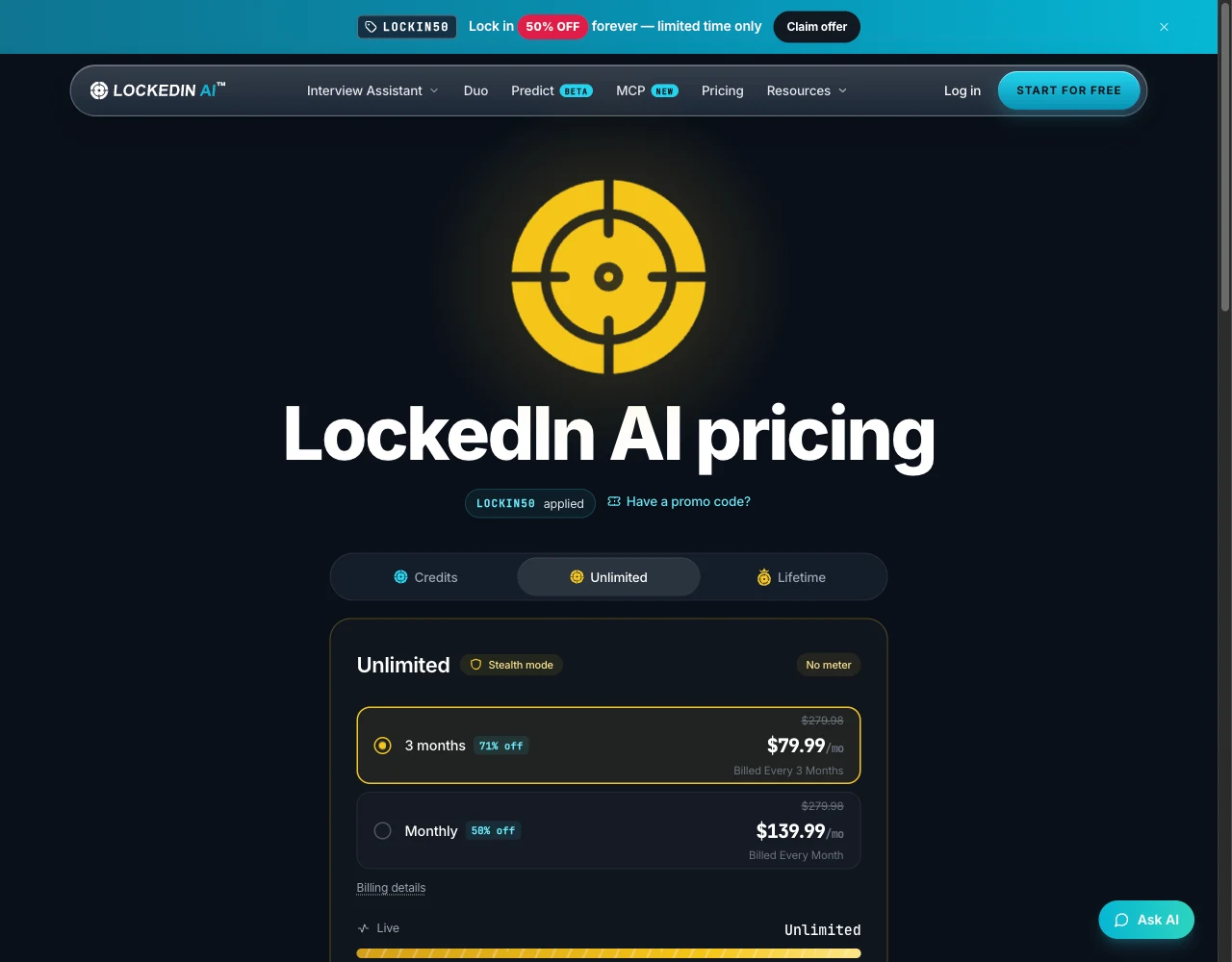
LockedIn's public Unlimited tab captured November 11, 2026, with the displayed LOCKIN50 promotion. This records the advertised billing choices, not a checkout or performance test. View full-size capture.
Final Round subscription prices
The Final Round subscription page displayed these plans when checked on November 11, 2026:
| Plan | Displayed price | Billing commitment |
|---|---|---|
| Monthly | $150/month | Billed monthly |
| Quarterly | $83.33/month equivalent | About $250 every three months |
| Yearly | $25/month equivalent | $300 per year |
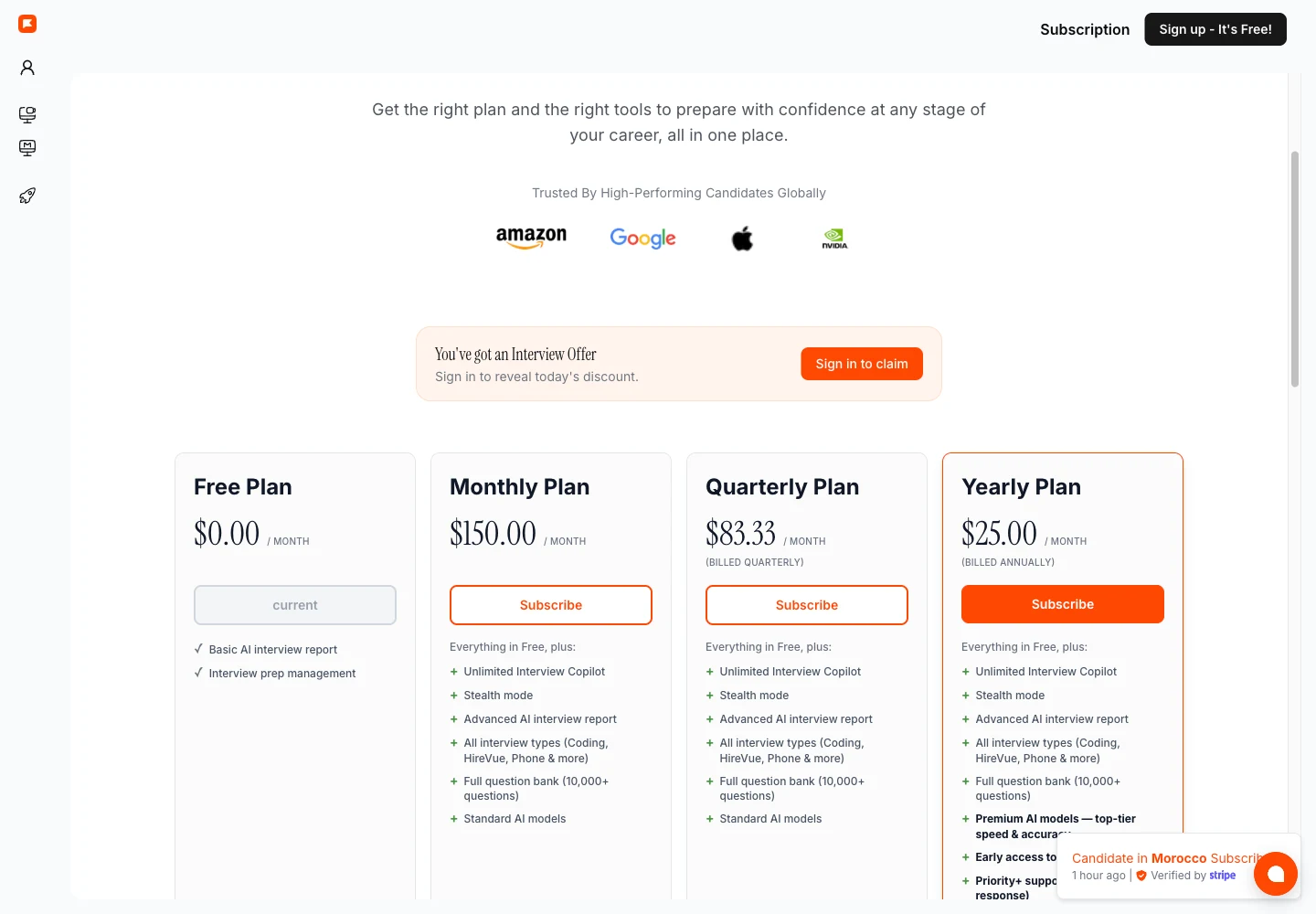
The quarterly total is approximate because the displayed monthly equivalent is rounded. All three paid cards list unlimited Interview Copilot; Monthly and Quarterly list Standard AI models, while Yearly lists Premium AI models. A sign-in banner offers additional discounts, so confirm the final charge and entitlements before subscribing.
For the displayed unlimited offers, Final Round's $150 monthly payment is $10.01 above LockedIn Unlimited's promotional $139.99 monthly payment. Final Round's roughly $250 quarterly payment is about $10.03 above LockedIn Unlimited's calculated $239.97 quarterly payment. This compares advertised payments and billing periods; it does not establish identical model access, session limits or performance.
LockedIn's page contains a billing inconsistency: the interactive cards offer monthly and quarterly billing, while the generic footer says subscriptions are billed every three months. Read the selected current pricing offer and the checkout total together; this guide does not resolve that conflict by guessing.
Metered minutes, mock usage and single-session limits
LockedIn's pricing FAQ describes Credits as 400 live minutes per month, while the selected quarterly card shows 20 live hours per three months. These are consistent in total, but do not establish when all minutes become available or what your checkout grants.
The official pages also disagree about practice consumption: pricing says mock interviews use half the standard rate, while support says paid mock interviews do not touch the balance. Confirm the applicable rule in your account before budgeting a mixture of live and mock use. The published sources do not resolve which rule applies to the plan you would buy.
Support also lists paid-session ceilings of 120 minutes for most sessions and 60 minutes for mock interviews, including unlimited plans. Removing a meter does not remove each session's maximum length. Final Round's unlimited-session headline likewise does not establish an unlimited length for one session; that limit was not verified here.
Free access: what can you actually try?
Final Round explicitly says live sessions need Pro and there is no free live trial. Free Goals and materials let you explore preparation, but do not test live audio or generated live answers.
LockedIn's support describes 5-minute free sessions, up to 60 free minutes a day, with a one-minute pause between sessions. Paid stealth is not included. Accounts with referral or top-up credits have different session conditions, so check your balance before treating a session as a free test.
Choose LockedIn's short free session if your immediate question is whether the intended input reaches the tool. It is too short to validate a complete longer interview. Choose Final Round's free preparation setup to inspect Goal organization; do not mistake that for a test of paid live performance.
Cancellation and phone purchases
LockedIn says purchases through its website or desktop are managed through the account's subscription link; Apple or Google purchases must be cancelled through the relevant store. It says in-app pricing includes store commission while the account and credits remain shared. Compare the actual store price rather than assuming web pricing applies on your phone.
Final Round's refund policy distinguishes cancellation from a refund. Its three-day guarantee has usage and eligibility conditions; it is not a free trial. Read the current policy before buying, and do the same for LockedIn's refund policy. A cancellation button does not guarantee return of the current payment.
A practical way to choose between them
- Lock the client and task. Write down your operating system, meeting app, headphones, question input and whether a phone client is required.
- Try the access that actually exists. Use LockedIn's short free session for an input check; use Final Round's free Goal setup for organization. Neither check proves the other's paid functionality.
- Compare equivalent paid scope. Match metered with metered or unlimited with unlimited, and compare the entire billing charge. Use the complete billing amounts above and confirm the selected offer before paying.
- Keep the evidence. Save the received question, answer, missing constraints, selected plan and applicable session cap. Avoid relying on a vendor's latency or success-rate slogan.
For coding, use this original check: return the first repeated ID in a list, or no result if no ID repeats. Test [A, B, A], [A, B, B] and an empty list. Then change the rule to ignore blank IDs. Supply it through the client you intend to use and check that the changed rule survives. This is a proposed exercise, not a product-test result or employer question.
Final recommendation
Choose Final Round AI when the Goal-based preparation, practice and debrief loop is your main reason to subscribe, your desktop meets the requirements, and you have confirmed the complete Pro price and session conditions.
Choose LockedIn AI when native phone access, short free live-input checks or choosing between Credits and Unlimited is central to your workflow. Confirm the selected billing period, practice consumption rule and per-session ceiling.
Wait before paying if you still cannot identify the complete charge or demonstrate that the intended question reaches the tool. Both document live and coding help; this research does not establish which produces better answers.
For deeper buying questions, read our Final Round AI review and LockedIn AI review. Those articles retain their own check dates. Use the November 11 subscription-page capture above for the prices observed in this comparison.
When to add SkillCopilotAI to your shortlist
Consider SkillCopilotAI if you need desktop interview and coding assistance with answers and controls on your phone. Its Mobile Mirror connects a phone browser to the running desktop session: read new answers, type follow-up questions and request desktop screenshots without installing another phone app. Remote screenshots must first be allowed in the desktop app and follow its capture settings.
That fits a candidate who wants to keep the computer focused on a practice call or coding problem while using the phone as a second screen for the same session. It is a different client choice from LockedIn's native mobile app. Choose Final Round for its documented Goal loop if that is your priority; choose LockedIn if you need its native phone workflow. SkillCopilotAI's phone companion requires the desktop app to stay running and is not an independently operating mobile assistant.
The paid subscription plans include unlimited core interview assistance, mock practice, coding and smart screenshots during the paid term. Monthly is $89.90 with Basic model access; Quarterly is $179.70 every three months with Professional access; Yearly is $346.80 with Premium access. Check the current model list before paying. Compare those payments against the tools and model access you need. They do not establish better answers or a lower price than both tools. Final Round's displayed full-period prices are listed above; personalized discounts and final checkout charges can differ.
Test the desktop-and-phone task before subscribing
Use SkillCopilotAI's limited 30-minute trial to check that specific workflow. The download page lists Windows 10/11 64-bit and macOS 14 or later. Download the desktop app, sign in from it to authorize the trial, and connect your phone using the Mobile Mirror flow.
Ask one project question whose facts you know, or use the original coding exercise above. Confirm that the intended input reaches the desktop session, the answer appears on the phone, and a typed phone follow-up reaches the same conversation. For remote screenshots, allow the feature first and check that the captured constraints are correct. If incoming audio matters, check it separately in a consenting partner call with your normal headphones. These are suggested checks; we did not run them for this article.
Choose a paid plan only after that task works on your setup and the model entitlement fits your needs. The trial is time-limited, and paid-period unlimited use does not turn it into unlimited free access. If you still need a broader comparison, use the interview copilot selection guide.
Questions before choosing
Is Final Round AI or LockedIn AI cheaper?
On November 11, Final Round displayed $150 monthly or about $250 quarterly, while LockedIn Unlimited displayed $139.99 monthly or a calculated $239.97 quarterly with the promotion. LockedIn costs less on those displayed payments, but model access and session conditions are not identical. Confirm the selected offer and full charge before paying.
Which offers a free live trial?
LockedIn documents short free sessions with daily and per-session caps. Final Round's free plan covers preparation; its homepage says paid Pro is required for live sessions.
Which is better for coding interviews?
Both document coding and screen-input support. Choose the client and plan that can receive your problem and preserve its constraints; no controlled coding-quality comparison was performed here.
Compare similar tools
Editor selected
Final Round AI Reviews: Trustpilot Ratings, Pricing, Refunds and Who It Fits (2026)
Final Round AI reviews checked on November 3, 2026: a 2.8/5 Trustpilot score from 280 reviews, two pricing layouts ($150 monthly or $125/mo every two months), the October 2026 refund policy, and who should pay.
Editor selected
LockedIn AI Review: Pricing, Refunds & Is It Worth It?
LockedIn AI review: verified pricing, refund limits and Trustpilot warning. Compare SkillCopilotAI’s unlimited plans, phone access and model choices.
Editor selected
Final Round AI vs Parakeet AI: Pricing, Free Access and Best Fit
Final Round AI vs Parakeet AI compared on billing, free access, platforms and prep tools, plus where SkillCopilotAI fits as a third option.
Same content type
Beyz AI Alternative: Coding, Phone Sharing and Input Fit
Compare Beyz AI with SkillCopilotAI by coding access, context files, phone workflow and full billing costs. Check whether to upgrade Beyz or switch.
Choose your next step
Compare another tool or move from research into structured interview practice.