


Sensei AI is worth trying on its free plan if you want interview answers shaped around your resume, role and work stories. Pay for Pro only after checking your audio setup and the paid feature you actually need. At the published prices, monthly billing costs less for one to three months; annual billing becomes cheaper from the fourth month. Coding Copilot and AI Playground are listed on Pro, so the free experience does not validate the whole paid package.
This review checks public product pages and policies on November 13, 2026. We have not run a logged-in Sensei trial, tested its coding answers or measured response speed. SkillCopilotAI, the publisher, makes a competing assistant. Our judgment covers the documented offer and buying conditions, rather than a performance score.
The cover is an AI-generated editorial illustration, separate from the official page captures below.
What Sensei AI offers
Sensei AI at senseicopilot.com is a real-time interview assistant. Its published workflow uses your resume, personal stories and job information to personalize suggested answers. The homepage also lists a resume builder, story editor, Coding Copilot and AI Playground.
The resume and story tools are relevant when you have experience to explain but struggle to organize it under interview pressure. A product manager might need a concise account of a difficult launch; a finance candidate might need to explain their own contribution to an analysis. The value depends on whether the suggestions preserve the facts and help you answer the question. A personalized-looking paragraph alone cannot establish that.
Sensei advertises support for more than 30 languages. Its meeting-platform FAQ recommends the latest Chrome and names Zoom, WebEx, Microsoft Teams, Google Meet and Amazon Chime. This is a published compatibility claim. It does not verify every browser, desktop meeting client or computer configuration.
Sensei AI free vs Pro: what can you actually try?
The current homepage lists repeatable 15-minute Copilot sessions. Its expanded free-trial FAQ says each session ends after 15 minutes and can be reactivated. The limit applies to each session; the FAQ allows you to start another one.
The visible pricing cards distinguish included features with checkmarks and crosses:
| Capability | Free | Pro |
|---|---|---|
| Interview Copilot | 15-minute sessions | Unlimited sessions |
| AI Resume Builder | Included | Included |
| AI Story Editor | Included | Included |
| Full Customization Suite | Not included | Included |
| Industry Knowledge Base Add-Ons | Not included | Included |
| Coding Copilot | Not included | Included |
| AI Playground | Not included | Included |
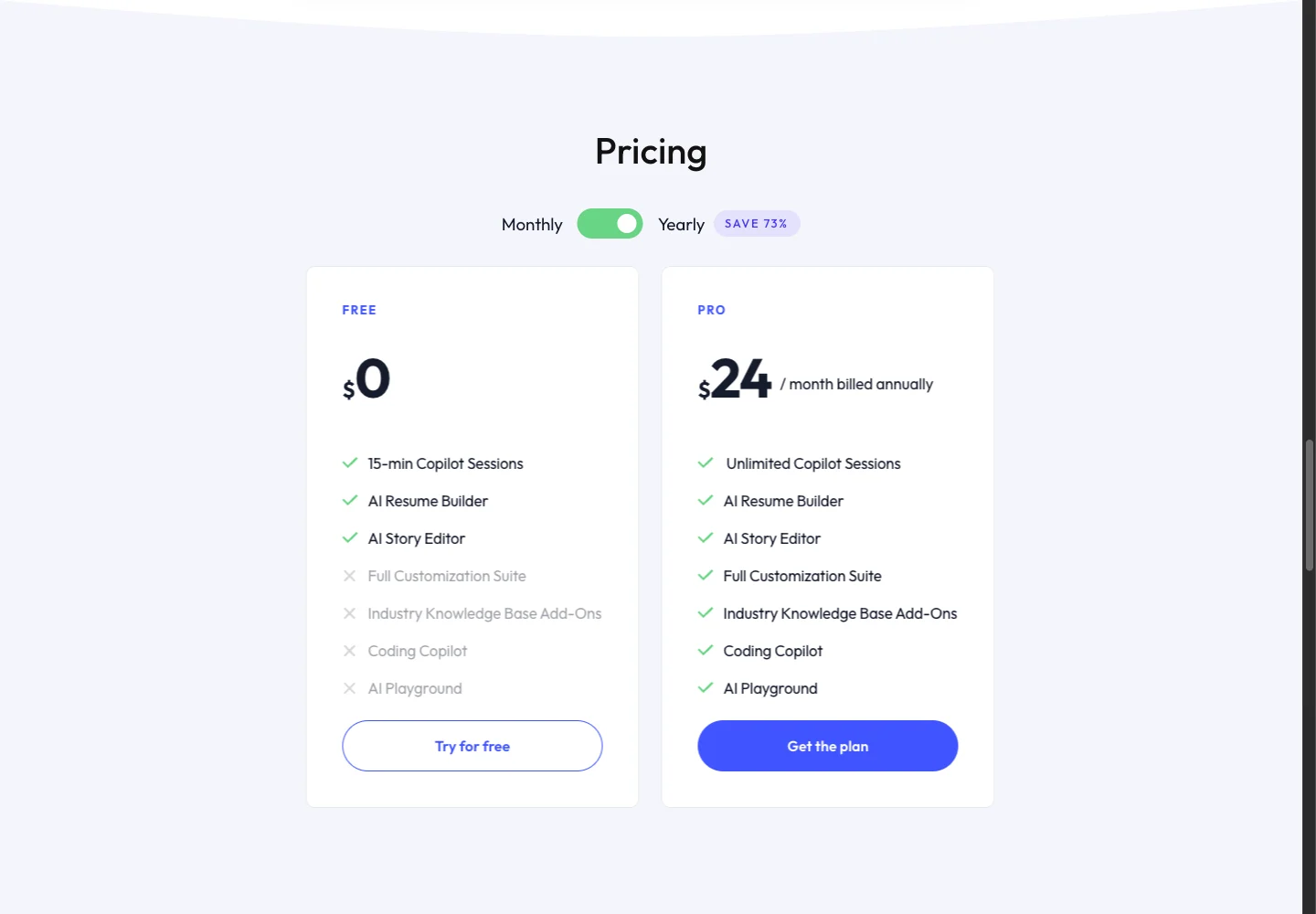
Sensei's public annual pricing view, captured November 13, 2026. The $24 figure is a monthly equivalent billed annually. This capture documents the offer, not a checkout or product test. View the full-size capture.
The separate refund policy still describes 10-minute free sessions. The current homepage card and FAQ both say 15 minutes. Use the homepage as the displayed offer, then check the timer in your account before planning an uninterrupted practice round.
For short spoken-answer practice, repeated free sessions may be enough. A 40-minute continuous rehearsal would exceed the advertised free session length. If your purchase depends on Coding Copilot, ask how you can evaluate that paid feature before subscribing; a free behavioral-answer session cannot establish coding quality.
Pro pricing: compare the amount you will pay
As checked on November 13, Sensei displays $89 per month on monthly billing and $24 per month billed annually. The annual figure implies $288 for the year, calculated as $24 × 12. Confirm the final total, renewal date and any taxes or discounts at checkout; we did not complete a purchase.
Annual billing becomes cheaper in month four
The comparison below assumes unchanged published prices, consecutive monthly subscriptions, and cancellation before any unwanted renewal. The annual column is the whole calculated yearly commitment, even when you only need a few months.
| How long you need access | Paying $89 monthly | Calculated annual commitment | Lower total for that horizon |
|---|---|---|---|
| 1 month | $89 | $288 | Monthly by $199 |
| 2 months | $178 | $288 | Monthly by $110 |
| 3 months | $267 | $288 | Monthly by $21 |
| 4 months | $356 | $288 | Annual by $68 |
| 6 months | $534 | $288 | Annual by $246 |
| 12 months | $1,068 | $288 | Annual by $780 |
The break-even calculation is $288 ÷ $89, or about 3.24 monthly payments. If you only need three months, the lower annual headline still costs $21 more in total. If you use four full months, annual billing costs $68 less.
A longer search could justify the annual commitment after the workflow fits. An uncertain timeline favors starting free or limiting the first payment to one monthly cycle. Neither calculation tells you whether the answers are good enough for your role.
Cancellation and refunds: the official pages differ
Cancellation stops renewal; it does not automatically refund unused time. Sensei's homepage FAQ says current-period charges will not be refunded and access remains active until the billing cycle ends.
The dedicated refund policy gives more detail:
| Situation | What the policy says | What to check before relying on it |
|---|---|---|
| Cancel a subscription | Automatic renewal stops; access continues to the end of the cycle | Confirm cancellation and the subscription end date |
| Monthly refund request | Generally not provided, except under special circumstances | Eligibility depends on Sensei's review; a request is not approval |
| Annual renewal | A partial refund may be available if you cancel within the first 3 days following the renewal date | The wording concerns renewal, not a general 3-day guarantee for a first purchase |
| Approved annual request | Sensei charges for one month and refunds the remaining amount | The page does not specify which monthly rate it retains; do not assume a refund amount |
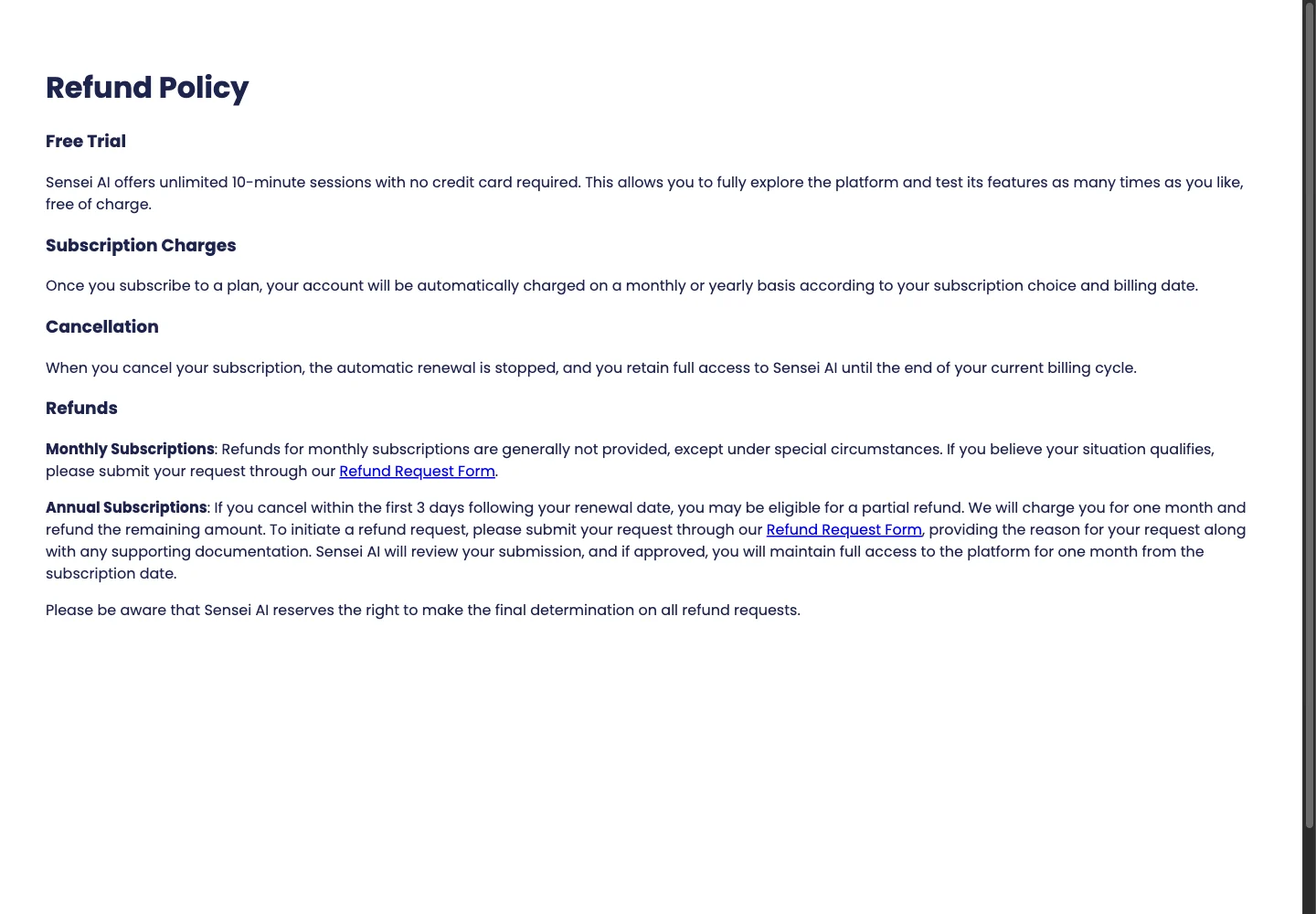
Public refund policy captured November 13, 2026. Read the current policy before payment or renewal. View the full-size capture.
The policy links a Refund Request Form and says Sensei makes the final determination. We have not submitted a request or verified how exceptions are handled. Budget for the commitment you accept at checkout; do not treat a possible exception as permission to buy first and evaluate later.
What other Sensei AI reviews can establish
Many visible reviews come from companies selling another interview assistant. Linkjob's review describes its own trial and screenshots, then recommends Linkjob. Bossed's assessment explicitly says it reviewed published information without testing Sensei. The Offer Inbox discloses affiliate links and describes setup and plan differences. These are different kinds of evidence.
A screenshot can show an interface or price. A documented trial can describe what happened on that author's setup. Neither establishes reliability across all users. The directly surfaced Reddit discussion was blocked when we attempted to read it, so we cannot corroborate its account or derive a customer consensus from it. We do not assign an aggregate user rating.
Sensei's homepage advertises sub-second latency, a success rate and undetectability. We have not independently verified those claims. A high offer count cannot tell you how much the tool caused the outcome, and a visibility claim cannot establish that assistance is permitted in your interview.
Is Sensei AI legitimate?
The product has a public website, an application entry point and published pricing and policies. That establishes an identifiable offering, not a verified success rate or guarantee of satisfactory answers. Start at the official application and confirm you are evaluating the interview tool, rather than another product using the Sensei name.
Who should try Sensei, and who should hold off?
Try it for resume- and story-based answers
Sensei's documented resume and story tools make it a reasonable free starting point when your main problem is organizing truthful experience. Give it one project with your actual responsibility and result, then ask a follow-up about your decision. Check whether the answer keeps your contribution distinct from the team's work and avoids inventing numbers.
For example, “I helped investigate a reporting delay” should not become “I led the redesign and cut costs by 40%.” This is an illustrative fact-checking example, not output we observed from Sensei. Correct source information matters even when a response sounds polished.
Hold off if coding quality is the main reason to pay
Pro lists Coding Copilot, so it would be inaccurate to say Sensei has no coding support. The free card excludes that feature. We have not verified its paid input methods, generated code or debugging depth.
Before paying specifically for coding, confirm the supported input for your problem and the ability to evaluate the paid feature. Use a prepared practice problem with a function signature, examples and constraints. A useful evaluation should check a valid solution, an edge case and an explanation you can defend. This is a proposed evaluation, not a completed Sensei benchmark.
Verify the exact audio and screen workflow
Use the meeting client and browser you intend to use, with a remote speaker in a practice call. Confirm that Sensei receives the other person's question rather than only your own microphone. The homepage's integration list is not evidence that a desktop-app call and a browser-tab call have identical setup.
If you require a native desktop app or a phone companion, get current confirmation of that particular workflow. The public pages we checked did not establish a supported phone-sharing setup. That is an unresolved buying condition, rather than proof that Sensei cannot offer one. Follow the interview's rules on outside assistance.
Our buying recommendation
Stay free if short Copilot sessions and the included resume/story tools cover your preparation. Consider one monthly cycle if the workflow already fits and your need is short or uncertain. Consider annual Pro only after checking the required paid capability and accepting the yearly commitment; the price advantage starts at four monthly payments under the published rates.
Hold off when coding performance, a specific audio setup or a phone workflow remains unconfirmed. Confirm those requirements before committing $288 for the year. An existing subscriber whose setup works does not need to switch simply because another review names an alternative.
If you want to evaluate coding before paying
Sensei's free plan excludes Coding Copilot. If you want to evaluate coding before subscribing, SkillCopilotAI's published 60-minute trial includes coding and screenshot features on a Windows/Mac desktop. It offers another way to check your practice task; we have not established that its answers are better than Sensei's.
After downloading and signing in from the desktop app, use one problem with a function signature, examples and constraints. Check the full prompt was captured, run the proposed solution against an edge case, and inspect the explanation. This is a suggested evaluation, not a comparison we performed for this review.
Mobile Mirror is an optional way to view the running desktop session on your phone; it requires the desktop to stay open. We have not verified Sensei's equivalent workflow. SkillCopilotAI Pro costs $48 monthly, $41 less than Sensei's captured $89 offer. Elite at $98 monthly is $9 more. Paid core assistants are unlimited during the paid term and model access varies by plan; the trial remains time-limited. If Sensei already meets your needs, there is no need to switch.
SkillCopilotAI plans (updated November 19, 2026): Pro is $48 monthly, $114 per quarter ($38/month) or $336 per year ($28/month). Elite is $98 monthly, $234 per quarter ($78/month) or $696 per year ($58/month). Entry-price comparisons refer to Pro unless marked Elite. Included models depend on both your tier and billing period; compare the actual model list on the pricing page.
For a broader replacement decision, use the separate Sensei AI alternatives guide.
If you also need application-writing tools or automatic submissions, our AIApply review separates those purchases from live interview assistance and explains the credit and cancellation conditions.
Compare similar tools
Editor selected
Final Round AI Reviews: Trustpilot Ratings, Pricing, Refunds and Who It Fits (2026)
Final Round AI reviews checked on November 3, 2026: a 2.8/5 Trustpilot score from 280 reviews, two pricing layouts ($150 monthly or $125/mo every two months), the October 2026 refund policy, and who should pay.
Editor selected
Interview Coder Review: Pricing, Audio & Buying Checks
Is Interview Coder worth paying for? Review its $299 monthly and $799 lifetime offers, free-access limits, Mac and Windows caveats, and official video walkthrough.
Same content type
Parakeet AI Reviews: Trustpilot Rating, Pricing, Refunds and Verdict (2026)
Parakeet AI reviews checked November 4, 2026: 4.6/5 from 406 Trustpilot reviews, $149.90 monthly or credit packs from $38, the 7-day unused-purchase refund rule, free sessions, and who should pay.
Useful next step
Netflix Layoffs: October 2026 Facts and Interview Preparation
What we know about the October 2026 Netflix layoffs, with practical examples for explaining a layoff and preparing for your next job interview.
Choose your next step
Compare another tool or move from research into structured interview practice.