

Interview Coder is worth considering if you want desktop coding assistance and can verify the workflow on your own computer before making a substantial purchase. We would hold off on paying if you need a free AI trial, dependable audio on an Intel Mac, or clear monthly cancellation terms that you have not yet confirmed. Its public documentation supports those buying checks; it does not establish an accuracy or speed advantage.
This research-based Interview Coder review checks official product, help, pricing and policy pages on November 12, 2026. We have not installed the app or measured its answers. SkillCopilotAI, the publisher, develops a competing assistant. The relevant alternative section below explains its different trial and phone-sharing workflow.
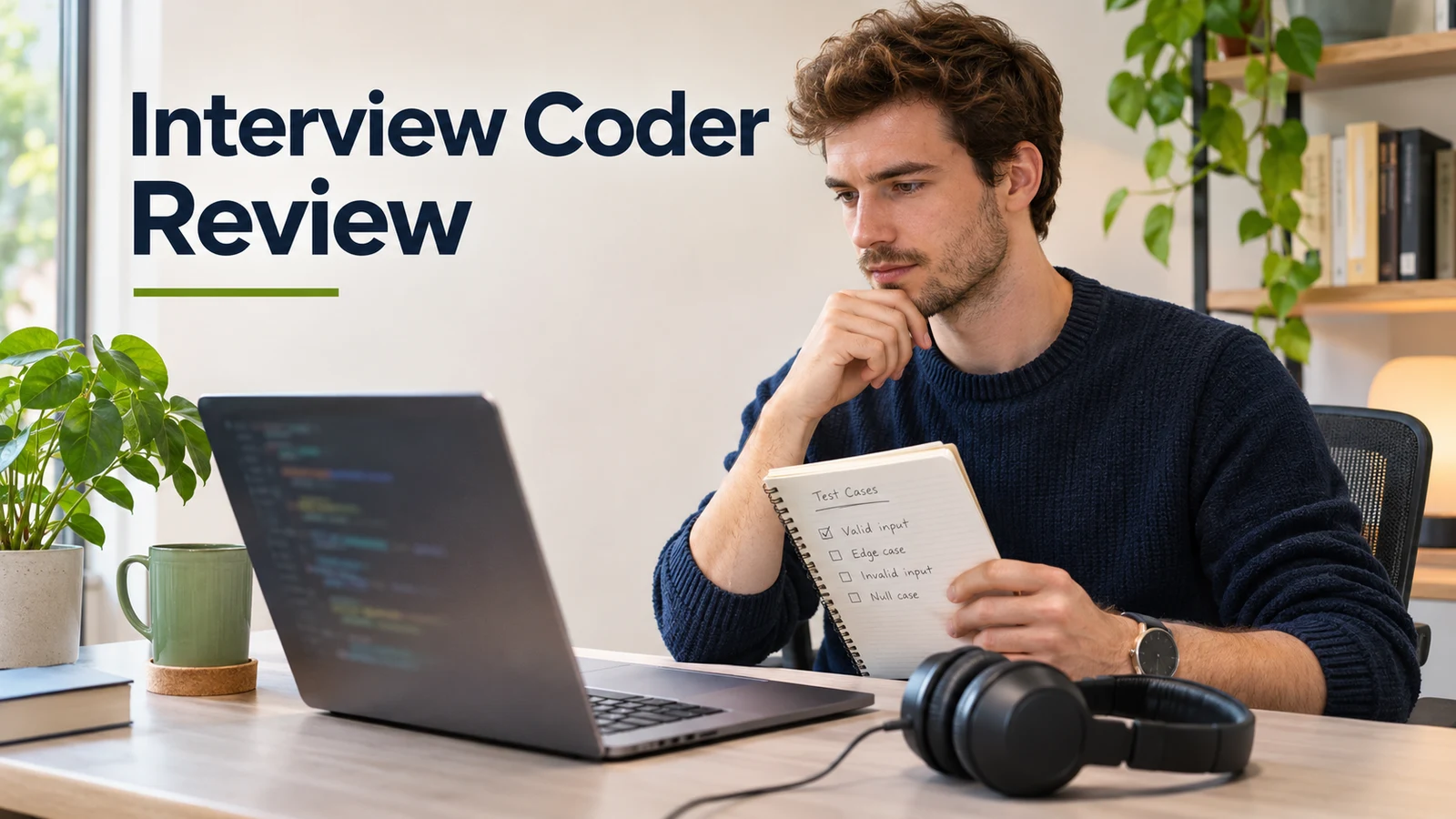
The cover is an AI-generated editorial illustration, separate from the official screenshots and video.
What Interview Coder does
Interview Coder is a Mac and Windows desktop assistant that uses screen context and, according to its current FAQ, spoken questions to suggest answers. Its proposed coding workflow is to capture the problem, inspect the generated solution and explanation, then provide more context when you need debugging or a follow-up.
The current product site advertises coding, system design, behavioral and other interview formats. Some older reviews describe it as coding-only. Evaluate the particular round you need instead of treating either description as evidence of answer quality.
For coding practice, capturing the screen can save you from retyping a prompt. Check that the capture includes the function signature, examples and constraints. A partial screenshot can leave an assistant solving a different problem.
Official video walkthrough
“How to Use Interview Coder,” published in September 2025 by InterviewCoder's official channel. Watch on YouTube. This is a vendor walkthrough, not our test or evidence of a general success rate. The interface and promotional pricing shown are historical; use the current pricing section below for today's public offer.
Check your computer before buying
The vendor's own FAQ identifies limitations that a generic “Mac and Windows” label misses. These are published support conditions, not results from our machines:
| Your setup | What the official FAQ says | Buying implication |
|---|---|---|
| Intel Mac | Core features still work, but audio is limited and advanced capabilities may be restricted | Confirm your required audio task before paying |
| Apple Silicon Mac | Recommended by the vendor for full Mac audio support | Check permissions and your actual audio source; the recommendation is not an independent compatibility test |
| Windows 10 with Google Meet | The FAQ addresses the app appearing during screen sharing and recommends Windows 11 | Do not assume the Windows download guarantees this particular workflow |
| Windows 11 | Recommended for full compatibility with the vendor's visibility-related features | Still check the exact app, OS and meeting versions you will use |
Source: the expanded device and audio questions on the official homepage FAQ, checked November 12. We report the limitations and recommendations without endorsing the vendor's explanation of their causes.
What the free basic checks can tell you
The Getting Started guide puts installation, account sign-in and basic checks before subscribing. Its Basic Checks page recommends a test meeting with screen sharing to inspect visibility on your setup.
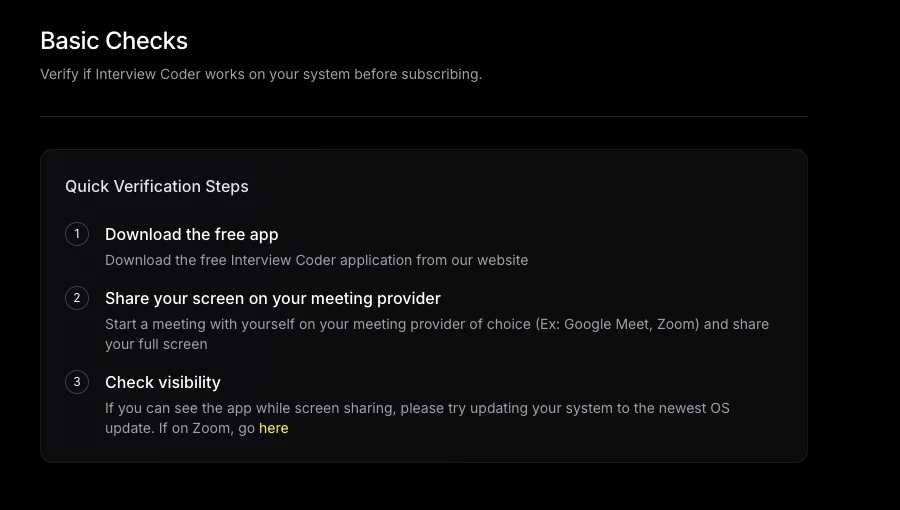
Official Basic Checks documentation, captured November 12, 2026 and cropped for readability. This records the vendor's suggested compatibility check; we did not perform it in the desktop app. Open the full-size capture.
A successful installation or visibility check does not tell you whether generated code is correct. The free download does not include AI features, according to the product FAQ. Ask what evaluation access is available for your account if you need to see an actual answer before paying.
Interview Coder pricing and the actual commitment
The public prices checked on November 12, 2026 are in US dollars:
| Offer | Listed payment | Published allowance | What remains to verify |
|---|---|---|---|
| Free download | $0 | Explore the app; AI requires paid access | Which compatibility checks you can complete without AI |
| Monthly Pro | $299 per month | 1,000 usage credits per month | Credit consumption, renewal date and applicable cancellation procedure |
| Lifetime Pro | $799 once | Unlimited lifetime access advertised | Whether the workflow fits before committing the larger amount |
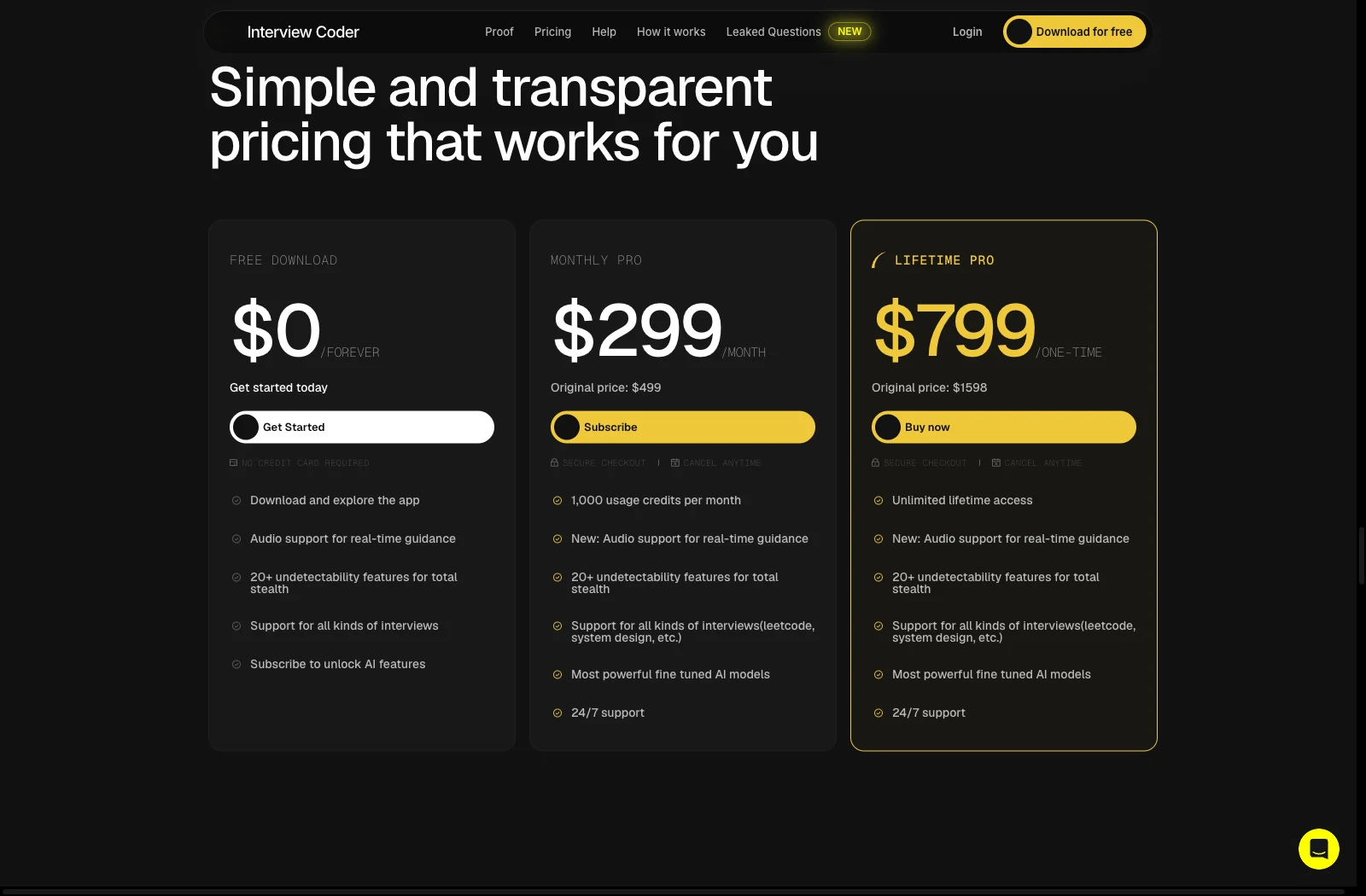
Official Interview Coder pricing, captured November 12, 2026. These are displayed offers, not a checkout receipt. Open the full-size capture.
Two monthly payments total $598; three total $897. Lifetime costs $98 less than three monthly payments, but requires $799 upfront. If you need only one month, choosing lifetime increases the initial bill by $500. A lower long-term total is useful only after you know the product suits you.
We could not establish a reliable conversion from the monthly credits to complete coding problems. A problem may involve capture, retries and follow-ups. Confirm how those actions are charged rather than reading 1,000 credits as 1,000 fully solved questions. Taxes, checkout-specific offers and your actual credit consumption were not tested.
Refunds and cancellation are separate questions
The refund page states that purchases are non-refundable. It also describes lifetime-only access with no subscription management, although the homepage sells Monthly Pro and labels it cancellable at any time.
The terms, section 8.1, separately describe automatic renewal and written non-renewal notice at least 30 days before renewal unless the order provides otherwise. Those public descriptions do not give a consistent monthly cancellation procedure.
Before paying monthly, get confirmation of the terms attached to your selected order: how to cancel, the deadline, when access ends and whether another payment is scheduled. Save that confirmation and your order details. We have not verified a billing-dashboard cancellation flow. Stopping renewal and receiving a refund are different outcomes.
How to evaluate the code and follow-ups
The published feature set makes Interview Coder a candidate for screenshot-based coding practice, debugging and spoken follow-ups. We cannot tell you how often it produces correct code or how quickly it responds. We did not collect a current-version set of inputs and outputs under controlled conditions.
Public discussions include both favorable practice accounts and detection or reliability complaints. The Reddit discussion about Interview Coder illustrates that disagreement. Versions, plans and test conditions are often missing, and some discussions mix different products or promote alternatives. They identify questions worth checking, not a dependable failure rate for today's app.
For a useful evaluation, keep one complete problem and run the returned code yourself. Then change one requirement and check whether the code and explanation both change. Our Interview Coder vs ShadeCoder comparison includes an original interval-merging task with independently checked outputs for that purpose. It is practice material, not a recorded Interview Coder result.
Record the app version, plan, input, unedited output, execution result and any correction you supplied. Measure time only if you actually need a latency comparison and can keep the conditions consistent. A polished explanation or a vendor video cannot replace checking the code.
Can you rely on the “undetectable” claim?
We have not verified it. An overlay being absent from a shared image is a narrower observation than proving that every assessment system will accept its use. Follow the assessment's permitted-tool rules and evaluate the workflow in a mock session or another allowed setting. This review does not certify a detection-proof setup.
Audio and data policies need clarification
The current product FAQ advertises audio transcription, but section 1.1 of the terms, dated June 10, 2025, still says the service does not process audio. The privacy policy, also dated June 10, describes customer data that may include recordings, transcripts and screenshots. These are conflicting public descriptions, not proof that audio is absent from the current product.
Section 3.2 of the terms also permits use of Free and Pro customer data for model training unless otherwise agreed. That wording does not establish that every submitted item is used for training. If the distinction affects your decision, confirm the current retention, deletion and training conditions before supplying sensitive material. Use a public or original practice problem for the initial evaluation.
Who should consider it, and who should hold off?
Consider Interview Coder if you specifically want its desktop screen-and-audio workflow, your machine passes the relevant checks, and the cost fits a preparation period you have already planned. The lifetime offer may suit an existing satisfied user who expects continued use. It is a payment option, not a reason to assume the software will work for a new buyer.
Its documented strengths are a coding-oriented desktop workflow, spoken-question support with stated device caveats, broader advertised interview coverage and a choice between monthly and lifetime access. Check those capabilities with the coding questions and computer you plan to use.
Hold off if you need to inspect AI output free before deciding, cannot confirm the required audio support, or have unresolved concerns about cancellation or data handling. If your existing assistant handles your practice tasks well, decide which problem Interview Coder would solve before adding a $299 monthly bill.
When to compare SkillCopilotAI
SkillCopilotAI is relevant if you want to try generated answers before purchasing, or want to read answers and send follow-ups from your phone while coding on the desktop. It advertises a 60-minute trial with limited models and a $48 Pro monthly subscription with unlimited core coding assistance and screenshots during the paid term. See the current plans; this is a different allowance system from Interview Coder's monthly credits.
Its mobile-sharing workflow lets a phone browser display live answers, request desktop screenshots and send typed questions to the current model. The desktop app must remain running. Remote screenshots require permission there and follow its settings; this is not a standalone mobile app. We have not confirmed an equivalent competitor workflow or performed a matched product test, so we do not claim better accuracy, speed or visibility behavior.
For the trial, prepare the same complete coding problem and one changed requirement. Download the installer for Windows 10/11 x64 or macOS 14+, then sign in from the app to authorize it. Check the generated code by execution; if phone sharing matters, separately check answer readability and whether the follow-up reaches the same desktop conversation. Paid plans provide different model tiers, so trial results do not evaluate every paid model.
SkillCopilotAI plans (updated November 19, 2026): Pro is $48 monthly, $114 per quarter ($38/month) or $336 per year ($28/month). Elite is $98 monthly, $234 per quarter ($78/month) or $696 per year ($58/month). Entry-price comparisons refer to Pro unless marked Elite. Included models depend on both your tier and billing period; compare the actual model list on the pricing page.
For a detailed replacement comparison, read Interview Coder alternatives. For a broader evaluation framework, use our interview copilot selection checklist.
Remaining questions
Is Interview Coder free?
The installer is free. The official FAQ requires payment for AI features, so a free download is not a free coding-answer trial. Verify any account-specific offer before planning around it.
Does Interview Coder work on Intel Macs?
The vendor says core features work, with limited audio and possible restrictions on advanced capabilities. Confirm your specific version and required task. We did not test an Intel Mac.
Is the $799 lifetime plan worth it?
It costs less than three $299 monthly payments, but the relevant question is whether you would otherwise keep using this product. Verify the workflow and purchase conditions before choosing the larger upfront payment.
Sources and review method
We checked the linked official homepage, expanded FAQ, help center, pricing, refund, terms and privacy pages on November 12, 2026, and used public discussions as questions to investigate. The official walkthrough is attributed to its publisher. Screenshots show public documentation and offers, not our desktop use or completed purchases.
This article was prepared with AI assistance and source checks. Emma's byline identifies article editing and website operations; it does not imply that Emma tested the desktop app. We did not verify current answer accuracy, latency, audio capture, the cancellation dashboard or screen-sharing behavior. The verdict is a conditional purchase assessment based on published access, device limits, costs and unresolved documentation conflicts.
Compare similar tools
Editor selected
ShadeCoder Review: Pricing, Features & Trial Checks
ShadeCoder review covering paid features, pricing, free-credit limits, and who should try it. Includes an original coding check and clearly stated research limits.
Same content type
CtrlPotato Review: Pricing, Free Trial, and Who It Fits
CTRLpotato review with user-provided coding output, pricing, trial limits, and Lite vs Pro differences. See what the evidence supports before subscribing.
Same content type
Sensei AI Reviews: Free Limits, Pro Pricing & Buying Advice
Is Sensei AI worth paying for? Check free-session limits, Pro costs, the monthly-versus-annual break-even point, coding access and conflicting refund terms.
Same content type
Parakeet AI Reviews: Trustpilot Rating, Pricing, Refunds and Verdict (2026)
Parakeet AI reviews checked November 4, 2026: 4.6/5 from 406 Trustpilot reviews, $149.90 monthly or credit packs from $38, the 7-day unused-purchase refund rule, free sessions, and who should pay.
Choose your next step
Compare another tool or move from research into structured interview practice.