


Cover: AI-generated editorial illustration.
The best AI interview assistant depends on the job you need it to do. Start with Sensei AI for short free Copilot sessions, Final Round AI for organizing preparation and debriefs around a target job, LockedIn AI for native phone access, ParakeetAI for an occasional call without a subscription, or SkillCopilotAI for a desktop session with a phone companion and a fixed-term unlimited core-assistance plan.
Those recommendations compare documented workflows and buying conditions. We have not run a controlled five-product test of answer quality, speed or screen-sharing behavior, so none is an overall performance winner.
Disclosure and method: SkillCopilotAI publishes this guide and sells one of the products. Emma handles article editing and website operations. This AI-assisted guide checks public product and pricing pages on November 15, 2026, and reuses dated evidence where noted. We did not buy these plans or test their paid sessions for this article. Prices are USD before applicable taxes or individualized discounts; checkout terms can change. Live-assistance descriptions apply only to situations where assistance is permitted. Otherwise, use these tools for private practice.
Which AI interview assistant should you try first?
| Your main requirement | First option to consider | Why it fits | Reason to choose another |
|---|---|---|---|
| Try short spoken-answer sessions without paying | Sensei AI | Free plan advertises 15-minute Copilot sessions; personalization uses resume, role and stories. | A 15-minute session cannot cover an uninterrupted 45-minute rehearsal. Coding Copilot is a Pro feature. |
| Keep preparation, live guidance and feedback attached to a target job | Final Round AI | Goals hold your materials; practice sessions and debriefs form a documented preparation loop. | Free access does not include live CoPilot sessions. |
| Use a native iPhone or Android app as well as desktop/web | LockedIn AI | Native mobile clients and shared account history are documented, with metered and unlimited paid choices. | Its cheapest headline price may require three months upfront; session limits still need checking. |
| Pay for an occasional call rather than a recurring plan | ParakeetAI | Non-expiring credit packs are available alongside subscriptions. | Buy the whole pack, not the advertised fraction of a credit your call consumes. |
| Run desktop interview/coding assistance with answers and controls on your phone | SkillCopilotAI | Mobile Mirror connects a phone browser to the desktop session; paid plans include unlimited core assistants during the term. | It needs the desktop app running. It is not a standalone native phone assistant. |
The list covers distinct buying decisions rather than every product in the market. Coding-only tools may deserve a separate comparison; our Interview Coder vs ShadeCoder guide addresses that narrower choice. If you only want an AI to ask mock questions and critique your own answers, start with the mock interview practice guide.
Sensei AI: start here for short free Copilot sessions
Sensei's current homepage lists a free plan with 15-minute Copilot sessions. Its workflow uses your resume, job information and personal stories to shape suggestions. That makes it a reasonable first option when you want to check whether short spoken-answer help is useful before making a payment.
The distinction is between a short session and a complete round. Restarting a session does not create an uninterrupted interview. The homepage's free-session FAQ, recorded for our Sensei review on November 13, said sessions could be reactivated; confirm the timer and access in your account. Coding Copilot and AI Playground are excluded on the free pricing card and included in Pro.
Pro displays $89 monthly, or $24 per month billed annually. The latter implies $288 upfront for a year, calculated from the displayed equivalent. Three monthly payments total $267, so annual billing would cost $21 more if you only needed three months. A low annual headline is not automatically a lower job-search budget.
Start with Sensei if short free sessions address your immediate need. If you need to try coding assistance or validate a continuous longer session before buying, check another option: a short free behavioral session cannot establish how the paid coding feature performs.
Final Round AI: choose it for a job-centered preparation loop
Final Round AI organizes work around a Goal containing your resume, target role, job description and reference materials. It documents practice interviews across eight scenarios, including behavioral, coding, system design and salary negotiation, followed by debriefs that identify what to improve.
Shortlist it when you have several rounds for one role and want the preparation and feedback together. Other products also offer mocks and reports; this recommendation is about Final Round's documented organization, not proof that competitors lack those features.
The free plan lets you set up Goals and materials. The homepage explicitly says there is no free live trial: live CoPilot needs an active Pro subscription. Use free access to inspect preparation organization, not to conclude that paid live audio and answers work on your setup.
The subscription page displays $150 monthly, $83.33 per month billed quarterly, or $25 per month billed annually. Those longer-term equivalents imply roughly $250 for three months and $300 for a year. Annual lists premium models; monthly and quarterly list standard models. Its refund FAQ distinguishes a conditional 72-hour guarantee for first-time quarterly/yearly purchases from non-refundable monthly plans; a refund policy is not a free trial.
Choose Final Round when: organizing and reviewing several job-specific rounds is central to the purchase. Consider another option when: you must verify live assistance for free before spending, or only need one occasional call. The current desktop page lists macOS 14.4+ and Windows; check the installer for your device.
LockedIn AI: choose it for native mobile access and metered plans
LockedIn AI documents Windows, macOS, browser, iPhone and Android access. A native phone app can matter when you want to work from the phone itself. That differs from a browser displaying a desktop session's output.
Its free access is useful for a small setup check. The support page describes five-minute sessions, up to 60 free minutes per day, with a one-minute pause between sessions. Referral or top-up credits can be consumed first under different limits. The daily total does not turn the free plan into a continuous hour.
On the pricing page, with the displayed LOCKIN50 promotion applied, monthly Credits costs $69.99 for 400 live minutes per month; Unlimited costs $139.99 monthly. The three-month view displays $49.99 and $79.99 monthly equivalents, implying $149.97 for Credits or $239.97 for Unlimited per quarter. The selected Credits card lists 20 live hours per three months, or 40 hours of mock practice at the published half rate.
Native mobile access and a defined live-minute budget are reasons to choose LockedIn. If you expect to exceed that allowance, price the top-up or Unlimited plan before deciding. Also confirm the maximum length of one session: “unlimited” usage does not establish unlimited session duration. Our Final Round AI vs LockedIn AI comparison explains their different preparation and device workflows in more detail.
ParakeetAI: choose credits for occasional use
ParakeetAI offers subscriptions and non-expiring credit packs. The pricing view says 0.5 credit covers one 30-minute call or mock interview. A single credit costs $38; larger packs lower the displayed unit price but require a larger purchase.
If you want one paid 30-minute call, that means buying a $38 credit, not paying $19 for half a credit. Whether you use the remaining balance later affects the value of that purchase. Check the rules for longer calls, extensions and rejoining before budgeting them; do not assume every session length converts linearly from the 30-minute example.
Parakeet also displays a $149.90 monthly interview-assistant subscription. Its homepage advertises a free first mock interview, but that does not by itself establish the available free live-call allowance. Check the session timer and what is charged before starting.
Its current FAQ distinguishes desktop apps, desktop Chrome and a mobile web interface. A native mobile app is described as forthcoming, so do not select it on the assumption that you can install one today. On a phone, taking a photo of a displayed problem differs from desktop screenshot capture and typed chat.
Choose Parakeet when: infrequent calls make a non-renewing credit purchase useful. Consider another option when: your planned use would require repeated packs, or you specifically need a native phone app. A credit pack is a payment choice, not evidence of more accurate answers.
SkillCopilotAI: choose it for desktop assistance with a phone companion
Consider SkillCopilotAI when you want interview and coding support on the computer while reading answers and sending follow-up questions from your phone. Its Mobile Mirror uses your phone's browser to join the running desktop session. You can view answers, ask a question and request a desktop screenshot after allowing remote capture in the desktop app.
This is useful when the phone is a second screen for the same conversation. It is different from selecting LockedIn for an independently usable native mobile client. If you want a phone-only setup, this companion workflow is not the reason to choose SkillCopilotAI.
The pricing page lists a limited 60-minute trial. Paid subscriptions include unlimited core interview assistance, mock practice, coding and smart screenshots during the paid term. Monthly costs $48, quarterly $114, and yearly $336; model access differs by plan. Compare the selected model entitlement as well as the payment. The trial does not become unlimited because the paid plan is unlimited.
To evaluate this fit, download the desktop app, sign in, and connect your phone through Mobile Mirror. Use one question from your own practice material in a consenting rehearsal. Check that the intended question reaches the desktop session, that its answer appears on the phone, and that a phone follow-up stays in the same conversation. If remote screenshots matter, allow capture first and inspect whether the relevant prompt and constraints were captured.
Passing those checks would support choosing the desktop-and-phone workflow on your setup. It would not establish universal audio reliability, answer quality or screen-sharing behavior. We did not operate that trial for this article. For a separate, dated example of actual outputs and their limits, the copilot selection guide reviews user-supplied practice-session photographs.
SkillCopilotAI plans (updated November 19, 2026): Pro is $48 monthly, $114 per quarter ($38/month) or $336 per year ($28/month). Elite is $98 monthly, $234 per quarter ($78/month) or $696 per year ($58/month). Entry-price comparisons refer to Pro unless marked Elite. Included models depend on both your tier and billing period; compare the actual model list on the pricing page.
Compare actual payments, not just monthly headlines
These are selected public offers checked November 15, not equivalent bundles or a complete price catalog. LockedIn figures include the displayed promotion. A calculated full-period charge based on a rounded monthly equivalent may differ slightly at checkout.
| Product and selected route | One monthly payment | Three-month planning cost | What changes the decision |
|---|---|---|---|
| Sensei Pro, paid monthly | $89 | $267 across three monthly payments | Annual equivalent implies $288 upfront; Coding Copilot requires Pro. |
| Final Round Pro | $150 | About $250 upfront on quarterly billing | Standard models listed for monthly/quarterly; annual is $300 with a different entitlement. |
| LockedIn Credits | $69.99 | Calculated $149.97 upfront with current quarterly promotion | 400 live minutes/month or 20 hours in the selected three-month offer; verify how the term's allowance becomes available. |
| LockedIn Unlimited | $139.99 | Calculated $239.97 upfront with current quarterly promotion | Removes the usage meter; verify per-session ceilings. |
| Parakeet interview-assistant subscription | $149.90 | $449.70 across three monthly payments | Credits and other subscription periods are separate alternatives, not included in this route. |
| SkillCopilotAI subscription | $48 | $114 upfront on quarterly billing | Unlimited core use during the paid term; monthly/quarterly/yearly model access differs. |
Sources: Sensei pricing, Final Round subscriptions, LockedIn pricing, Parakeet pricing and SkillCopilotAI pricing.
Case 1: one uninterrupted 30-minute practice call
Sensei's 15-minute free sessions and LockedIn's five-minute free sessions do not cover this continuous task. SkillCopilotAI's advertised 60-minute trial may fit the nominal duration, but any trial time consumed by setup or earlier checks reduces what remains. Check your timer before planning the full call.
Final Round's free setup does not include live CoPilot. Parakeet's free first mock may be useful if an AI-led mock is what you want; a mock is not the same input as a partner's live practice call. If you decide to buy Parakeet credits for that 30-minute call, the smallest displayed purchase is $38 for one credit.
Choose from the access you can actually use. Splitting a rehearsal into short answers may make Sensei sufficient; buying a long subscription solely to test a single short task may be unnecessary.
Case 2: three months with 30 permitted calls of 45 minutes
That plan needs 1,350 live minutes, or 22.5 hours, before setup, overruns or retries. Here “live” means call assistance in permitted sessions, not mock practice charged at a different rate.
LockedIn's selected quarterly Credits offer includes 20 hours, leaving a 150-minute gap. Its listed Unlimited quarter calculates to $239.97. A Credits plan plus a top-up might be another route, but the top-up price was not verified here, so we cannot call it the cheaper solution.
For this horizon, the selected unlimited subscription routes total $114 for SkillCopilotAI, $267 for three Sensei monthly payments, about $250 for Final Round quarterly, and $449.70 for three Parakeet monthly payments. These compare payment routes, not identical models or tested performance; they do not establish the cheapest possible Parakeet credit combination.
SkillCopilotAI has the lowest listed cost among those selected unlimited routes. That supports a budget reason to try it if the desktop workflow fits. Choose Final Round instead if its Goal-based organization is the feature you need, or LockedIn if native mobile access is essential. A lower bill cannot fix an unsuitable input or device setup.
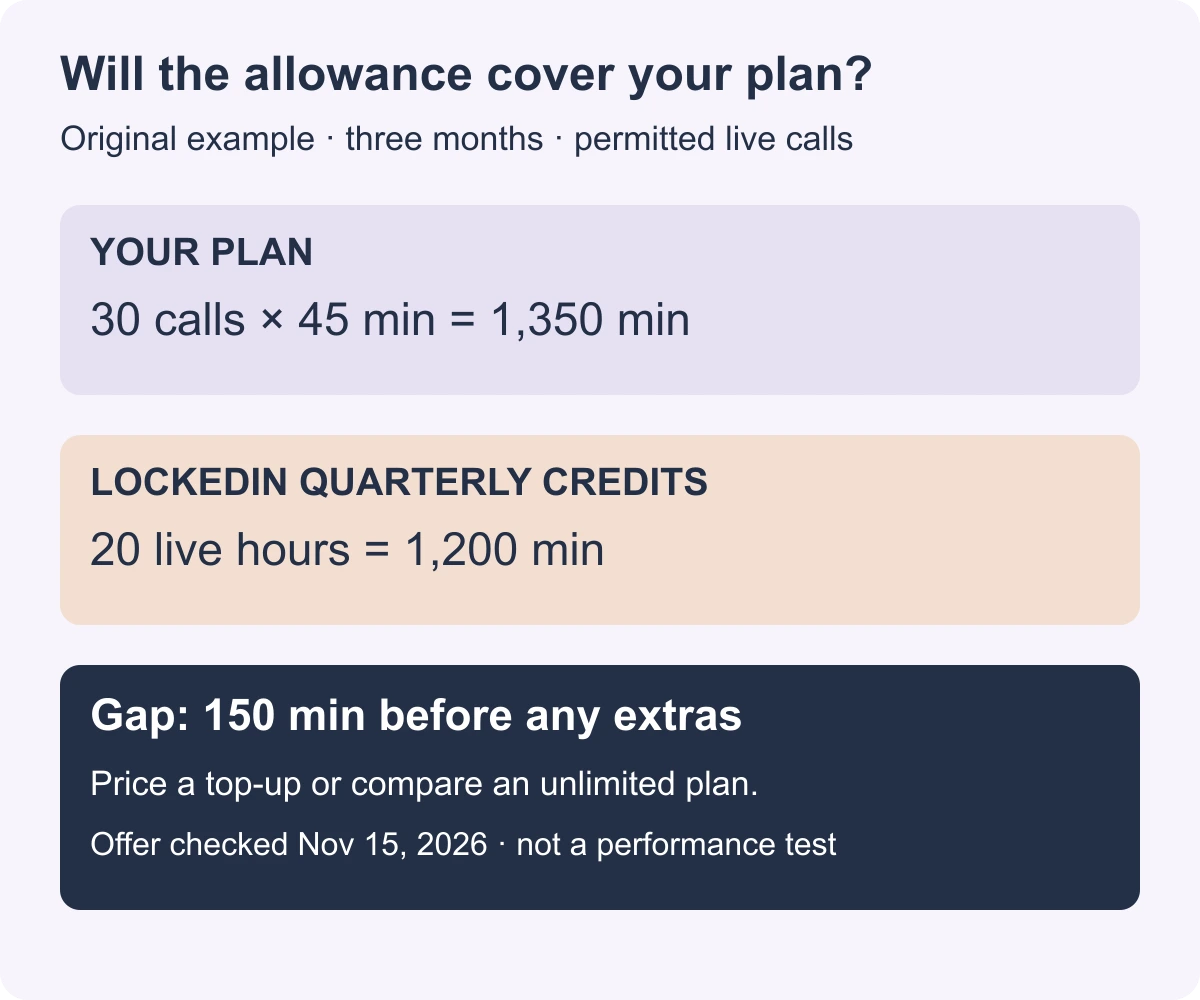
Original arithmetic example using the selected LockedIn three-month Credits allowance checked November 15. It does not include overruns or setup. The calculations also appear in the text.
Download the filled three-month budget comparison
. It includes the selected routes, billing basis, coverage limits and official source URLs. Replace the workload and verify the current offer before buying; the file is a snapshot, not a live price feed.
Questions that can change your shortlist
Which is the best free AI interview assistant?
For short Copilot sessions, start with Sensei's advertised 15-minute access. For a brief device or input check, LockedIn's five-minute sessions may suffice. SkillCopilotAI offers a limited 60-minute trial; Final Round offers free preparation setup rather than live sessions. These are different free entitlements, so there is no verified permanent, unlimited free equivalent across this shortlist.
Which assistant is best for coding interviews?
First check how the prompt reaches it: audio, a desktop screenshot, a phone photo or pasted text. All five products document coding-related assistance, but Sensei gates Coding Copilot behind Pro. A phone companion controlling desktop capture, a native mobile photo input and a desktop screen reader are different workflows. Choose the one that captures your practice problem correctly, then execute the suggested code and check its explanation. This guide does not establish a coding-accuracy winner.
Will it work with Zoom, Teams or Google Meet and headphones?
A meeting-platform logo is not enough to answer that. Incoming system audio and room microphone audio differ. LockedIn's public web requirements, for example, distinguish Windows system-audio capture from macOS Chrome-tab sharing. Use the vendor's setup instructions for your actual client and a consenting practice call with your normal headphones. A typed-question test does not validate audio capture.
Can I rely on “undetectable” or a vendor's success rate?
We did not validate those claims. Screen-share behavior depends on the application, OS and sharing mode, and it does not establish permission to use assistance. Treat claimed latency, accuracy and job-offer rates as vendor assertions unless the measurement method and results support the decision you need to make. If assistance is prohibited, keep these tools in preparation.
What should I do once I have two candidates?
Eliminate the one that fails a required device, input, session length or payment condition. For the remaining choices, use the same fictional background and practice questions. The selection guide's reusable test pack and evaluation sheet help you check factual answers and changed constraints without inventing personal achievements. Buy only when you can name the task the product helps with, what you have verified and the amount you will pay.
Choose your next step
Compare tools or explore guidance for a permitted practice conversation.