

Choose LockedIn AI if you need its interview-focused modes or an invited human helper through Duo. Choose Parakeet AI if its browser-first call workflow and prepaid sessions fit the way you want to use live assistance. Both also offer subscriptions, coding support and practice. Compare the session you need to finish, which device receives the question and where you want to read the answer.
I found a more consequential difference than the usual speed claims: LockedIn's current help center warns that opening a second client on your phone can terminate the running desktop session. Parakeet's phone workflow accepts a photographed problem, but its typed chat and desktop screenshots belong to a computer workflow. “Works on mobile” does not describe the same arrangement in each case.
If you specifically want the question on the computer and the same session's answers on your phone, SkillCopilotAI's Mobile Mirror is another option. Our 60-minute trial lets new users attempt that workflow before subscribing, with a continuous timer and the conditions below.
Method and disclosure: I checked public documentation, rendered prices and attributed user reviews on November 26, 2026. This is a research-based comparison, not a completed matched performance test. SkillCopilotAI develops a competing assistant. Use practice examples privately or where assistance is permitted.
LockedIn AI vs Parakeet AI at a glance
| Your immediate need | LockedIn AI | Parakeet AI | What changes your choice |
|---|---|---|---|
| Start live assistance without paying | Short free sessions with a daily allowance | A set of short free sessions, plus a free mock | Neither free allowance is one uninterrupted interview-length session |
| Work through repeated interview rounds | Interview modes, coding help, reports and optional Duo | Interview or regular calls, uploaded context, Auto Answer and notes | Choose the workflow you will use, not the longest feature list |
| Use a phone as the client | Mobile workflow exists; verify the current app/store and input path | Mobile web with audio and photo/file input | A phone client is different from mirroring a running computer session |
| Keep a session running while you change devices | Help center warns that a second client terminates the first | Leave, End and credit-session extension have different effects | Confirm continuity before changing windows or devices |
| Handle a question on screen | Desktop screen analysis; mobile paste/photo described | Desktop screenshot/chat; phone image or file input | Confirm the question and its latest constraints reach the active client |
| Avoid a usage balance | Paid Unlimited; individual session ceilings remain | Interview Assistant subscription; covered calls have no timer | Unlimited usage and an unlimited single session are different promises |
SkillCopilotAI for one session on two screens
A phone can solve a specific workspace problem: the computer is already occupied by the call and the question, and you want to read guidance somewhere else. SkillCopilotAI's Mobile Mirror connects a phone browser to the running desktop session. You can read new answers on the phone and type a follow-up into that same conversation. Remote desktop screenshots require permission in the desktop app and follow its capture settings.
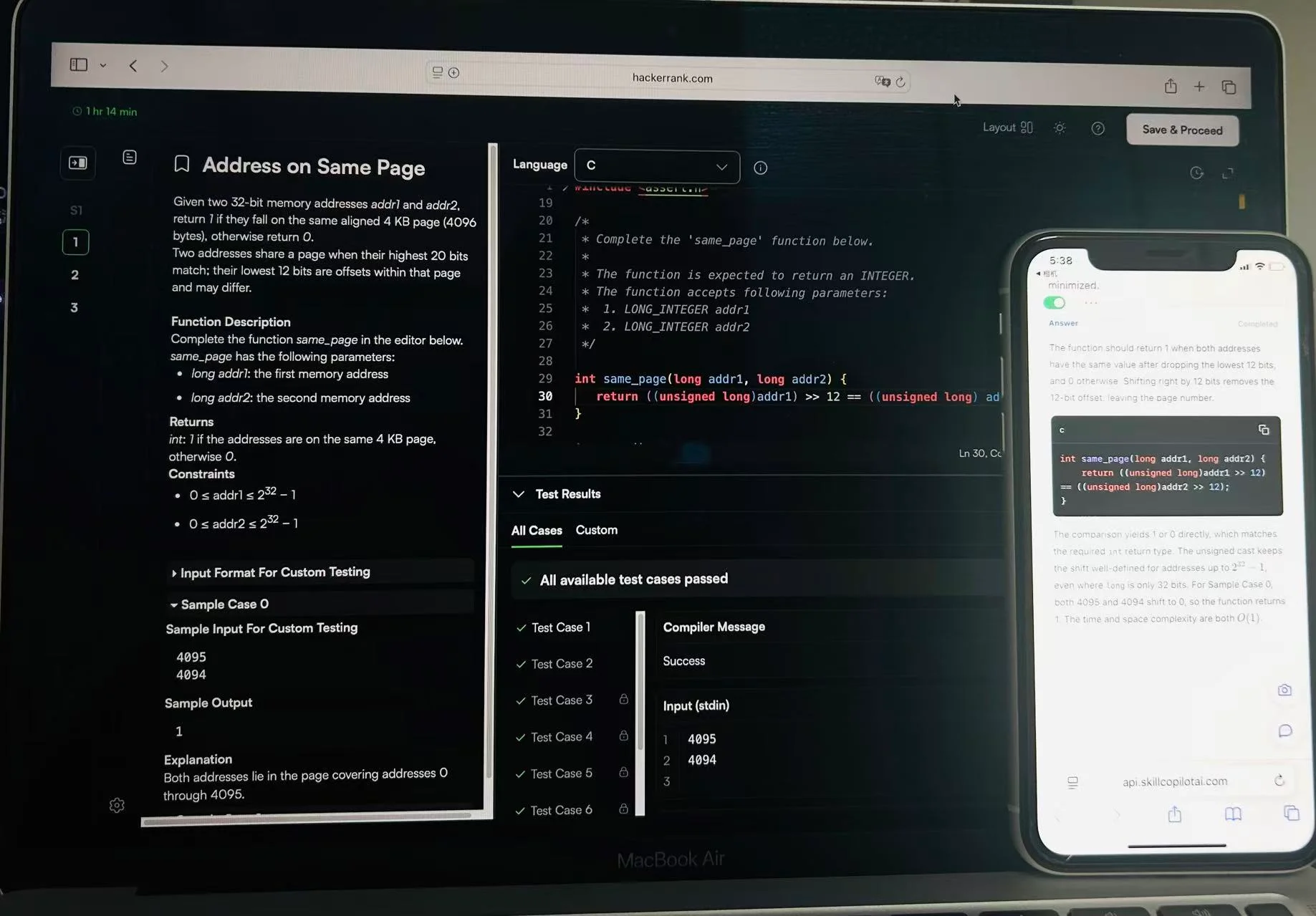
Computer and phone display arrangement, reused from our NVIDIA Ignite article. This separate example shows answers on the phone; it is not a result from testing LockedIn AI against Parakeet AI. Tap to open the full-size photo.
The benefit to evaluate is whether you can keep your working area on the computer and follow the answer comfortably on the phone. It also adds another place to look, and the desktop app must stay running. Mobile Mirror is a companion to the desktop session, not an independent phone assistant. If you need a phone to capture and process everything by itself, compare the competitors' specific phone paths instead.
SkillCopilotAI gives new users one shared 60-minute trial across real-time interview assistance, AI mock interviews, Coding Copilot and the Online Quiz Assistant. It starts at first authorization and runs continuously, including when the app is closed. Signing in again does not reset it, and model access is limited. Prepare your resume context and one practice question before starting. Supported systems are macOS 14+ and Windows 10/11 x64; current trial terms explain the offer.
For this comparison, the first task is straightforward: connect the phone, ask a question whose facts you know, then send a follow-up from the phone. Confirm that both answers belong to the same desktop conversation. If you need a screenshot, allow remote capture first and check the resulting input. This demonstrates the workflow you need to evaluate; it does not establish better answer accuracy than either competitor.
Can the free version cover your next round?
A 45-minute practice round exposes a limit that a two-minute demo can miss: whether the session stays available through the first answer and several follow-ups.
LockedIn's help center describes free sessions of five minutes, up to 60 free minutes per day, with a one-minute pause between sessions when there is no Copilot balance. Twelve full five-minute sessions would provide 60 minutes of assistance, but the eleven pauses make that at least 71 elapsed minutes. They cannot be stitched into one continuous hour-long interview.
Parakeet's Billing FAQ describes 10 free sessions of up to 10 minutes, with another session start available every 12 minutes, and one free mock interview. That gives you a longer initial input check than LockedIn's five-minute session. It still does not cover a 45-minute call uninterrupted, and the page does not describe those ten sessions as a daily renewal.
| What you can learn | LockedIn free session | Parakeet free session |
|---|---|---|
| Does incoming audio reach the assistant? | Yes, a short setup check fits the published time | Yes, with more time for an initial question and follow-up |
| Does uploaded context reach the answer? | Check one question with facts you know | Check the same question in interview mode |
| Can it finish a full 45-minute rehearsal? | Not on one five-minute free session | Not on one ten-minute free session |
| Does a successful short check prove long-call reliability? | No | No |
Use the free session to check the input and the way you read the answer. If the question was never captured correctly, paying for a longer session will not by itself identify the microphone or tab-sharing mistake.
Starting a session: what reaches the assistant?
LockedIn's documented setup is to choose the interview mode, add resume and job-description context, start the session and then start audio capture. The interface's “Start Recording” wording should not be read as proof that an audio or video recording is saved: its help center describes saved text history and reports instead.
Parakeet separates interview mode from regular calls. Its FAQ says the interview mode uses the uploaded CV; documents and instructions also provide context. Auto Answer can detect a question, while an Answer control provides a manual route. A comparison claiming that Parakeet requires a manual prompt for every answer misses that documented option.
Consider this short editor-created practice prompt, not a company interview or output from either tool:
My responsibility was the dashboard read API, not the whole data platform. Explain why we cached results. Then explain what changes if the freshness requirement becomes five seconds instead of five minutes.
The input needs to include your responsibility and both freshness constraints. An answer that describes a successful five-minute cache without noticing the five-second follow-up has not answered the question. A polished story claiming that you designed the entire platform also exceeds the supplied background.
For LockedIn, put that boundary in the resume/materials and relevant session settings. For Parakeet, use interview mode with the background document and session instructions. The comparison to make is whether the resulting response retains the facts and updates the reasoning. Neither vendor's advertised response speed proves that behavior. Actual paired outputs are still needed to identify an answer-quality winner.
When the new condition is only on screen
A technical interviewer may change a number or add a constraint in an editor without reading it aloud. Audio-only input will not contain that change. LockedIn documents desktop screen analysis; Parakeet documents screenshots in the computer client. Use the active client's visual input so the answer can refer to the current version of the problem.
On a phone, the path changes. Parakeet's FAQ describes taking a photo or sending a supported file through the image button beside Answer; typed questions and desktop screenshots use the computer client. LockedIn's mobile page describes pasted or photographed coding problems. A phone camera may include the editor but omit a constraint just outside the frame, so check the captured material rather than inferring completeness from a readable answer.
For a candidate who needs repeated spoken and visual follow-ups, this input path is more useful to understand than a claim that one assistant is “for interviews” and the other is only “for calls.” Both offer interview and coding help.
Phone access can change or end the session
LockedIn's current cross-device FAQ explicitly warns that opening the same account in another client, including a phone while the desktop is active, terminates the older session. It recommends reading the answer on the machine running the session or using two monitors on that machine. An invited Duo helper is a separate supported arrangement, not a second copy of your own client.
That matters before you buy for a two-device setup. A native phone app being available does not mean it mirrors the running desktop conversation. LockedIn's mobile marketing page and help-center wording also differ about Android availability; verify the actual store listing and installed version rather than relying on a platform badge alone.
Parakeet documents mobile web and desktop clients, but the inspected pages do not establish that a phone will mirror a running desktop conversation. Its phone input features establish what the phone client can do, not simultaneous shared-session behavior. Confirm that exact arrangement if it is essential.
Our Mobile Mirror workflow is relevant to this narrower requirement. It is intended to expose the existing desktop session on the phone. The photo and connection link above show that arrangement; they do not prove that every device, audio route or screen-sharing configuration works automatically.
What happens when a call runs longer than expected?
LockedIn distinguishes your remaining balance from the maximum length of a single session. The help center lists 120 minutes for most paid session types and 60 minutes for paid mock interviews, including on Unlimited. Free accounts with Copilot balance have different limits. A long workshop or a practice session followed by a live call may therefore require a new session even when the plan has no usage meter.
Parakeet's credit sessions start in 30-minute blocks at 0.5 credit. The Billing FAQ says an active session extends automatically for another block when the timer reaches zero, if Auto Extend is enabled and the session is eligible. An idle session or an open Exit dialog can change that behavior. A subscription covering calls has no session timer, according to that FAQ.
For illustration, a 75-minute credit session requires three 30-minute blocks, or 1.5 credits, under those published rules. That is different from paying exactly 75 minutes out of a continuously metered balance. Leaving the session through Leave for now keeps its timer running; End session has different rejoin conditions. Decide which action you intend before clicking it.
This also corrects a misleading shortcut in some comparisons: Parakeet says unused credits do not expire. A session timer reaching zero, an empty balance and a credit expiring are different events. Check the current extension setting and balance instead of assuming that every hour causes a forced freeze.
Current prices: compare the payment, not just the monthly label
The LockedIn pricing page displayed the BF60 promotion on November 26, 2026. The following are rendered offers, not completed purchases:
| LockedIn offer | Displayed price | Payment and allowance |
|---|---|---|
| Monthly Credits | $55.99/month | 400 live minutes per month |
| Quarterly Credits | $39.99/month equivalent | Calculated $119.97 every three months; card lists 20 live hours per period |
| Monthly Unlimited | $111.99/month | No usage meter; individual session limits still apply |
| Quarterly Unlimited | $63.99/month equivalent | Calculated $191.97 every three months |
| Lifetime | $799.60 once | One-time purchase; check the applicable refund condition |
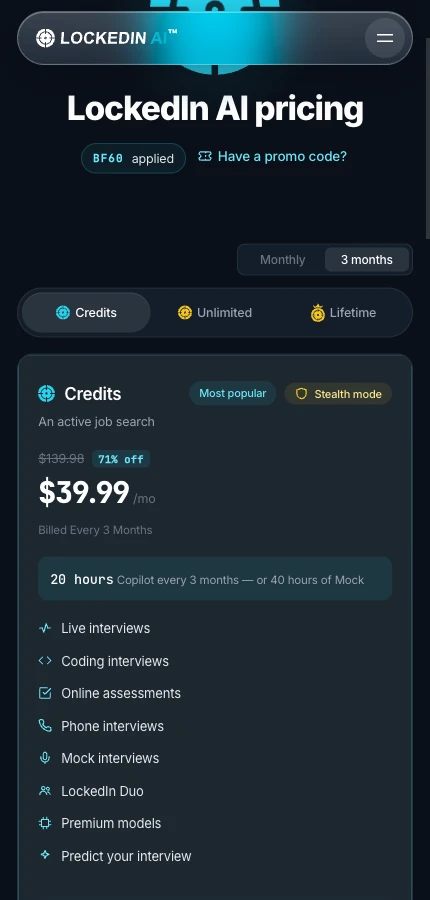
Current quarterly Credits offer captured November 26, 2026. The displayed rate is a monthly equivalent, not a monthly payment. Open full-size.
Parakeet's Interview Assistant pricing rendered $78 weekly, $149.90 monthly and $49.99/month billed yearly. The last rate implies about $600 for a year; check the exact annual checkout total. These are the Interview Assistant options, not the separate Job Search or combined Unlimited bundle.
Its Credits selector showed one credit at $38, a three-credit pack at $59, and an eight-credit pack at $118 paid once. Packs have different per-credit rates. Do not multiply the single-credit price by your expected use and assume that is the cheapest applicable package; compare the actual pack and its final payment.
For example, three separate 45-minute credit calls use three credits under the half-credit blocks. The selected three-credit pack displayed $59 paid once. LockedIn’s promotional monthly Credits offer displayed $55.99 for 400 minutes. In this snapshot, the prepaid pack is not automatically cheaper for those three calls. Its different advantage is retaining unused credits for a later date; compare the entitlements after a subscription ends too. LockedIn’s refund policy says remaining credits still work with general models after the subscription, while professional models require active access.
For a heavy interview month, a subscription may simplify repeated calls. For a small number of calls, a pack may avoid paying for unused months. Neither rule settles the choice by itself: the current discount, total payment, session length, input workflow and refund terms all matter. LockedIn's promotional monthly Credits offer can also be competitive for occasional use, so “credits always mean cheaper” is not a sound verdict.
There is an important documentation conflict on mock practice: LockedIn's pricing page describes a half-rate allowance, while its help center says paid mock interviews do not deduct a balance. Confirm the rule in the specific account before using mock minutes to justify a purchase. I have not silently selected the more generous version.
User reports: useful warning signs, not a performance ranking
On LockedIn's Trustpilot page, the aggregate rating is unavailable with a guidelines warning about removed fake reviews. That is a concern about the review profile, not proof that the product fails for everyone. Both positive and negative accounts remain visible.
A reviewer using MC, with an experience dated September 27, 2026, described dissatisfaction after ten minutes of use and a refused refund. LockedIn's November 6 reply pointed to its monthly-plan policy and recommended using the free trial first. The same profile includes Scott Sun's positive update about support correcting an accidental General-plan purchase and helping with setup. Keep that resolution alongside the criticism.
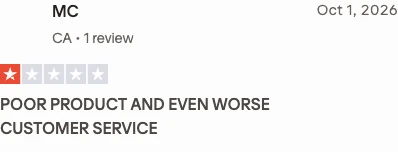
Cropped review header, captured November 26, 2026; the browser shows the publication date in local time. The experience date is separate. Read MC's review and the company reply. The screenshot shows the rating and title, not the full complaint.
Parakeet's Trustpilot profile showed a 4.6 rating in this check. N P's three-star review, for an experience dated October 22, says the product was mostly useful but some answers needed the reviewer's own information. That is mixed feedback, not a claim that every response failed. Other reviewers praise practice and transcript usefulness.

Review header captured November 26, 2026. The experience date in the full review is October 22; its relative publication time is separate. Read N P’s mixed review. This crop shows the rating and title, not the full text.
The actionable concern is whether an answer remains specific enough for your experience, and whether you understand the commitment before paying. Ratings and isolated reports do not establish latency, accuracy or a better result from our product. For more dated source detail, read our LockedIn review and Parakeet review; historical offers there may differ from the current check.
Refunds: buying more time is not a risk-free test
LockedIn's refund policy says monthly and quarterly subscriptions are non-refundable once started. It describes a partial-refund window for annual subscriptions and a separate lifetime condition before the first session, with billing-error exceptions. A money-back banner should not be read as an unconditional paid trial.
Parakeet's current policy describes 14 days for accidental or unused purchases and 28 days for unused renewals, subject to its definitions of use. Paid call or mock use can affect eligibility; limited short-session exceptions and technical-fault conditions exist. It does not promise a partial refund for unused credits or the remaining subscription period. This differs from the older seven-day rule reported in some reviews.
Keep purchase and cancellation confirmations. If you buy through a phone app store, use that store's management and refund route. Check the current policy for the exact purchase instead of assuming that uninstalling the app stops renewal.
Which should you choose?
Shortlist LockedIn AI when you need its interview workflow, reports or Duo, and its selected plan fits the session length and client you will use. Check General versus Pro or Credits entitlements. Do not plan to open a phone client as a second view of an already running desktop session.
Shortlist Parakeet AI when you want browser, desktop or mobile-web call assistance and its credit blocks or call subscription match your schedule. Its Auto Answer, document context and coding input make “lightweight” an incomplete description. Check extension and Exit behavior before a long credit session.
Try SkillCopilotAI when your specific requirement is to keep the desktop session running while reading answers and sending follow-ups on your phone. Prepare the task before the shared 60-minute trial starts. The practical reason to try it is that device arrangement, not an unmeasured claim that it beats both competitors on speed or correctness.
Frequently asked questions
Is LockedIn AI better than Parakeet AI for coding interviews?
Both document coding and visual-input support. LockedIn also offers Duo and interview-specific workflows; Parakeet documents desktop screenshots and mobile photo/file input. We have not compared their code outputs on the same task, so there is no measured coding-quality winner here.
Does Parakeet AI force a new payment every hour?
Its current FAQ describes 30-minute credit blocks and eligible automatic extensions, with credits that do not expire. A credit balance, a session timer and an expiring purchase are different things. Verify Auto Extend, the session state and remaining balance before a long call.
Can I use either free plan for a complete interview?
A full 45-minute session exceeds LockedIn's five-minute free sessions and Parakeet's ten-minute free sessions. Daily or account totals do not remove the individual-session limit. SkillCopilotAI's separate 60-minute trial uses a continuous clock and shared access across its trial features.
Can I read desktop answers on my phone?
LockedIn's help center warns that opening a second client ends the previous session. Parakeet's phone capability does not establish desktop mirroring. SkillCopilotAI's Mobile Mirror is specifically a companion to its running desktop session, with the dependency and capture permissions explained above.
Share this article
Compare similar tools
Editor selected
LockedIn AI Review: Pricing, Refunds & Is It Worth It?
LockedIn AI review: verified pricing, refund limits and Trustpilot warning. Compare SkillCopilotAI’s unlimited plans, phone access and model choices.
Editor selected
Parakeet AI Reviews: Trustpilot Rating, Pricing, Refunds and Verdict (2026)
Parakeet AI reviews checked November 4, 2026: 4.6/5 from 406 Trustpilot reviews, $149.90 monthly or credit packs from $38, the 7-day unused-purchase refund rule, free sessions, and who should pay.
Editor selected
Final Round AI vs Parakeet AI: Pricing, Free Access and Best Fit
Final Round AI vs Parakeet AI compared on billing, free access, platforms and prep tools, plus where SkillCopilotAI fits as a third option.
Same content type
Cluely vs Final Round AI: Live Help or Interview Practice?
Compare Cluely vs Final Round AI on usable live prompts, interview practice, screen-based coding, follow-ups and free access, with a worked technical example.
Choose your next step
Compare another tool or move from research into structured interview practice.