

For Sensei AI vs Final Round AI, start with the kind of help you need during the round. Sensei is worth investigating when you want suggested answers shaped around your resume and stories, with a short free spoken-input check. Final Round is the clearer documented fit when you want to rehearse a target role aloud and carry a debrief into the next attempt. Neither description tells you whether the answer will arrive at the right moment, stay readable or survive a follow-up.
I found two different reasons people start looking for these tools. One experienced candidate described having ten years of experience and being tired of relearning material used mainly in interviews. Another first-time interview candidate had an interview the next day, felt nervous and wanted to know how real-time suggestions actually worked. One wants help retrieving and presenting existing knowledge; the other also has preparation gaps. The same answer generator will not necessarily solve both problems.
Then I read a direct account of trying Sensei and Final Round. The writer described Sensei missing questions and Final Round producing paragraphs that were hard to use while the conversation continued. That is a historical, unverified report, but the underlying difficulty is specific: the candidate has to listen, decide what matters and keep speaking while another stream of text appears.
Those accounts helped me separate several problems in this comparison. An assistant can transcribe correctly yet give the wrong emphasis. It can produce a technically correct paragraph that takes too long to read. It can offer a persuasive first answer that leaves you unable to explain a follow-up. Each failure needs a different remedy; paying for more features does not identify which one you have.
| What you need to do | Sensei AI: documented route | Final Round AI: documented route |
|---|---|---|
| Explain your own experience | Resume, job and story context for suggested answers | Resume and role materials attached to a Goal |
| Rehearse and improve an answer | Paid AI Playground; format needs checking in use | Spoken Practice Interview and automatic Debrief |
| Work through a visual technical prompt | Paid Coding Copilot with a Chrome extension | Paid Screen Help with Auto-capture or Solve screen |
| Check live assistance before paying | Free 15-minute Copilot sessions; coding excluded | Free preparation; no free live CoPilot trial |
Method: this draft combines public product checks and attributed user reports read on November 24–25, 2026, with an original practice exercise below. Paired product trials and their outputs are still pending. SkillCopilotAI publishes the article and makes a competing assistant. Practice privately or use assistance where permitted.
Where SkillCopilotAI fits into this choice
Our product is relevant when your preparation crosses spoken answers and coding, and you want to evaluate that combination before committing to a subscription. SkillCopilotAI's live assistant describes using resume, role, company and interview context to shape a concise answer outline in a desktop overlay. Its Coding Copilot describes screenshot analysis, an approach with edge cases and complexity, and support for explaining and debugging the solution.
Those capabilities address different parts of the same round. For a project question, context should keep the outline grounded in your own contribution. When the conversation turns technical, visual input can supply constraints that were never spoken aloud. A mock session gives you a place to rehearse explaining the result. These are published capabilities and intended uses; the actual quality needs checking on your material.
The useful starting point is the part of your interview that you want to improve. If your only difficulty is organizing one behavioral story, start with that story. If you need an AI interviewer and an automatic post-session debrief, compare Final Round's documented preparation loop carefully. If coding is decisive, include code execution in the evaluation rather than judging the spoken answer alone.
SkillCopilotAI gives new users a 60-minute trial shared across real-time interview assistance, AI mock interviews, Coding Copilot and the Online Quiz Assistant. It is another option if you want to check both a spoken answer and a coding task before subscribing. Prepare those tasks first: the clock starts at first authorization and runs continuously, including when the app is closed. Model access is limited; signing in again does not reset it.
The practical goal is to find out whether the tool captures your question, gives a useful direction you can explain, and preserves the facts when you ask a follow-up. Use the same questions and correctness checks below when evaluating our trial or either competitor. Supported systems are macOS 14+ and Windows 10/11 x64. See the current trial details.
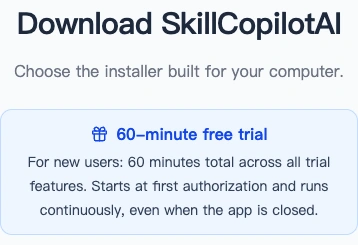
Our public download-page trial terms, captured November 24, 2026. Open full-size.
The setup difference matters before the first answer
The Sensei coding tutorial describes a sequence: add your job and stories, start an interview session, enable Coding Copilot and use the Chrome extension on the problem page. Its guide then returns the user to the live interview screen for the solution. The guide is dated September 2024, so confirm today's controls in the account. It does explain why a browser-based workflow needs more than simply opening the meeting link.
Final Round's current desktop walkthrough starts with a Goal for a role and company, a resume in Library, and a Preflight that checks the session configuration and audio. Materials can be uploaded for the role. A file still being prepared is not yet usable, and a session keeps the configuration with which it launched. This gives you a concrete preparation sequence, but it also means a last-minute upload or context change should not be assumed to have reached an already running session.
There is an important version distinction. Final Round's orientation guide says the new desktop app, older desktop app and website run differently. A complaint about the web interface is not a complete evaluation of the current desktop workflow. I would identify the app and version before comparing either a review or a test result.
For your own decision, sketch the actual arrangement: meeting window, problem window and assistant. On one laptop, those compete for space; on two monitors, you also need to know which display supplies the visual context. Switching between those windows or finding the wrong screen costs attention while someone is waiting for you to answer.
Hearing the words is only the first part of understanding the question
A fast response can still arrive at the wrong moment. In a July 2026 Trustpilot review, Julia described useful help with phone screening and basic preparation, but also premature responses and ordinary conversation being treated as interview questions. An October review by Michael Amend Jr described new responses replacing the current one before he had finished using it. These are individual reports, not measurements we reproduced. Read the reviews.
That is why I would start with a greeting, then a question spoken in two parts:
“You mentioned fixing a reporting problem. Before explaining the fix, what made you realize the original numbers were unreliable?”
The final clause changes the task. An answer that launches into the fix without addressing how the problem was identified has missed it. Keep the captured question beside the answer so you can distinguish an input mistake from a reasoning mistake.
For Sensei, its extension-listener guide describes connecting a meeting tab. Final Round's desktop workflow distinguishes microphone and incoming system audio in its setup FAQ. Test the route you will actually use, including headphones. Hearing your own microphone does not establish that the other side of the call is arriving correctly.
The two-part question also gives you a way to diagnose a bad answer. If the transcript ends before “what made you realize,” the input is incomplete. If that clause is present but the response only celebrates the fix, the answer has missed the requested reasoning. Changing the microphone will not fix the second problem; adding a better story will not fix the first.
Final Round's walkthrough says a new question can intentionally replace an answer in progress. That explains why response replacement needs to be evaluated in conversation, rather than treating every change as a crash. The useful question is whether the behavior lets you finish understanding a suggestion while still following the interviewer. Sensei's short free spoken sessions offer a way to begin checking that experience on your own setup; a product description cannot supply the observation.
Personalization starts with the facts of my experience
For this exercise, use the following fictional project note, or replace it with your own accurate experience:
“I found inconsistent definitions in a recurring report. I added a validation check and an owner checklist. Turnaround fell from two days to one. I contributed to the work; I did not manage the team. No revenue saving was measured.”
Ask the reporting question above. A useful direction would be to explain which definitions disagreed, what you compared to verify the discrepancy and why you checked before releasing the report. The project note does not supply those details, so a tool should help you identify what to add rather than invent the evidence.
Here I would inspect two different qualities. First, does the answer stay inside the supplied facts? Claiming that you led a team or saved a dollar amount would make it less trustworthy. Second, can you find the main point quickly enough to continue speaking in your own words?
Sensei explicitly uses resume and story context. Final Round attaches role materials to a Goal. Both therefore have a documented route for personalization. The comparison needs to show what each actually does with the same facts; “supports resume upload” cannot settle that question.
Here is the difference I mean. These are editor-written examples, not outputs from any product:
| Response style | Example based on the exercise | What it leaves you to do |
|---|---|---|
| Polished but unsupported | “I led a cross-functional transformation that saved the company $50,000.” | Reject invented responsibility and financial results |
| Faithful but thin | “I found a reporting problem and fixed it.” | Explain how you identified it and what you personally changed |
| Useful speaking outline | “Inconsistent definitions → validation check and owner checklist → turnaround from two days to one.” | Supply the real verification details and explain the connection |
The third version is not a complete interview answer. It is a compact structure that leaves the factual work with the candidate. In a real story, you would still need to name the disagreement, show how you checked it and explain why the change reduced turnaround. An assistant that asks for that missing detail may be more useful than one that fills the gap confidently.
For SkillCopilotAI, resume and role context are relevant here: the intended benefit is an outline grounded in what you supplied, rather than another general definition of teamwork. I would load an accurate account of my contribution, keep the result explicit and use the first answer to check whether those boundaries survived. If they did not, I would correct the context before continuing with more questions.
A long answer is not automatically bad. It may be useful during preparation, when you have time to review it. During a conversation, I would prefer an answer whose first visible lines identify the decision and leave room for my own explanation. Preserve the complete output when comparing tools, including any useful qualification or invented detail further down.
Follow-ups introduce a new decision
The follow-up is where I would put the same project note under pressure:
“The stakeholder needs the report today, but validation is still failing. What would you do?”
Now the stakeholder needs a decision before the data issue is resolved. Repeating the original achievement misses that change. A defensible answer would explain what can be verified, which result remains uncertain, who needs to know and what can safely be delivered. It should not claim authority or actions absent from your experience.
An editor-written practice response could begin:
“I would first establish which parts are verified and what the stakeholder needs the report to decide. I would explain the unresolved validation issue, offer the confirmed subset if that is useful, and agree on the next update rather than present uncertain numbers as final.”
That response addresses the new constraint. It still needs details from the real situation: who owns the release decision, how serious the discrepancy is and whether a partial report is acceptable. It does not assume the candidate can approve a release or that delaying delivery is always the right answer.
I would then ask a second follow-up: “What if the stakeholder says the partial report is not enough?” Now the answer needs escalation and trade-offs. Repeating “communicate clearly” offers little help unless it identifies who needs to decide and what information they need. The same project facts now have to support two different decisions: what to release and when to escalate.
This is also a way to distinguish help with wording from help with reasoning. After reading a suggestion, close it and explain your decision aloud. If you cannot explain why you would act that way, the wording has not resolved the preparation gap.
In the community discussion about comparing copilots, readers ask about contextual accuracy and whether the benefit was better performance or mainly confidence. Those are separate outcomes. Our hands-on comparison needs the first answer and follow-up together before it can judge either product on them.
Coding assistance needs an explanation and a correct implementation
I kept the coding exercise small enough that its correctness can be checked independently. This is an original practice task, not a question attributed to an employer:
“Given half-open intervals
[start, end)withstart < end, return the largest number active at once. An interval ending at 3 does not overlap one starting at 3.”
For [(1, 3), (3, 5), (2, 4)], the answer is 2. Now remove the third interval. For [(1, 3), (3, 5)], the answer becomes 1.
That change gives the comparison something concrete to inspect. Suggesting a sweep-line algorithm is a useful starting hint, but the endpoint rule still has to appear in the explanation and code. If an implementation counts starts before ends at equal timestamps, the touching-interval case will incorrectly produce 2. Processing ends first avoids counting a completed interval as still active.
| Independent check | Expected maximum |
|---|---|
[(1, 3), (3, 5), (2, 4)] | 2 |
[(1, 3), (3, 5)] | 1 |
[(1, 5), (2, 3)] | 2 |
[(1, 3), (1, 3)] | 2 |
[] | 0 |
The correction should be small enough to explain
This editor-written reference implementation makes the tie rule visible. It is a correctness reference for inspecting a tool's output, not a claimed output from Sensei, Final Round or SkillCopilotAI:
def max_active(intervals):
    events = []
    for start, end in intervals:
        events.append((start, 1))
        events.append((end, -1))

    active = peak = 0
    for _, change in sorted(events):
        active += change
        peak = max(peak, active)
    return peak
Python sorts equal timestamps by the second tuple value, so -1 comes before 1. At time 3 in [(1, 3), (3, 5)], the count falls from 1 to 0 before rising back to 1. Reversing that tie order would briefly count 2 and retain an incorrect maximum. Sorting dominates the running time at O(n log n); the event list uses O(n) space. Empty input returns 0.
A helpful debugging response should point to that ordering and explain the counterexample. Replacing the whole solution without identifying the mistake makes it harder to learn what went wrong or justify the fix. The reference and expected cases have been checked independently; the product-generated implementations still need to be collected and run.
Ask the same follow-up on each tool: “Why do equal endpoints need that ordering?” A usable response should let you explain the rule and correct the code yourself. Keep the returned implementation and run these cases; an algorithm name or plausible complexity statement is not the result.
Sensei's Coding Copilot tutorial describes an extension passing webpage information to its main app. Final Round's Screen Help describes screen capture for prompts and diagrams, with long-form solutions available for review. With either route, first confirm that the half-open rule was captured. Otherwise, an apparently reasonable answer may solve a different problem.
The input paths also deserve a practical distinction. Final Round's screen-reading guide says it captures the display containing its floating assistant. With several monitors, placing the problem on another display can therefore change what is available to it. Its documentation offers automatic capture and a manual Solve screen action. Sensei's extension workflow instead starts from the relevant problem webpage. Neither route guarantees that every constraint arrived; inspect that before comparing solutions.
With SkillCopilotAI, screenshot analysis and coding guidance provide a route to examine the visible prompt together with the code. For this task, include the half-open rule, both equal-endpoint examples and your current implementation. Ask for the smallest correction and its reason, then run the same independent cases. This checks debugging and explanation as well as initial code generation. The trial includes Coding Copilot, so that evaluation is available before a paid plan.
Preparation is useful when the second attempt changes
For preparation, I would want the session to leave a specific next action. “Be more detailed” is hard to use. “Explain what you compared before trusting the report” points to an identifiable gap. For the coding task, the next attempt might be explaining equal endpoints before writing the sorting rule.
Final Round's Practice Interview documents spoken rehearsal using the target Goal, while its Debrief records strengths, gaps and next steps. That makes it a relevant option for someone who wants a repeated practice-and-review workflow. The value still depends on whether the feedback identifies a gap present in the actual answer.
I would compare the second attempt with the first on an observable change. In the project story, does the next answer explain the evidence for the discrepancy? In coding, does it state the interval convention before choosing the event order? A higher score with the same omission would not resolve either problem.
SkillCopilotAI's shared trial includes AI mock interviews as well as live assistance. That lets you use rehearsal to expose a gap, revisit the relevant story or code, and make another attempt within the remaining trial window. It does not mean our mock feedback is equivalent to Final Round's automatic Debrief, or that the allowance renews after every exercise. The benefit to investigate is whether you leave with a correction you can explain without the assistant.
Sensei's paid Playground is another documented way to explore responses, but we have not established that it offers an equivalent spoken rehearsal and debrief loop. If you already have strong project stories and mainly need help expressing them, resume/story personalization may matter more to you than a broader preparation suite. The Sensei review and Final Round review cover their individual offers.
What can I check free, and what must I pay for?
After defining the task, the free-access difference becomes easier to interpret. Sensei's public card includes 15-minute Copilot sessions, a resume builder and story editor. It excludes Coding Copilot and AI Playground. Final Round says there is no free live CoPilot trial; its free preparation tools do not validate paid live or coding output.
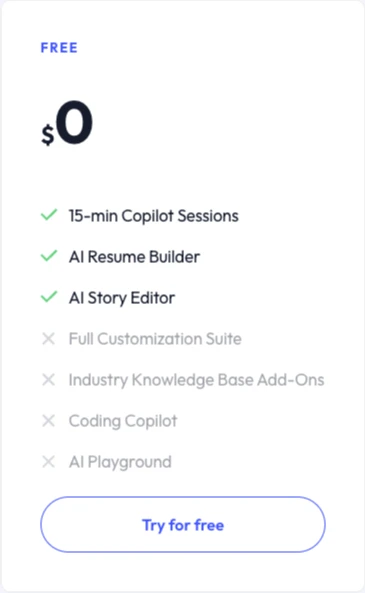
Sensei's public pricing card, captured November 24, 2026. Grey crosses mark excluded features. Open full-size.
A short Sensei session lets you start with spoken-question capture and personalization. It cannot answer how the paid coding feature handles the interval problem. Final Round's free preparation screens leave its live behavior untested. For the wider range of free allowances and their limits, use our free AI interview assistant guide.
Compare the payment after checking the task fit
These are the public USD offers checked November 24, 2026, before checkout-specific taxes or discounts. They do not represent a completed purchase.
| Billing choice | Sensei Pro | Final Round |
|---|---|---|
| Monthly | $89 | $150 |
| Quarterly | Not listed in the observed cards | $83.33/month equivalent; about $250 per quarter |
| Annual | $24/month equivalent; calculated $288/year | $25/month equivalent; calculated $300/year |
For a known three-month period, three Sensei monthly payments total $267, versus about $250 for Final Round's quarter. Annual commitments differ by only $12. Those differences matter, but they do not tell you whether the tool can capture your audio or give useful feedback. An unused annual plan can also cost more than ending monthly payments after a short search.

Final Round's subscription page, captured November 24, 2026. Quarterly totals are approximate because the monthly equivalent is rounded. Open full-size.
Final Round's current table also lists Standard models on monthly/quarterly billing and Premium models annually. Record the selected plan and model in a comparison; otherwise a different model may explain an answer difference.
Its refund policy provides a conditional 72-hour guarantee, once per customer, excluding a billing period containing two or more interview sessions each longer than 30 minutes. Fees may be deducted where permitted. Cancellation and a refund request are separate actions. We could not verify Sensei's complete current refund terms, so confirm them before treating a paid plan as a trial.
Which would I investigate for my next interview?
Sensei: start here if your main difficulty is expressing your own experience and you want a short free spoken-input check. Keep the question capture, the answer and a follow-up together. Check that the suggestions preserve your facts and are usable while you speak.
Final Round: investigate it if you want target-role spoken practice and a debrief that informs the next attempt. Verify that the feedback identifies a concrete weakness rather than assuming a larger preparation suite will improve your answers.
SkillCopilotAI: consider our 60-minute shared trial if you want to evaluate spoken assistance and coding before a subscription. Prepare the project note and interval cases before first authorization, then use the same checks. Save the complete answers and check the code yourself before deciding whether to subscribe.
For a fair comparison, preserve the device, meeting/audio route, plan, model, full prompt, complete output and follow-up. Our paired trials remain pending, so this draft offers a task-based selection route rather than a tested performance winner.
Share this article
Compare similar tools
Editor selected
Sensei AI Reviews: Free Limits, Pro Pricing & Buying Advice
Is Sensei AI worth paying for? Check free-session limits, Pro costs, the monthly-versus-annual break-even point, coding access and conflicting refund terms.
Editor selected
Final Round AI Reviews: Trustpilot Ratings, Pricing, Refunds and Who It Fits (2026)
Final Round AI reviews checked on November 3, 2026: a 2.8/5 Trustpilot score from 280 reviews, two pricing layouts ($150 monthly or $125/mo every two months), the October 2026 refund policy, and who should pay.
Editor selected
Final Round AI vs LockedIn AI: Plans, Trials & Client Fit
Compare Final Round AI vs LockedIn AI on coding inputs, desktop and mobile clients, billing commitments and usable free access before choosing.
Same content type
LockedIn AI vs Parakeet AI: Which Workflow Fits Your Interview?
Compare LockedIn AI vs Parakeet AI on live-session limits, phone and desktop inputs, free trials, credits, current payments and user-reported problems.
Choose your next step
Compare another tool or move from research into structured interview practice.