

Start with SkillCopilotAI’s 60-minute free trial if you want time to explore interview assistance, mock practice and coding help in one desktop app. It gives a new user a longer evaluation window than the five- or 15-minute sessions in several free plans below, with access shared across trial features rather than a speech-only introduction.
Prepare your material before signing in to authorize the app: the 60-minute clock starts at first authorization and runs continuously, including while the app is closed. It is a one-time trial. For practice that renews each day or month, compare the recurring options below.
Method and disclosure: SkillCopilotAI publishes this guide and is included below. We checked public plan pages on November 24, 2026, including feature exclusions visible on Sensei’s pricing cards. We have not tested these products’ answer quality, paid accounts or end-to-end free signup flows. The examples are planning calculations and suggested practice tasks, not reported interview outcomes.
What the free plans include
These are published allowances, not a ranking of response quality. Where the public page does not establish a reset, this guide leaves it unspecified.
| Tool | Free allowance | What it can help you check | The limit that matters |
|---|---|---|---|
| SkillCopilotAI | 60-minute free trial shared across interview, mock and coding features | A prepared desktop interview, mock or coding workflow check | Clock starts at first authorization and continues with the app closed |
| CoPilot Interview | 15 minutes each day; up to 15 per session | A short drill, including its advertised mock mode | Longer sessions and premium models need paid access |
| LockedIn AI | Up to 60 minutes/day, split into five-minute sessions | Brief input checks and short answers | One-minute pause between sessions; daily minutes do not make one long session |
| Sensei AI | 15-minute Copilot sessions | Spoken-answer assistance | Coding Copilot is excluded; no current daily allowance is established here |
| Hedy | Up to five hours/month; live insights for the first 30 minutes/session | General conversation coaching and notes | The live-insight window is shorter than the monthly total |
| ParakeetAI | First mock interview free | Trying a spoken mock | Duration and a recurring allowance are not confirmed here |
| Final Round AI | Free Goals, resume/material setup and prep checklist | Organizing a target-job preparation workspace | No free live CoPilot trial; live sessions require Pro |
Free download, free preparation and free live answers are different benefits. Do not count an installer or an account-creation button as evidence of a free session.
SkillCopilotAI: start with a 60-minute trial
The trial is worth considering when a brief preview would leave you unable to check the workflow you need. Its published trial access covers interview assistance, AI mock interviews and coding help with limited model access.
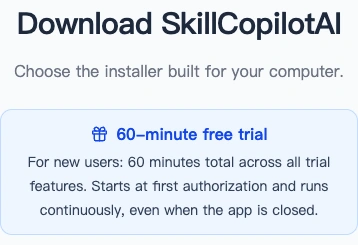
Source: SkillCopilotAI downloads, captured November 24, 2026. The page states that the trial starts at first authorization and continues even when the app is closed. Open screenshot.
- A longer first evaluation window: 60 minutes from authorization, compared with the five- and 15-minute session caps listed for several alternatives.
- Interview and coding access: you can evaluate a relevant mode before paying, rather than using a spoken-answer preview to guess how a coding feature will behave.
- One prepared task to judge: bring an answer to rehearse or code to inspect, then check whether the guidance helps you understand and improve your own work.
SkillCopilotAI’s download page says new users receive 60 minutes total, beginning at first authorization. The clock runs continuously even when the application is closed. Signing in again does not restart it. This differs from an allowance deducted only during active sessions.
For an illustrative schedule, authorize at 14:00 and the trial ends at 15:00. If you close the app at 14:10 and return at 14:50, ten minutes remain. Closing it did not save the earlier unused time.
Before authorization, prepare one question, the relevant job context and a way to check the answer. Install the version for your device; the current download page lists macOS 14+ and Windows 10/11 x64. Then reserve a continuous block in which you can finish setup and the task.
A concrete coding check for the trial
Use this practice task from our TikTok walkthrough: count contiguous subarrays whose neighboring numbers alternate between odd and even. For [2, 5, 8, 8], the number of valid subarrays ending at each position is 1, 2, 3, 1, for a total of seven.
Suppose an attempted loop extends its count across the last two even values. Capture the rules, that loop and the input together. A suggested request for SkillCopilotAI is:
Trace the number of valid subarrays ending at each position. Where does my implementation first disagree with the alternating-parity rule? Explain a local correction before rewriting the solution.
A useful suggestion should reset the ending count to one at the final 8. It should also explain why each singleton counts. Check the correction on [2, 4], which has two valid subarrays, and [1, 2, 3], which has six.
The TikTok CodeSignal walkthrough explains the recurrence and code. The checks above let you evaluate a suggestion; we have not run this task through the product for this article. Use your own practice material, not restricted assessment content.
Choose by the task you need to finish
A short drill you can repeat on another day
CoPilot Interview’s public FAQ describes a non-expiring free plan with a daily allowance, free models and mock mode. It also states that no card or signup is required. A ten-minute spoken drill fits inside its published limit; that does not establish how well its feedback will suit your role.
LockedIn is another recurring option when each exercise fits within five minutes. Its support page says the daily allowance resets in UTC. Referral or purchased credits can produce different session limits, so check the baseline Free plan rather than another user’s credited account.
Sensei’s pricing cards advertise 15-minute access. We confirmed the Coding Copilot and Playground exclusions in the rendered page. Before relying on repeated sessions, check the allowance in your account; this guide does not promise unlimited restarts.
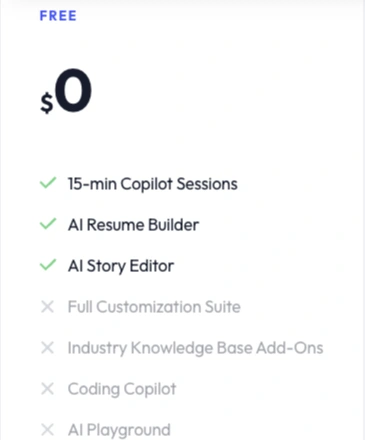
Source: Sensei’s pricing cards, captured November 24, 2026. This crop shows the free-plan column: green checks mark included features; grey crosses exclude Coding Copilot and AI Playground. Open screenshot.
One continuous 30-minute rehearsal
SkillCopilotAI’s 60-minute trial is the first option to consider here if you want to evaluate its interview or mock workflow in a prepared block. Leave time for setup within that countdown. Hedy’s recurring allowance is a different choice when general conversation coaching meets your needs.
Filter on the session limit first. Hedy’s free plan documents live AI insights during the first 30 minutes of a session, alongside its monthly allowance. It is a general conversation coach, with a job-seeker use case, rather than a verified substitute for every dedicated mock-interview or coding feature.
Do not infer that Parakeet’s first free mock lasts 30 minutes simply because it is described as a full mock. Its public page offers that first mock without a card; confirm the duration before scheduling around it.
One coding problem and a correction you can verify
Check feature access separately from time. Sensei’s free speech-assistance session does not include its Coding Copilot. A free plan can have enough minutes and still exclude the task you need.
SkillCopilotAI’s trial description includes coding assistance with limited model access. For a useful check, bring your own attempted code and a failing input, then inspect the explanation and execute the correction yourself. The worked example below gives you a result to check without pretending that we measured an assistant response.
Compare daily minutes with the single-session limit
Consider a plan with a five-minute session cap and a one-minute wait between sessions. To accumulate 30 minutes of active practice, you need six sessions and five waits:
6 sessions × 5 minutes = 30 minutes of active practice
5 waits × 1 minute = 5 minutes of waiting
Total elapsed time = 35 minutes
Even if you have time for the waits, the practice has five interruptions. That can work for six separate questions. It does not reproduce a continuous conversation in which a follow-up depends on an earlier answer.
| Your planned task | Duration check | What to conclude |
|---|---|---|
| One four-minute answer | Fits a five-minute cap | Leaves little room for setup or feedback |
| Six separate five-minute drills | 30 active minutes plus five one-minute gaps | Reserve at least 35 elapsed minutes under these assumptions |
| One continuous 30-minute mock | Requires a single suitable session | A larger daily total cannot remove the per-session cap |
| A 45-minute call with live suggestions throughout | Requires at least 45 minutes of live guidance | Hedy’s documented free 30-minute insight window does not cover the whole call |
These are arithmetic examples. They do not measure product latency, setup overhead or whether context survives a restart.
Know where the free route ends
Final Round’s current homepage explicitly separates free preparation from paid live CoPilot. Creating Goals and organizing materials may still be useful, but it does not let you evaluate a live-answer session for free.
For other tools, the boundary may be session length, a model restriction, a coding feature or exhausted trial time. Read the actual payment schedule before upgrading. A monthly equivalent on an annual plan is not the amount you pay for one month. A refund window also requires a payment and its own conditions; it is not a free trial.
Open-source and bring-your-own-key options need a separate cost check. Natively’s README lists local and API-backed processing choices. A free application can still use a paid model or speech provider. Count those costs before calling the complete workflow free.
For overall product fit beyond free access, use our AI interview assistant shortlist. This article answers the narrower question of what you can complete before paying.
A free-plan check before you start
Write down these five items for the exact mode you intend to use:
- Task: spoken answers, interviewer-style practice, coding help or document preparation.
- Session limit: the longest uninterrupted session, separate from daily or monthly time.
- Reset or expiry: when access renews, or when a one-time trial ends.
- Enabled features: input capture, selected model, feedback and coding access.
- Payment boundary: card requirement, external API costs and what triggers a purchase decision.
Download the free-plan planning worksheet. It includes source links and the assumptions used here. Update it from your account before relying on a plan; it is a dated reference, not a live entitlement feed.
Questions about free AI interview assistants
Is there a permanently unlimited free option?
This comparison does not establish one. Some plans renew an allowance, but still limit sessions, features or live suggestions. A recurring free tier can be useful without being unlimited.
Do I need to enter a credit card?
CoPilot Interview and Parakeet advertise no-card access for the routes described above. Do not extend that promise to every tool or every mode. Check the signup screen, and do not enter payment details merely to discover what “free” means.
Can I get mock interviews rather than suggested answers?
CoPilot Interview advertises mock mode in its daily free plan; Parakeet offers a first free mock. Check whether a product asks questions, follows up and critiques your own answer, rather than only suggesting an answer to read. For a structured rehearsal, see the AI mock interview practice guide.
Can I use these during a formal interview or assessment?
Follow the employer’s and platform’s rules. Free access does not establish permission. The examples here can be used in independent preparation or a rehearsal with consenting participants.
Share this article
Choose your next step
Compare tools or explore guidance for a permitted practice conversation.